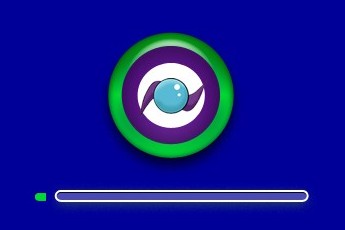
Hi~all,
Here is the html code between the “if(DetectUnityWebPlayer())”:
document.write('<object id="UnityObject" classid="clsid:444785F1-DE89-4295-863A-D46C3A781394" width="800" height="540"> \n');
document.write('  <param name="src" value="Nerdel.unity3d" /> \n');
document.write('  <param name="disableContextMenu" value="true" />\n');
document.write('  <param name="backgroundcolor" value="000099" />\n');
document.write('  <param name="bordercolor" value="000099" />\n');
document.write('  <param name="logoimage" value="images/powerlogo.png" />\n');
document.write('  <param name="progressframeimage" value="images/initialization_bar.png" />\n');
document.write('  <param name="progressbarimage" value="images/initialization_bar02.png" />\n');
document.write('  <embed id="UnityEmbed" src="Nerdel.unity3d" width="800" height="540" '+
'pluginspage="http://www.unity3d.com/unity-web-player-2.x" disableContextMenu="true" backgroundcolor="000099" bordercolor="000099" logoimage="images/powerlogo.png" ' +
'progressframeimage="images/initialization_bar.png" progressbarimage="images/initialization_bar02.png" /> \n');
document.write('</object>');
then I found the progress bar shows diffenently bwtween Mac and Windows OS.I have both tested in IE and FireFox, so I think this isn’t caused by broswer but OS.
In Mac, it’s OK, just what I want, but the bar may cover the frame in Windows. WHY???
Here are the pics: