Im currently trying to implement a cone cast. The solution Ive found for this online a lot is to do a SphereCast and then filter the results by the angle between the direction of the cast and the vector from the starting point of the cast to the hitpoint. If the angle is higher than some given cone angle, filter that hit out of the results. The issue I see with this is that if an object is hit by the SphereCast both outside and inside of the cone angle, that object will be registered as outside of the cone, specifically if the hit outside of the cone occurs later.
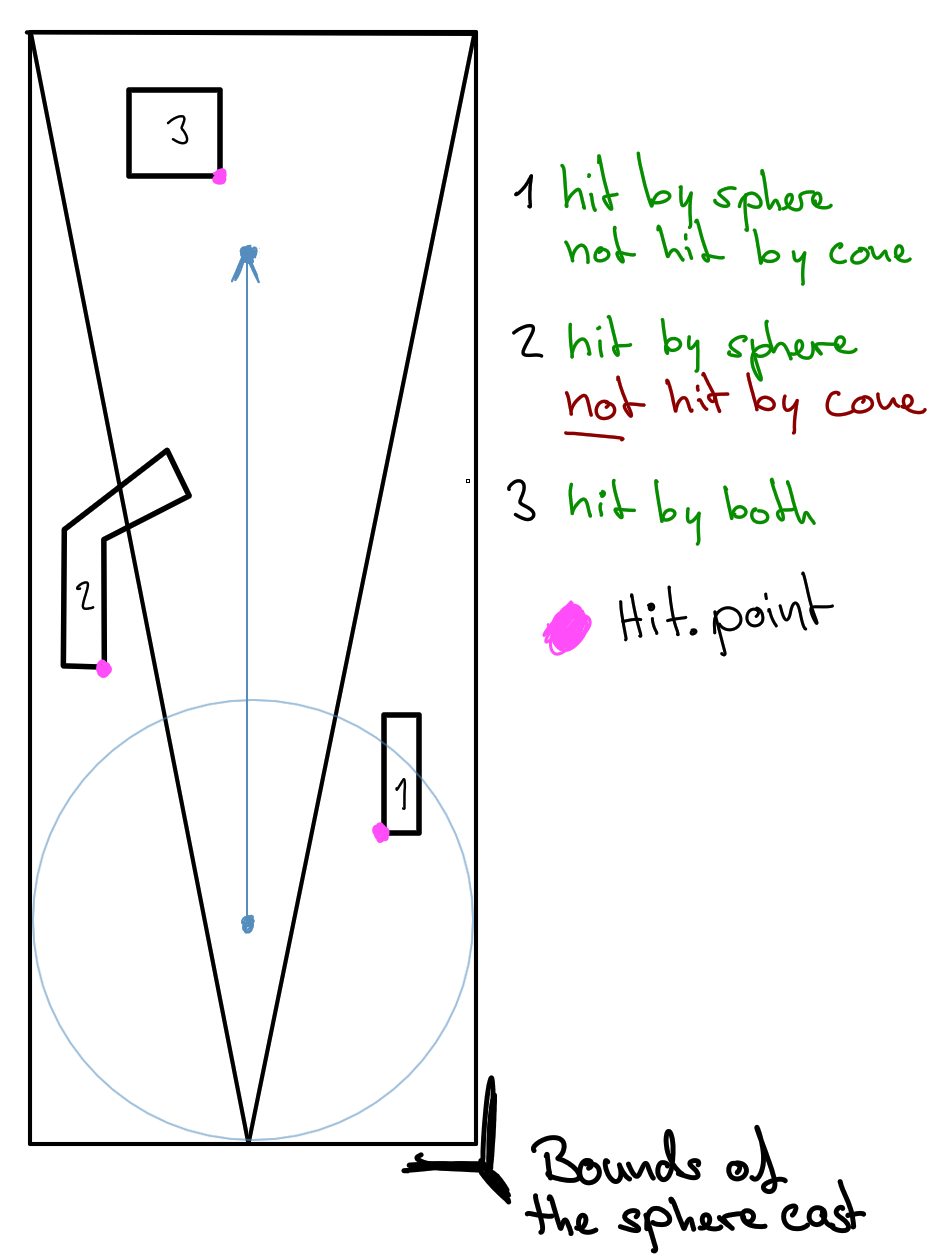
Ive attached a little graphic to make clear what I mean. The first object is hit outside of the angle, and is correctly filtered. The third object is hit inside the cone and therefore not filtered. The second object’s registered hit point is outside of the cone angle, and therefore filtered. Due to its shape / orientation, it does overlap with cone later on and so was incorrectly filtered from the results.
I think the general solution is to put child objects at all “distant corners” of each oddly-shaped object and raycast to all of those points. If any one of them is within the cone, then the object is retained.
Technically if object 1 was a little further “up” in the picture, it too would have the same issue that object 2 has.
ALSO: nice drawing, communicates it perfectly… pictures really are worth 1000 words.
Hmm, I could see that working if this only applied to weird shapes like that. But if you imagine shape 1 being rotated 45 degrees, it would also be filtered incorrectly like object 2, despite being perfectly rectangular.
By child objects that implies if this thing rotates, the child objects rotate too, maintaining registration with the distal points they correlate to.
The only way I see it could still fail is with a sufficiently large object with sufficiently-far-spaced distal child point markers that all markers fall outside the cone, but the object is still within.
The solution there is to add extra marker points at mid-spans on long / large objects.
Oh I think it would definitely work if you do it on all of your objects. You said on oddly-shaped objects, so I was using shape 1 as an example where a “regular shaped” object (cuboid) would fail if you didnt apply that technique.
Putting them on all object might not be a bad solution! Definitely a lot of overhead work though especially for objects with many corners
One idea i had was to do the spherecast, create a new scene + physicsscene, copy all the objects hit in that spherecast in there and then offset them away from the center of the cast according to their distance to it. Then spherecast in there again with the exact same parameters, and that should simulate a conecast in the original scene.
Sounds terribly expensive and over-complicated for a “simple” conecast, but thats the only truly accurate solution I can think of
I think I would go with the child object markers… but if you have a TON of these shapes to create then maybe write either an editor script to add markers to them as a build step, or an explicit step, or just procedurally do some heavy lifting initially and put points on the corners at runtime, like at level load.
This would have to work for nearly all static colliders in the scene, so yeah, TON of objects Ideally Id want this as generically as SphereCast etc.
Ive done a little more research since but havent come up with much more since. Ill try implementing my PhysicsScene idea and report back just how bad the performance is.
I checked the code, it looks a little bit unoptimized (creating an array with Linq for nothing) but it’s easy to fix (just return the list directly instead of creating an array at the end).
Thanks, but as far as I can tell that solution implements the angle filtering solution I described in the op. Did not test it out yet though, maybe Im missing some part of the code that accounts for the false negatives.
To be clear here, this isn’t a cone cast, it’s an overlap cone because the cone isn’t moving through space correct? You want an intersection point though from this overlap test.
I doubt there’s an accurate AND fast way to implement it on your side here. There are approximations you could do but it’s not clear how accurate you need it here. I am also presuming that these shapes about are arbitrary colliders?
Ah youre right, it would be an OverlapCone. I was getting the terms Overlap and Cast confused because what I was originally looking for was the ability to do a SphereCast with the sphere’s radius increasing (lerping the radius from startRadius to endRadius based on the percentage of maxDistance traveled).
Im starting to think so too Tbf, it doesnt have to be that fast, just not too terrible. This is only triggered on a specific action by the player, not called every frame or anything.
I did want it perfectly accurate originally, but Id be happy with a solution without false negatives too. False positives are fine if theyre mostly edge cases.
Okay so I’ve not thought long and hard about this but I’ve tried to put it in an image; it might be a good balance of performance and accuracy or it might be trash!
EDIT: Note that in some circumstances, the center of mass might be a better of choice but it likely depends on a few things.
Also, if you detect that these are primitive collider shapes (sphere, box & capsule), you can easily create fast-path checks for those as they are much simpler. I’m more concerned about arbitrary mesh-based shapes here.
I was coming in to say something similar to Melv’s excellent answer above. Putting child objects on something to test against is a human-simple approach, but it’s computationally expensive - all of those GameObjects need to be maintained even when you’re not doing collision checks, there’s lots of calculation and memory access when you need their positions, etc. It can also still lead to false negatives.
Learning some intersection algorithms is really useful as a game developer or when working with 3D graphics. Here’s one article which is useful, and here’s another.
One way to get a perfect answer for each object with relatively straightforward math would be to check every triangle to see if it is in the cone (closest point on triangle to the cone’s centre line, is it inside the cone?). However, that’s expensive, so you’d only want to do it in the “maybe” cases. If the AABB is outside of the cone, no need to test any more. If anything cheaper to check is inside the cone, also no need to check any further. Even in those “maybe” cases, there’s probably some way to avoid needing to check every triangle, though that may not matter depending on the complexity of your objects.
If your objects are convex then that simplifies things quite a bit. And because of that, another strategy is to break up complex objects into smaller convex ones. It’s not always feasible, though.
Alot of that is actually very similar to some of the stuff Ive been trying within the PhysicsScene solution I mentioned. The issue with it for me is that I dont see a surefire way to prevent false negatives with this (as you said yourself).
Thanks for the resources, those look great! Will dig into them.
What Ive resorted to now is having a cone mesh with a mesh collider (whose vertices I adjust depending on the parameters). Im assuming collisions with mesh colliders do basically a Unity-optimized version of those triangle checks? Either way, this works fine, also performance wise.
As an overlap it works, but as I mentioned I also want to get the “first impact” point. I thought I would be able to do this using ContactPoints and vector projection, but now Im not so sure. There are a few questions I have about ContactPoints, to which I couldnt find a clear answer online.
In the image I attached, each purple sphere is a contact point between my cone (more of a pyramid right now) and the other object. The other object uses a MeshCollider in this example, but the behavior was similar when using a BoxCollider.
Why are there contact points fully outside of the cone MeshCollider (two on the bottom right)?
Why is there no contact point on the left most corner of the object (I assume this is because the check starts in the middle of the cone?)
FYI: Interpolation is nothing to do with collision detection so has no relevance here nor is the Collision Detection mode as it’s not moving so is irrelevant.
I have no idea how you’re using this Convex Cone Mesh (make sure you flag it as convex though) but if you get at least a contact point after a simulation step then that means it’s in contact so surely the points don’t matter which are, after all, where it would consider applying forces to remove the overlap. That’s the role of contact points.
Also, don’t modify the Mesh itself as that means it has to be cooked again. Just use the Transform to scale it if you can. More info here.
Ah okay, was not aware of that. In the docs it just says that ContactPoints “describe a contact point where the collision occurs” so I figured / hoped you could derive from them something like the first surface point of a collider that was involved in the collision… which I admittedly wasnt sure either how that’d work for two static objects lol.


 especially for objects with many corners

 Ideally Id want this as generically as SphereCast etc.


