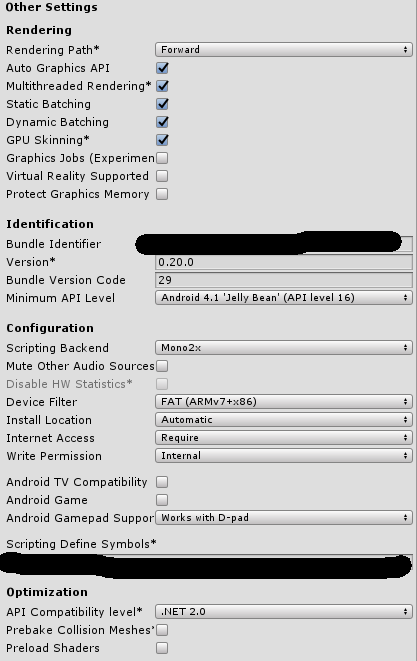
I’m either confused, or something is broken with Unity 5.4.x (multiple versions) regarding the Android Minimum API Level.
In the Player Settings for Android, I have the “Minimum API Level” set to:
Minimum API Level: Android 4.1 ‘Jelly Bean’ (API Level 16)
But after I uploaded to the Google Play Developer Console, the APK is showing:
“API levels 10+”.
Unless I am missing something, API Level 10+ is OS 2.3.3. Shouldn’t it show 16+, like it is set to in the Player Settings? Does anyone else have this issue? In my SDK manager I have Android 7.1.1 (API 25) downloaded only. Thanks for your help.
I have found that sometimes it takes a while for things to update on the play store dev console. I would wait a little while and see if it updates.
Thanks for the response @CoopOwnz but my game has been in the Store since October, with about 10 APK updates, all of them show API level 10+ on the Google Play Developer Console even though I built all of them with Min API Level 16.
Any ideas?
On your store listing at the bottom what does it say for, “Requires Android”. Does it say 2.3.3 and up?
Good spot to look! Here it is:
Requires Android
2.3.3 and up
Obviously not what I want. Attached image of my settings, have been the same for a long time. Thanks again for trying to help. I wonder if Unity team will jump in, this is not good.