It can be used for any destructable/constructible terrain, but it doesn’t have to be; it can also be used simply for efficient drawing (rectangles, ellipses, lines, pictures, etc.).
I’m thinking about cleaning this up and making it available in the Asset Store. I posted this first in the 2D forum, but didn’t get any reaction there. What do you think?
Well, nuts to you all, I’m going to do it anyway. This sort of engine opens up all sorts of interesting gameplay possibilities, and also feeds into the ever-popular retro market. It’s also not trivial to do efficiently. So I think it’s a very useful addition to the Unity toolbox, and I’m sure imaginative developers will come along and put it to good use!
I have just a couple more bits of functionality to add (e.g. an ApplyInRect method that takes a delegate, and applies it to all pixels in a rectangular area), and some performance optimization, and then I’ll be ready to document it and submit it to the Asset Store.
I may extend the demo a little more, too… I’m imagining a DigDug-ish character who can dig tunnels in the dirt. This would illustrate how PixelSurface plays nicely with sprites.
If anybody has any other requests or suggestions before I wrap it up, please let me know!
As always this kind of thing is cool. Always been a huge fan of this type of engine and you are right it is difficult to do this efficiently with modern hardware graphics API’s. That said it sort of seems a bit slow still. Are you using like setpixels/apply or something else?
Seems fast enough here…normally around 13% CPU when playing with the explode tool. Fire (which is cool) does seem more intensive, going up to 60% CPU when there’s a bunch of it.
I’m using SetPixels/Apply, but on smaller tiles (these ones are 64x64 pixels, but that’s something you can choose when you set it up). And wherever you have a tile of all one color, I disable the texture entirely and use just a solid-color material. (That doesn’t come up a lot in the main surface in this demo because the scene is so busy, but it happens a lot on the overlay surface used while dragging rects/ovals/lines around in draw mode.)
And yeah, fire spawns a LOT of “live pixels” that are updating on every frame, so it does use a lot of CPU cycles. I haven’t put a lot of effort into optimization yet, so I can probably improve that somewhat.
I’ve updated the demo with a little bomb you can drop from the top by clicking anywhere on the pixel surface. The bomb is a sprite, which checks the color in the pixel surface on its update method. So it demonstrates converting between pixel coordinates and world coordinates, as well as sprite integration.
When the bomb hits, it uses two other demo features already there: exploding pixels and lighting fires.
You could take a look at games like Clonk / Open Clonk: http://www.clonk.de/http://www.openclonk.org/
Some useful functionality would be to save per pixel what material will be in the background at a certain point. For example behind a tree should be a sky background and when the tree has no longer any pixel connecting it to solid ground it should collapse. When you dig a tunnel the background that gets revealed should be earth instead of the sky background and if you dig out an “island” of land it should stay in place because it is connected to solid ground in the “background”. Different materials need different attributes to get meaningful for the gameplay. For example Clonk has rock that can not be dug up, but can be exploded with bombs. Granite needs double the amount of bombs, the first one basically downgrades it to rock. Gold behaves like rock, but spawns gold nuggets instead of collectable rocks.
It’s not something I have use for, because I’m not working on anything 2D at the moment, but I could see this be a very useful asset if you find a way to make it easily extensible with new functionality. Maybe also take a look at Cortex Command: https://www.datarealms.com/
Looking awesome if I dare say so myself! Would be really great to see some material strengths put in place. Always thought collapsing scenery would be a really fun addition to worms.
Let me know if you need a shiny new UI or sprite graphics etc.
Thanks for the feedback! The behavior of the pixels isn’t actually part of the PixelSurface; you can code them up to behave however you want.
To make collapsing scenery, whenever you remove a pixel (say because of an explosion, or because the pixel below was removed), you’d check the color of the pixel above, and if it’s something collapsible, erase it and replace it with a LivePixel that behaves according to gravity (like the sand and explosion debris in this demo).
Hmm, maybe I should put that into the demo… perhaps have at least the sand behave that way. Just to show how it’s done.
I’ve documented the library and submitted it to the Asset Store. I’ll post an announcement thread when it goes live.
(I’ve also improved the performance substantially by recycling both individual LivePixels, and the “pixel stack” objects that represent a collection of live pixels at one location.)
That’s kind of you to say. But I’m not likely to make enough money to live on no matter what I charge for it, and I publicly suggested $10 when I first floated the idea, so I think I’ll stick with that unless the Unity Asset Store folks disagree.
I would also suggest $20. $10 is too little for something like this, and devalues the asset, regardless of whether you expect to make a living with it or not.
Sigh… that was nine days ago. Still no signs of approval.
Hopefully this is because the approval folks at Unity are having so much fun dropping sand, blowing stuff up, and lighting things on fire that they’ve simply forgotten to click the “Approve” button!
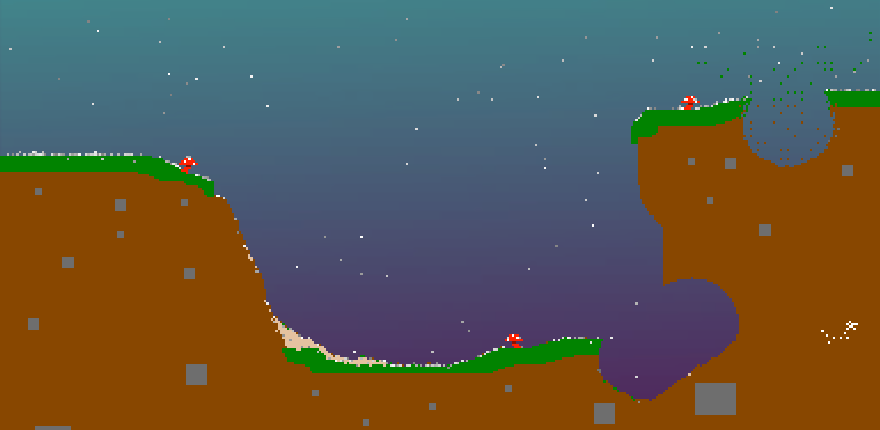
 This sort of engine opens up all sorts of interesting gameplay possibilities, and also feeds into the ever-popular retro market. It’s also not trivial to do efficiently. So I think it’s a very useful addition to the Unity toolbox, and I’m sure imaginative developers will come along and put it to good use!

