# Billboard trees render queue
**URL:** https://discussions.unity.com/t/billboard-trees-render-queue/101675
**Category:** Questions & Answers
**Created:** [April 7, 2014, 4:04pm UTC](https://discussions.unity.com/t/billboard-trees-render-queue/101675 "2014-04-07T16:04:40Z")
**Posts on this page:** 2
**Page:** 1
### Author:  [@adsamcik](https://discussions.unity.com/u/adsamcik)
#### Post date: [April 7, 2014, 4:04pm UTC](https://discussions.unity.com/t/billboard-trees-render-queue/101675/1 "2014-04-07T16:04:40Z")
Hello,
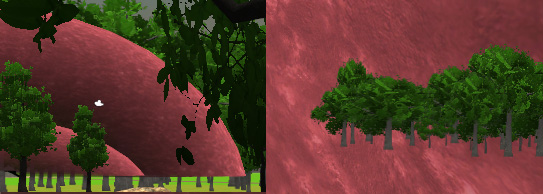
I have problem with billboards, yes I know that they have render queue transparent - 100 but the actual problem is, they are always wrong. If the renderqueue is lower (transparent - 110 for example) they seemed to be OK from one side, but now when looking through the transparent object, billboard trees appear over it, but when I set it higher, the object appear over it. I smell that there is something wrong with unity rendering, because this should have been handeled by default, without any need to change anything.
Any ideas?
**LEFT:** object renders over billboard trees **RIGHT:** trees render over object
---
### Author:  [@adsamcik](https://discussions.unity.com/u/adsamcik)
#### Post date: [May 12, 2014, 1:14pm UTC](https://discussions.unity.com/t/billboard-trees-render-queue/101675/2 "2014-05-12T13:14:55Z")
I solved it but I don’t know what happened under-hood. I set render queue the same, it did not work before but it works now. No idea how, but it works.