I’ve looked at all the Blender topics but haven’t seen anything like this yet. Anyone else seen it?
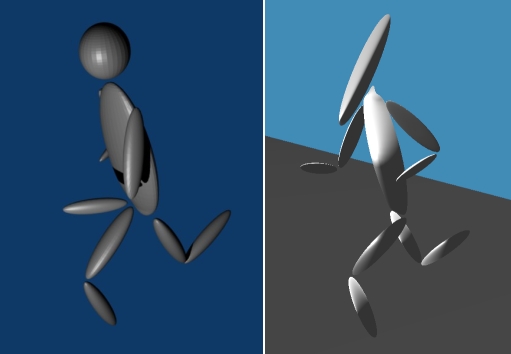
Pic attached. The one on the left is in Blender, on the right after being imported into Unity.
Most of the character looks ok, but the head the top of the oval torso is distorted, almost like the scale has been junked up on those vertices. BTW, it’s a single mesh, not individual meshes for each body part so I don’t have different scales for the objects.
I’m new to Unity so it could be something I’ve done, but the problem does seem strange.
Bump.
Seriously. Anybody have any idea what’s up? I tried converting to triangles just to see - nothing. Tried removing the head and I still see some distortion at the top of the torso. It doesn’t seem to be happening anywhere else on the model - just the top. wtf?
I had a similar problem, and I wasn’t using any sort of bones or armature … I had a pile of cylinders, and I had rotated them in several directions, and they looked fine in Blender but were all stretched and thin in Unity. It seemed to me that when I rotated the cylinder, Blender interpreted the rotation correctly, but Unity didn’t, and thus it appeared oddly stretched.
Since the problem seemed to be happening only to cylinders I’d created using the Duplicate command, I deleted those “bad cylinders” and created new cylinders. The new cylinders rotated just fine and appeared in Unity fine.
At least that’s what did it for me. Don’t know if your problem has the same cause as mine, or if the same fix will take care of it … I still don’t understand why the objects appeared fine in Blender but were skewed in Unity.