I have been struggling to make a door and a doorway in blender (as separate models.)
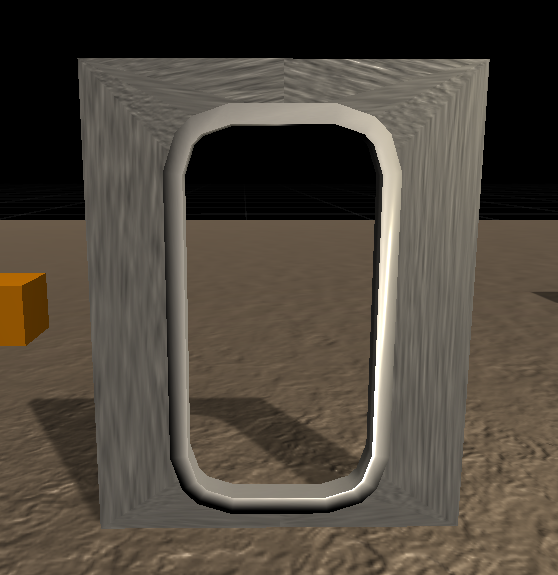
I made the door shape and the doorway shape, but giving them textures in unity makes them look terrible. Textures are stretched (see pictures below.)
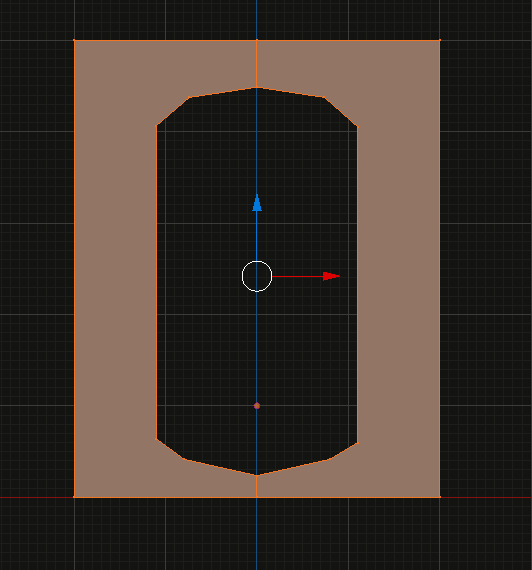
I use Ctrl+n and unwrap them before exporting to unity.
How do I make the surfaces have one single texture on them instead of a repeating texture that stretches? Please help, I have been hitting myself on the head about this for hours now.
files: My door and doorway model in-game, my door and doorway model in blender.

1 Like
You need to learn UV mapping, in Blender. This is the process how YOU decide exactly how the texture works, what parts of the door get what part of the texture, if it repeats, if there is stretching, etc…
As kburkhart84 says - this is a UV and texturing skill. There is no auto-magic way of making a material apply to a model perfectly without having to do the work yourself. Watch some intro tutorials on UV mapping and texturing.
If you aren’t going to learn art tools properly and are working on a hobby project, you might find unwrapping with the ‘Smart UV Project’ tool to be easier for laying out the UVs quickly (though this is something I never use as it is much less efficient for professional UV mapping). There are lots of tutorials that will help you understand the basics of UV mapping to get a result similar to what you are looking for.
Keep in mind if you are expecting to make models that look amazing - UV mapping and texturing mapping is what most artists find to be the hardest part about creating quality assets.
If you are serious about getting into learning art and texturing, I would recommend looking into and picking up Substance Designer and Substance Painter along the way as the learning curve isn’t very intensive and they make creating AAA quality materials much easier than traditional approaches.
I’m not an “expert” texture mapper(or artist in the first place). I have learned a few tricks and like the tools we now have access too. One of the primary issues with bad texture maps is stretching, and difficulty in painting it. Now, with software like Painter involved, you can get away with “not so good” UV maps. Painter let’s you directly paint on the model, so as long as your UVs aren’t extremely bad, you can typically be just fine that way.