Hi,
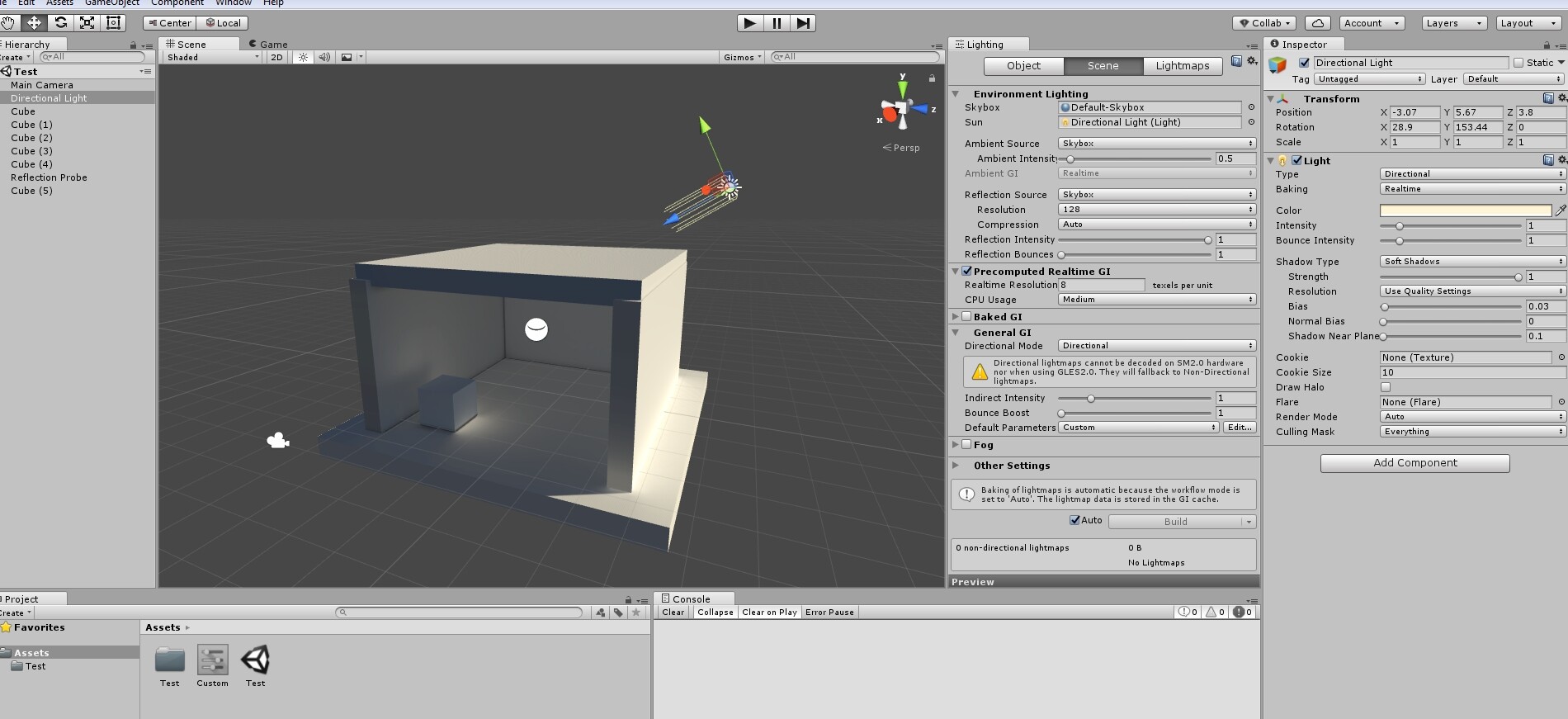
i have set up a very simple scene to play with and learn the GI settings.
One thing i can’t seem to get rid of (except when effectively disabling indirect bounces…), is overbright indirect light in shadowed areas that looks like the object is emitting light itself. I feel like the ‘contrast’ could somehow just be too high (between the surroundings and the near overbright area, also visible on the outside, where the light directly hits corners).
every object with a mesh (each of these boxes) is completely static (all flags set). (which is also why there’s this overbright ‘band’ at the outer right side, where it intersects the ‘wall’)
I attached my test files, can you see where i mis-configured something?
(Edit: actually in these files i tried a few other tweaks, not sure if the scene looks like in my entry post, but i’d think so)
Ok, i got the answer that this is apparently easily avoided by “changing Indirect Intensity and Bounce Boost parameters”, i can’t find the values that do that though, except… setting indirect intensity to 0 (i hope that was not what they meant).
The probably misunderstood something, it happens with QA sometimes
The issue is that indirect shadowing is not working for directional lights in 5.5.2, when it’s supposed to work.
(it’s NOT supposed to work for point lights and spots though, since that is not implemented yet, so maybe that’s what QA thought? Maybe reply and stress that this is a directional light and it should work properly and has been working properly in virtually all other versions, you could also link to this thread)
Update for 5.6 which i immediately downloaded; it’s still the same.
I noticed something else in this test-scene: when i reverse the sunlight the cube also darkens unnaturally:
So, try this: Lower the Indirect resolution to something like 4. Does it look fine now? (it will be lower resolution of course, but it should look “correct”)
interesting and strange. Yes that indeed eliminates the glow. Everything above 4 looks wrong, but below looks bad in terms of quality and precision, but atleast doesn’t have this glow. (The darkening with the inverted light also doesn’t happen <= 4)
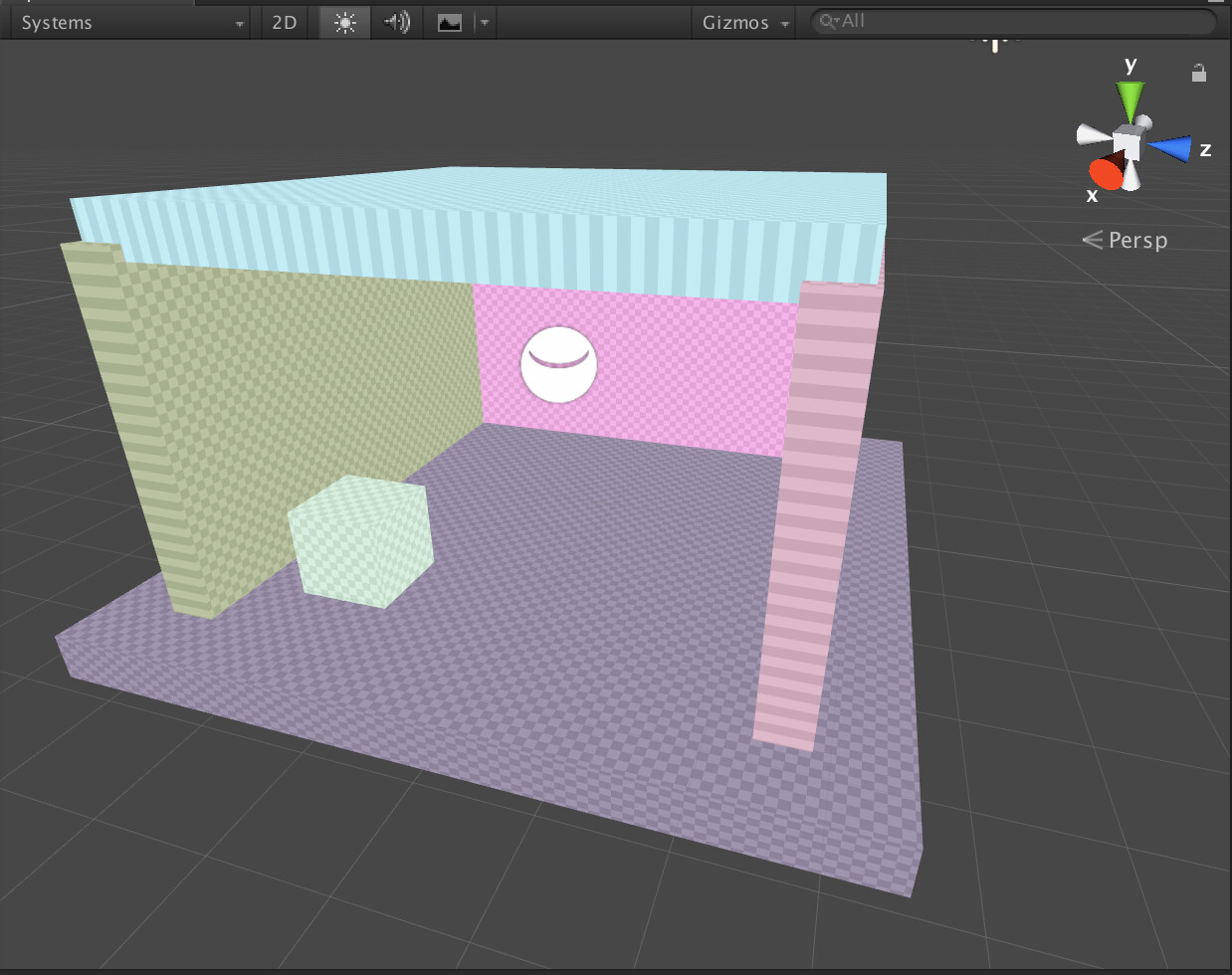
Basically, when you increase your realtime GI resolution higher than, in this case, 4 (it depends) then realtime lightmaps are separated into different chunks and thus, systems (in Enlighten terminology). So, objects are no longer part of the same system and that’s why the cube does not evaluate the walls as occluders and indirect shadowing issue persists.
You can easily address this issue by marking your static objects as “Important GI” (in 5.5, under Object tab) or “Prioritize Illumination” in Mesh Renderer component (option is moved to Mesh Renderer component in 5.6). This reinforces objects to be calculated within the same system and ideally, it fixes the issue. I hope this helps.
Thanks for your answer, @kemalakay , i read the tooltip of that option before but it actually did not make it clear to me that it could solve this kind of issue, i expected the opposite kind of problems to be fixed by it (create illumination if it falsely did not before). And sadly it also did not solve it for me.
Edit: After re-reading your post, it works if i mark every object with it (but this can’t be the intended usage of that toggle, what are the side effects?)
So in my case, I only marked the cube, ceiling and right wall as “Important GI” (if I understand correctly, you only marked the cube), basically necessary occluders to block emission from the light source and it worked. For instance, if you only mark right wall, then indirect bounces from the light source can still pass through the ceiling and create the issue.
Technically, there is a reason why Enlighten splits objects into different systems, essentially to facilitate the processing. But this option forces objects to be included in the same system, however there shouldn’t be any major drawback (a couple of months ago, there was a bug but it’s fixed so if you encounter any problems, please let us know)