I’m Using Unity version 2021.3.27f1 Personal
After created the project I clicked the File > Build Settings… menu.
In the opened window I clicked on Android on the left side, it was grayed out, I saw the message No Android module loaded Install with Unity Hub, when clicking the button, I installed the Android Build Support > OpenJDK and Android SDK & NDK Tools.
After installed finished both buttons still grayed out and I clicked Switch Platform, and it did work but, in the end, both buttons are still greyed out and I also got an error:
Library\PackageCache\com.unity.burst@1.6.6\Editor\BurstAotCompiler.cs(754,27): error CS0234: The type or namespace name ‘AndroidExternalToolsSettings’ does not exist in the namespace ‘UnityEditor.Android’ (are you missing an assembly reference?)
Screenshot of what I have installed and the error:
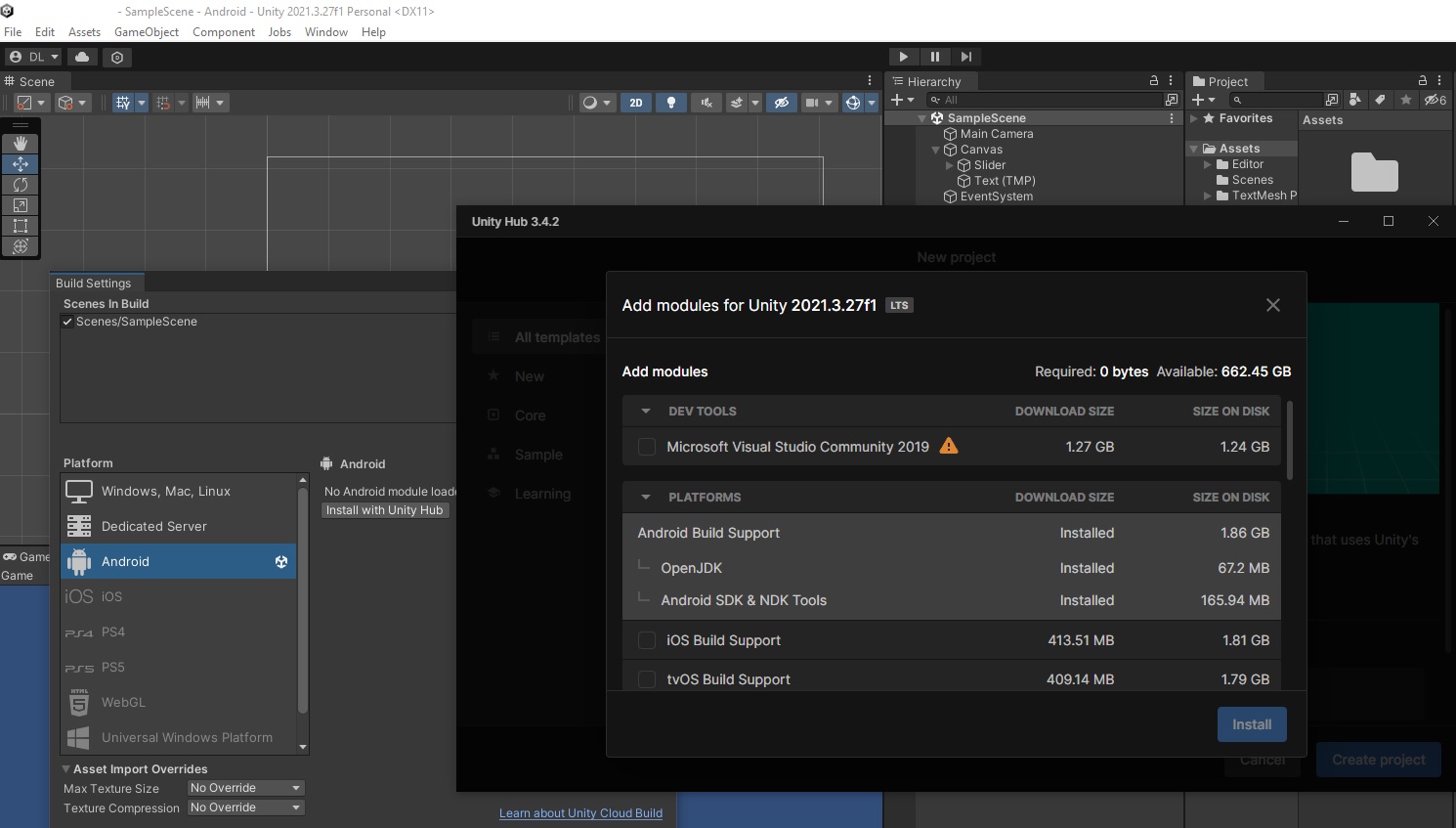
Restarting the editor over again fixed this error. and both buttons Build & Build And Run are enabled now.
When I click on Build or either Build And Run I’m getting the end of the compiling 4 errors:
I have no clue what these errors are and how to fix them.
The first error:
Task :unityLibrary:compileReleaseAidl NO-SOURCE
Task :unityLibrary:packageReleaseRenderscript NO-SOURCE
Task :unityLibrary:compileReleaseRenderscript NO-SOURCE
Task :launcher:generateReleaseBuildConfig
Task :unityLibrary:generateReleaseResValues
Task :launcher:compileReleaseAidl NO-SOURCE
Task :unityLibrary:generateReleaseResources
Task :launcher:compileReleaseRenderscript NO-SOURCE
Task :launcher:generateReleaseResValues
Task :launcher:generateReleaseResources
Task :launcher:createReleaseCompatibleScreenManifests
Task :launcher:extractDeepLinksRelease
Task :launcher:prepareLintJar
Task :unityLibrary:packageReleaseResources
Task :unityLibrary:extractDeepLinksRelease
Task :launcher:checkReleaseDuplicateClasses
Task :unityLibrary:generateReleaseBuildConfig
Task :launcher:mergeReleaseShaders
Task :launcher:compileReleaseShaders NO-SOURCE
Task :launcher:generateReleaseAssets UP-TO-DATE
Task :launcher:processReleaseJavaRes NO-SOURCE
Task :unityLibrary:javaPreCompileRelease
Task :launcher:collectReleaseDependencies
Task :unityLibrary:mergeReleaseShaders
Task :unityLibrary:compileReleaseShaders NO-SOURCE
Task :unityLibrary:generateReleaseAssets UP-TO-DATE
Task :launcher:sdkReleaseDependencyData
Task :launcher:mergeReleaseJniLibFolders
Task :launcher:validateSigningRelease
Task :launcher:javaPreCompileRelease
Task :launcher:mergeReleaseResources
Task :launcher:desugarReleaseFileDependencies
Task :launcher:mergeExtDexRelease
Task :unityLibrary:packageReleaseAssets
Task :unityLibrary:processReleaseJavaRes
Task :unityLibrary:mergeReleaseJniLibFolders
Task :unityLibrary:processReleaseManifest
Task :unityLibrary:bundleLibResRelease
Task :unityLibrary:compileReleaseLibraryResources
Task :unityLibrary:prepareLintJarForPublish
Task :unityLibrary:parseReleaseLocalResources
Task :unityLibrary:mergeReleaseNativeLibs
Task :unityLibrary:stripReleaseDebugSymbols
Task :unityLibrary:copyReleaseJniLibsProjectOnly
Task :unityLibrary:generateReleaseRFile
Task :unityLibrary:compileReleaseJavaWithJavac FAILED
Task :launcher:mergeReleaseAssets
35 actionable tasks: 35 executed
0x00007ff628054ccd (Unity) StackWalker::GetCurrentCallstack
0x00007ff62805b889 (Unity) StackWalker::ShowCallstack
0x00007ff628fdd693 (Unity) GetStacktrace
0x00007ff62968dd0d (Unity) DebugStringToFile
0x00007ff6271d9c22 (Unity) DebugLogHandler_CUSTOM_Internal_Log
0x000002670f32626a (Mono JIT Code) (wrapper managed-to-native) UnityEngine.DebugLogHandler:Internal_Log (UnityEngine.LogType,UnityEngine.LogOption,string,UnityEngine.Object)
0x000002670f3260db (Mono JIT Code) UnityEngine.DebugLogHandler:LogFormat (UnityEngine.LogType,UnityEngine.Object,string,object)
0x000002670f32555e (Mono JIT Code) UnityEngine.Logger:Log (UnityEngine.LogType,object)
0x000002673824e5aa (Mono JIT Code) UnityEngine.Debug:LogError (object)
0x000002673824d993 (Mono JIT Code) UnityEditor.Android.GradleInvokationException:ParseAndShowException ()
0x00000267306f694b (Mono JIT Code) UnityEditor.Android.PostProcessor.PostProcessRunner:RunAllTasks (UnityEditor.Android.PostProcessor.PostProcessorContext)
0x00000267381fcc3b (Mono JIT Code) UnityEditor.Android.PostProcessAndroidPlayer:PostProcess (UnityEditor.Modules.BuildPostProcessArgs,AndroidPlayerBuildProgram.Data.AndroidPlayerBuildProgramOutput)
0x000002673819887b (Mono JIT Code) UnityEditor.Android.AndroidBuildPostprocessor:PostProcess (UnityEditor.Modules.BuildPostProcessArgs,UnityEditor.BuildProperties&)
0x00000267381979ec (Mono JIT Code) UnityEditor.PostprocessBuildPlayer:Postprocess (UnityEditor.BuildTargetGroup,UnityEditor.BuildTarget,int,string,string,string,int,int,UnityEditor.BuildOptions,UnityEditor.RuntimeClassRegistry,UnityEditor.Build.Reporting.BuildReport)
0x000002673819801f (Mono JIT Code) (wrapper runtime-invoke) :runtime_invoke_void_int_int_int_object_object_object_int_int_int_object_object (object,intptr,intptr,intptr)
0x00007ff892a7fb04 (mono-2.0-bdwgc) [mini-runtime.c:3445] mono_jit_runtime_invoke
0x00007ff8929be7a4 (mono-2.0-bdwgc) [object.c:3066] do_runtime_invoke
0x00007ff8929be93c (mono-2.0-bdwgc) [object.c:3113] mono_runtime_invoke
0x00007ff627f77e44 (Unity) scripting_method_invoke
0x00007ff627f57644 (Unity) ScriptingInvocation::Invoke
0x00007ff629a01201 (Unity) CallMono
0x00007ff629a094d7 (Unity) PostprocessPlayer
0x00007ff629a040bf (Unity) DoBuildPlayer_PostBuild
0x00007ff629a0208e (Unity) DoBuildPlayer
0x00007ff6299f618d (Unity) BuildPlayer
0x00007ff627849f56 (Unity) BuildPipeline::BuildPlayerInternalNoCheck
0x00007ff6275ea760 (Unity) BuildPipeline_CUSTOM_BuildPlayerInternalNoCheck
0x00000267305a4d58 (Mono JIT Code) (wrapper managed-to-native) UnityEditor.BuildPipeline:BuildPlayerInternalNoCheck (string,string,string,UnityEditor.BuildTargetGroup,UnityEditor.BuildTarget,int,UnityEditor.BuildOptions,string,bool)
0x00000267305a3863 (Mono JIT Code) UnityEditor.BuildPlayerWindow/DefaultBuildMethods:BuildPlayer (UnityEditor.BuildPlayerOptions)
0x000002672f5c8dbb (Mono JIT Code) UnityEditor.BuildPlayerWindow:CallBuildMethods (bool,UnityEditor.BuildOptions)
0x0000026738310e9b (Mono JIT Code) UnityEditor.BuildPlayerWindow/<>c__DisplayClass43_0:b__0 ()
0x0000026738310d8a (Mono JIT Code) UnityEditor.GenericMenu:CatchMenu (object,string,int)
0x00000267382ec757 (Mono JIT Code) (wrapper runtime-invoke) :runtime_invoke_void__this___object_object_int (object,intptr,intptr,intptr)
0x00007ff892a7fb04 (mono-2.0-bdwgc) [mini-runtime.c:3445] mono_jit_runtime_invoke
0x00007ff8929be7a4 (mono-2.0-bdwgc) [object.c:3066] do_runtime_invoke
0x00007ff8929be93c (mono-2.0-bdwgc) [object.c:3113] mono_runtime_invoke
0x00007ff627f77e44 (Unity) scripting_method_invoke
0x00007ff627f57644 (Unity) ScriptingInvocation::Invoke
0x00007ff628a3b09d (Unity) CustomPopupMenuInterface::Execute
0x00007ff6289c1870 (Unity) MenuController::ExecuteMenuItem
0x00007ff628ffcb72 (Unity) ShowDelayedContextMenu
0x00007ff62900d8a6 (Unity) GUIView::OnInputEvent
0x00007ff628a7b233 (Unity) GUIView::ProcessInputEventFromAPI
0x00007ff628a7b108 (Unity) GUIView::ProcessInputEvent
0x00007ff62900668e (Unity) GUIView: oPaint
0x00007ff62900fa1d (Unity) GUIView::RepaintAll
0x00007ff628ba9b47 (Unity) PlayerLoopController::UpdateScene
0x00007ff628ba7b3b (Unity) Application::TickTimer
0x00007ff628fe364a (Unity) MainMessageLoop
0x00007ff628fe7edb (Unity) WinMain
0x00007ff62a3c7d2e (Unity) __scrt_common_main_seh
0x00007ff8e9ef7614 (KERNEL32) BaseThreadInitThunk
0x00007ff8ea3026b1 (ntdll) RtlUserThreadStart
The second error:
lashlight\Library\Bee\Android\Prj\Mono2x\Gradle\unityLibrary\src\main\java\com\unity\androidnotifications\UnityNotificationManager.java:592: error: cannot find symbol
return alarmManager.canScheduleExactAlarms();
^
symbol: method canScheduleExactAlarms()
location: variable alarmManager of type AlarmManager
D:\Unity Projects\Android Flashlight\Library\Bee\Android\Prj\Mono2x\Gradle\unityLibrary\src\main\java\com\unity\androidnotifications\UnityNotificationManager.java:944: error: cannot find symbol
if (Build.VERSION.SDK_INT >= Build.VERSION_CODES.S) {
^
symbol: variable S
location: class VERSION_CODES
D:\Unity Projects\Android Flashlight\Library\Bee\Android\Prj\Mono2x\Gradle\unityLibrary\src\main\java\com\unity\androidnotifications\UnityNotificationManager.java:946: error: incompatible types: Icon cannot be converted to Bitmap
style.bigPicture(icon);
^
D:\Unity Projects\Android Flashlight\Library\Bee\Android\Prj\Mono2x\Gradle\unityLibrary\src\main\java\com\unity\androidnotifications\UnityNotificationManager.java:954: error: cannot find symbol
Object pic = getIconFromResources(picture, Build.VERSION.SDK_INT < Build.VERSION_CODES.S);
^
symbol: variable S
location: class VERSION_CODES
D:\Unity Projects\Android Flashlight\Library\Bee\Android\Prj\Mono2x\Gradle\unityLibrary\src\main\java\com\unity\androidnotifications\UnityNotificationManager.java:955: error: cannot find symbol
if (Build.VERSION.SDK_INT >= Build.VERSION_CODES.S && pic instanceof Icon)
^
symbol: variable S
location: class VERSION_CODES
D:\Unity Projects\Android Flashlight\Library\Bee\Android\Prj\Mono2x\Gradle\unityLibrary\src\main\java\com\unity\androidnotifications\UnityNotificationManager.java:956: error: incompatible types: Icon cannot be converted to Bitmap
style.bigPicture((Icon)pic);
^
D:\Unity Projects\Android Flashlight\Library\Bee\Android\Prj\Mono2x\Gradle\unityLibrary\src\main\java\com\unity\androidnotifications\UnityNotificationManager.java:963: error: cannot find symbol
if (Build.VERSION.SDK_INT >= Build.VERSION_CODES.S) {
^
symbol: variable S
location: class VERSION_CODES
D:\Unity Projects\Android Flashlight\Library\Bee\Android\Prj\Mono2x\Gradle\unityLibrary\src\main\java\com\unity\androidnotifications\UnityNotificationManager.java:964: error: cannot find symbol
style.setContentDescription(extras.getString(KEY_BIG_CONTENT_DESCRIPTION));
^
symbol: method setContentDescription(String)
location: variable style of type BigPictureStyle
D:\Unity Projects\Android Flashlight\Library\Bee\Android\Prj\Mono2x\Gradle\unityLibrary\src\main\java\com\unity\androidnotifications\UnityNotificationManager.java:965: error: cannot find symbol
style.showBigPictureWhenCollapsed(extras.getBoolean(KEY_BIG_SHOW_WHEN_COLLAPSED, false));
^
symbol: method showBigPictureWhenCollapsed(boolean)
location: variable style of type BigPictureStyle
Note: D:\Unity Projects\Android Flashlight\Library\Bee\Android\Prj\Mono2x\Gradle\unityLibrary\src\main\java\com\unity3d\player\UnityPlayerActivity.java uses or overrides a deprecated API.
Note: Recompile with -Xlint:deprecation for details.
Note: Some input files use unchecked or unsafe operations.
Note: Recompile with -Xlint:unchecked for details.
Note: Some messages have been simplified; recompile with -Xdiags:verbose to get full output
11 errors
1 warning
FAILURE: Build failed with an exception.
- What went wrong:
Execution failed for task ‘:unityLibrary:compileReleaseJavaWithJavac’.
Compilation failed; see the compiler error output for details.
-
Try:
Run with --stacktrace option to get the stack trace. Run with --info or --debug option to get more log output. Run with --scan to get full insights. -
Get more help at https://help.gradle.org
BUILD FAILED in 15s
Picked up JAVA_TOOL_OPTIONS: -Dfile.encoding=UTF-8
0x00007ff628054ccd (Unity) StackWalker::GetCurrentCallstack
0x00007ff62805b889 (Unity) StackWalker::ShowCallstack
0x00007ff628fdd693 (Unity) GetStacktrace
0x00007ff62968dd0d (Unity) DebugStringToFile
0x00007ff6271d9c22 (Unity) DebugLogHandler_CUSTOM_Internal_Log
0x000002670f32626a (Mono JIT Code) (wrapper managed-to-native) UnityEngine.DebugLogHandler:Internal_Log (UnityEngine.LogType,UnityEngine.LogOption,string,UnityEngine.Object)
0x000002670f3260db (Mono JIT Code) UnityEngine.DebugLogHandler:LogFormat (UnityEngine.LogType,UnityEngine.Object,string,object)
0x000002670f32555e (Mono JIT Code) UnityEngine.Logger:Log (UnityEngine.LogType,object)
0x000002673824e5aa (Mono JIT Code) UnityEngine.Debug:LogError (object)
0x000002673824d993 (Mono JIT Code) UnityEditor.Android.GradleInvokationException:ParseAndShowException ()
0x00000267306f694b (Mono JIT Code) UnityEditor.Android.PostProcessor.PostProcessRunner:RunAllTasks (UnityEditor.Android.PostProcessor.PostProcessorContext)
0x00000267381fcc3b (Mono JIT Code) UnityEditor.Android.PostProcessAndroidPlayer:PostProcess (UnityEditor.Modules.BuildPostProcessArgs,AndroidPlayerBuildProgram.Data.AndroidPlayerBuildProgramOutput)
0x000002673819887b (Mono JIT Code) UnityEditor.Android.AndroidBuildPostprocessor:PostProcess (UnityEditor.Modules.BuildPostProcessArgs,UnityEditor.BuildProperties&)
0x00000267381979ec (Mono JIT Code) UnityEditor.PostprocessBuildPlayer:Postprocess (UnityEditor.BuildTargetGroup,UnityEditor.BuildTarget,int,string,string,string,int,int,UnityEditor.BuildOptions,UnityEditor.RuntimeClassRegistry,UnityEditor.Build.Reporting.BuildReport)
0x000002673819801f (Mono JIT Code) (wrapper runtime-invoke) :runtime_invoke_void_int_int_int_object_object_object_int_int_int_object_object (object,intptr,intptr,intptr)
0x00007ff892a7fb04 (mono-2.0-bdwgc) [mini-runtime.c:3445] mono_jit_runtime_invoke
0x00007ff8929be7a4 (mono-2.0-bdwgc) [object.c:3066] do_runtime_invoke
0x00007ff8929be93c (mono-2.0-bdwgc) [object.c:3113] mono_runtime_invoke
0x00007ff627f77e44 (Unity) scripting_method_invoke
0x00007ff627f57644 (Unity) ScriptingInvocation::Invoke
0x00007ff629a01201 (Unity) CallMono
0x00007ff629a094d7 (Unity) PostprocessPlayer
0x00007ff629a040bf (Unity) DoBuildPlayer_PostBuild
0x00007ff629a0208e (Unity) DoBuildPlayer
0x00007ff6299f618d (Unity) BuildPlayer
0x00007ff627849f56 (Unity) BuildPipeline::BuildPlayerInternalNoCheck
0x00007ff6275ea760 (Unity) BuildPipeline_CUSTOM_BuildPlayerInternalNoCheck
0x00000267305a4d58 (Mono JIT Code) (wrapper managed-to-native) UnityEditor.BuildPipeline:BuildPlayerInternalNoCheck (string,string,string,UnityEditor.BuildTargetGroup,UnityEditor.BuildTarget,int,UnityEditor.BuildOptions,string,bool)
0x00000267305a3863 (Mono JIT Code) UnityEditor.BuildPlayerWindow/DefaultBuildMethods:BuildPlayer (UnityEditor.BuildPlayerOptions)
0x000002672f5c8dbb (Mono JIT Code) UnityEditor.BuildPlayerWindow:CallBuildMethods (bool,UnityEditor.BuildOptions)
0x0000026738310e9b (Mono JIT Code) UnityEditor.BuildPlayerWindow/<>c__DisplayClass43_0:b__0 ()
0x0000026738310d8a (Mono JIT Code) UnityEditor.GenericMenu:CatchMenu (object,string,int)
0x00000267382ec757 (Mono JIT Code) (wrapper runtime-invoke) :runtime_invoke_void__this___object_object_int (object,intptr,intptr,intptr)
0x00007ff892a7fb04 (mono-2.0-bdwgc) [mini-runtime.c:3445] mono_jit_runtime_invoke
0x00007ff8929be7a4 (mono-2.0-bdwgc) [object.c:3066] do_runtime_invoke
0x00007ff8929be93c (mono-2.0-bdwgc) [object.c:3113] mono_runtime_invoke
0x00007ff627f77e44 (Unity) scripting_method_invoke
0x00007ff627f57644 (Unity) ScriptingInvocation::Invoke
0x00007ff628a3b09d (Unity) CustomPopupMenuInterface::Execute
0x00007ff6289c1870 (Unity) MenuController::ExecuteMenuItem
0x00007ff628ffcb72 (Unity) ShowDelayedContextMenu
0x00007ff62900d8a6 (Unity) GUIView::OnInputEvent
0x00007ff628a7b233 (Unity) GUIView::ProcessInputEventFromAPI
0x00007ff628a7b108 (Unity) GUIView::ProcessInputEvent
0x00007ff62900668e (Unity) GUIView:oPaint
0x00007ff62900fa1d (Unity) GUIView::RepaintAll
0x00007ff628ba9b47 (Unity) PlayerLoopController::UpdateScene
0x00007ff628ba7b3b (Unity) Application::TickTimer
0x00007ff628fe364a (Unity) MainMessageLoop
0x00007ff628fe7edb (Unity) WinMain
0x00007ff62a3c7d2e (Unity) __scrt_common_main_seh
0x00007ff8e9ef7614 (KERNEL32) BaseThreadInitThunk
0x00007ff8ea3026b1 (ntdll) RtlUserThreadStart
Third error:
ntel64 Family 6 Model 158 Stepping 10, GenuineIntel
ProgramW6432 = C:\Program Files
USERPROFILE = C:\Users\choco
JAVA_HOME = C:\Program Files\Unity\Hub\Editor\2021.3.27f1\Editor\Data\PlaybackEngines\AndroidPlayer\OpenJDK
CommonProgramFiles = C:\Program Files\Common Files
DriverData = C:\Windows\System32\Drivers\DriverData
ComSpec = C:\Windows\system32\cmd.exe
AMPLITUDE_API_KEY = 28f3cae0b33b8b3702120c9ed1a935aa
PSModulePath = C:\Program Files (x86)\WindowsPowerShell\Modules;C:\Windows\system32\WindowsPowerShell\v1.0\Modules;C:\Program Files (x86)\AutoIt3\AutoItX
ANDROID_NDK_ROOT = C:\Program Files\Unity\Hub\Editor\2021.3.27f1\Editor\Data\PlaybackEngines\AndroidPlayer\NDK
SystemRoot = C:\Windows
HEAP_CLIENT_TOKEN = 1717415662
NUMBER_OF_PROCESSORS = 12
AMPLITUDE_API_KEY_STAGING = 83ee04fccc67e4fcc7dd527c4c6f1e21
WOOTRIC_CLIENT_TOKEN = NPS-aa8be4c3
JAVA_TOOL_OPTIONS = -Dfile.encoding=UTF-8
DEBUG_ENV_VAR = UnityHub
BURST_ANDROID_MIN_API_LEVEL = 22
TEMP = C:\Users\choco\AppData\Local\Temp
Path = C:\Windows\system32;C:\Windows;C:\Windows\System32\Wbem;C:\Windows\System32\WindowsPowerShell\v1.0;C:\Windows\System32\OpenSSH;C:\Program Files\Microsoft SQL Server\150\Tools\Binn;C:\Program Files\dotnet;C:\Program Files\nodejs;C:\Users\choco\AppData\Local\Microsoft\WindowsApps;C:\Users\choco.dotnet\tools;C:\Users\choco\AppData\Roaming\npm
USERNAME = choco
COMPUTERNAME = DESKTOP-B4A2LN6
SCITE_USERHOME = C:\Users\choco\AppData\Local\AutoIt v3\SciTE
SystemDrive = C:
ALLUSERSPROFILE = C:\ProgramData
SENTRY_ACCESS_TOKEN = 3df78d9e53f8456aa90fbae044ce1a6261421ab1d0014674bc2e933477289017
HEAP_CLIENT_TOKEN_STAGING = 3786794399
windir = C:\Windows
HOMEPATH = \Users\choco
PUBLIC = C:\Users\Public
CommonProgramFiles(x86) = C:\Program Files (x86)\Common Files
APPDATA = C:\Users\choco\AppData\Roaming
OneDrive = C:\Users\choco\OneDrive
PROCESSOR_LEVEL = 6
CommonProgramW6432 = C:\Program Files\Common Files
ProgramFiles(x86) = C:\Program Files (x86)
SESSIONNAME = Console
LOGONSERVER = \DESKTOP-B4A2LN6
LOCALAPPDATA = C:\Users\choco\AppData\Local
LAUNCH_DARKLY_CLIENT_TOKEN = 60a7e30fafc7e60e33446283
LAUNCH_DARKLY_CLIENT_TOKEN_STAGING = 60a7e30fafc7e60e33446282
HOMEDRIVE = C:
USERDOMAIN_ROAMINGPROFILE = DESKTOP-B4A2LN6
ProgramData = C:\ProgramData
ORIGINAL_XDG_CURRENT_DESKTOP = undefined
stderr[
warning: D:\Unity Projects\Android Flashlight\Library\Bee\Android\Prj\Mono2x\Gradle\unityLibrary\libs\classes.jar(com/samsung/android/gamesdk/GameSDKManager.class): major version 53 is newer than 52, the highest major version supported by this compiler.
It is recommended that the compiler be upgraded.
D:\Unity Projects\Android Flashlight\Library\Bee\Android\Prj\Mono2x\Gradle\unityLibrary\src\main\java\com\unity\androidnotifications\UnityNotificationManager.java:164: error: cannot find symbol
if (Build.VERSION.SDK_INT >= Build.VERSION_CODES.TIRAMISU)
^
symbol: variable TIRAMISU
location: class VERSION_CODES
D:\Unity Projects\Android Flashlight\Library\Bee\Android\Prj\Mono2x\Gradle\unityLibrary\src\main\java\com\unity\androidnotifications\UnityNotificationManager.java:165: error: cannot find symbol
permissionGranted = mContext.checkCallingOrSelfPermission(Manifest.permission.POST_NOTIFICATIONS) == PackageManager.PERMISSION_GRANTED;
^
symbol: variable POST_NOTIFICATIONS
location: class permission
D:\Unity Projects\Android Flashlight\Library\Bee\Android\Prj\Mono2x\Gradle\unityLibrary\src\main\java\com\unity\androidnotifications\UnityNotificationManager.java:592: error: cannot find symbol
return alarmManager.canScheduleExactAlarms();
^
symbol: method canScheduleExactAlarms()
location: variable alarmManager of type AlarmManager
D:\Unity Projects\Android Flashlight\Library\Bee\Android\Prj\Mono2x\Gradle\unityLibrary\src\main\java\com\unity\androidnotifications\UnityNotificationManager.java:944: error: cannot find symbol
if (Build.VERSION.SDK_INT >= Build.VERSION_CODES.S) {
^
symbol: variable S
location: class VERSION_CODES
D:\Unity Projects\Android Flashlight\Library\Bee\Android\Prj\Mono2x\Gradle\unityLibrary\src\main\java\com\unity\androidnotifications\UnityNotificationManager.java:946: error: incompatible types: Icon cannot be converted to Bitmap
style.bigPicture(icon);
^
D:\Unity Projects\Android Flashlight\Library\Bee\Android\Prj\Mono2x\Gradle\unityLibrary\src\main\java\com\unity\androidnotifications\UnityNotificationManager.java:954: error: cannot find symbol
Object pic = getIconFromResources(picture, Build.VERSION.SDK_INT < Build.VERSION_CODES.S);
^
symbol: variable S
location: class VERSION_CODES
D:\Unity Projects\Android Flashlight\Library\Bee\Android\Prj\Mono2x\Gradle\unityLibrary\src\main\java\com\unity\androidnotifications\UnityNotificationManager.java:955: error: cannot find symbol
if (Build.VERSION.SDK_INT >= Build.VERSION_CODES.S && pic instanceof Icon)
^
symbol: variable S
location: class VERSION_CODES
D:\Unity Projects\Android Flashlight\Library\Bee\Android\Prj\Mono2x\Gradle\unityLibrary\src\main\java\com\unity\androidnotifications\UnityNotificationManager.java:956: error: incompatible types: Icon cannot be converted to Bitmap
style.bigPicture((Icon)pic);
^
D:\Unity Projects\Android Flashlight\Library\Bee\Android\Prj\Mono2x\Gradle\unityLibrary\src\main\java\com\unity\androidnotifications\UnityNotificationManager.java:963: error: cannot find symbol
if (Build.VERSION.SDK_INT >= Build.VERSION_CODES.S) {
^
symbol: variable S
location: class VERSION_CODES
D:\Unity Projects\Android Flashlight\Library\Bee\Android\Prj\Mono2x\Gradle\unityLibrary\src\main\java\com\unity\androidnotifications\UnityNotificationManager.java:964: error: cannot find symbol
style.setContentDescription(extras.getString(KEY_BIG_CONTENT_DESCRIPTION));
^
symbol: method setContentDescription(String)
location: variable style of type BigPictureStyle
D:\Unity Projects\Android Flashlight\Library\Bee\Android\Prj\Mono2x\Gradle\unityLibrary\src\main\java\com\unity\androidnotifications\UnityNotificationManager.java:965: error: cannot find symbol
style.showBigPictureWhenCollapsed(extras.getBoolean(KEY_BIG_SHOW_WHEN_COLLAPSED, false));
^
symbol: method showBigPictureWhenCollapsed(boolean)
location: variable style of type BigPictureStyle
Note: D:\Unity Projects\Android Flashlight\Library\Bee\Android\Prj\Mono2x\Gradle\unityLibrary\src\main\java\com\unity3d\player\UnityPlayerActivity.java uses or overrides a deprecated API.
Note: Recompile with -Xlint:deprecation for details.
Note: Some input files use unchecked or unsafe operations.
Note: Recompile with -Xlint:unchecked for details.
Note: Some messages have been simplified; recompile with -Xdiags:verbose to get full output
11 errors
1 warning
FAILURE: Build failed with an exception.
- What went wrong:
Execution failed for task ‘:unityLibrary:compileReleaseJavaWithJavac’.
Compilation failed; see the compiler error output for details.
-
Try:
Run with --stacktrace option to get the stack trace. Run with --info or --debug option to get more log output. Run with --scan to get full insights. -
Get more help at https://help.gradle.org
BUILD FAILED in 15s
Picked up JAVA_TOOL_OPTIONS: -Dfile.encoding=UTF-8
]
stdout[
Configure project :launcher
WARNING: The option setting ‘android.enableR8=false’ is deprecated.
It will be removed in version 5.0 of the Android Gradle plugin.
You will no longer be able to disable R8
Exception while marshalling C:\Program Files\Unity\Hub\Editor\2021.3.27f1\Editor\Data\PlaybackEngines\AndroidPlayer\SDK\build-tools\30.0.2\package.xml. Probably the SDK is read-only
Exception while marshalling C:\Program Files\Unity\Hub\Editor\2021.3.27f1\Editor\Data\PlaybackEngines\AndroidPlayer\SDK\platform-tools\package.xml. Probably the SDK is read-only
Exception while marshalling C:\Program Files\Unity\Hub\Editor\2021.3.27f1\Editor\Data\PlaybackEngines\AndroidPlayer\SDK\platforms\android-29\package.xml. Probably the SDK is read-only
Exception while marshalling C:\Program Files\Unity\Hub\Editor\2021.3.27f1\Editor\Data\PlaybackEngines\AndroidPlayer\SDK\platforms\android-30\package.xml. Probably the SDK is read-only
Exception while marshalling C:\Program Files\Unity\Hub\Editor\2021.3.27f1\Editor\Data\PlaybackEngines\AndroidPlayer\SDK\tools\package.xml. Probably the SDK is read-only
Task :unityLibrary:preBuild UP-TO-DATE
Task :launcher:preBuild UP-TO-DATE
Task :unityLibrary:preReleaseBuild UP-TO-DATE
Task :launcher:preReleaseBuild UP-TO-DATE
Task :unityLibrary:compileReleaseAidl NO-SOURCE
Task :unityLibrary:packageReleaseRenderscript NO-SOURCE
Task :unityLibrary:compileReleaseRenderscript NO-SOURCE
Task :launcher:generateReleaseBuildConfig
Task :unityLibrary:generateReleaseResValues
Task :launcher:compileReleaseAidl NO-SOURCE
Task :unityLibrary:generateReleaseResources
Task :launcher:compileReleaseRenderscript NO-SOURCE
Task :launcher:generateReleaseResValues
Task :launcher:generateReleaseResources
Task :launcher:createReleaseCompatibleScreenManifests
Task :launcher:extractDeepLinksRelease
Task :launcher:prepareLintJar
Task :unityLibrary:packageReleaseResources
Task :unityLibrary:extractDeepLinksRelease
Task :launcher:checkReleaseDuplicateClasses
Task :unityLibrary:generateReleaseBuildConfig
Task :launcher:mergeReleaseShaders
Task :launcher:compileReleaseShaders NO-SOURCE
Task :launcher:generateReleaseAssets UP-TO-DATE
Task :launcher:processReleaseJavaRes NO-SOURCE
Task :unityLibrary:javaPreCompileRelease
Task :launcher:collectReleaseDependencies
Task :unityLibrary:mergeReleaseShaders
Task :unityLibrary:compileReleaseShaders NO-SOURCE
Task :unityLibrary:generateReleaseAssets UP-TO-DATE
Task :launcher:sdkReleaseDependencyData
Task :launcher:mergeReleaseJniLibFolders
Task :launcher:validateSigningRelease
Task :launcher:javaPreCompileRelease
Task :launcher:mergeReleaseResources
Task :launcher:desugarReleaseFileDependencies
Task :launcher:mergeExtDexRelease
Task :unityLibrary:packageReleaseAssets
Task :unityLibrary:processReleaseJavaRes
Task :unityLibrary:mergeReleaseJniLibFolders
Task :unityLibrary:processReleaseManifest
Task :unityLibrary:bundleLibResRelease
Task :unityLibrary:compileReleaseLibraryResources
Task :unityLibrary:prepareLintJarForPublish
Task :unityLibrary:parseReleaseLocalResources
Task :unityLibrary:mergeReleaseNativeLibs
Task :unityLibrary:stripReleaseDebugSymbols
Task :unityLibrary:copyReleaseJniLibsProjectOnly
Task :unityLibrary:generateReleaseRFile
Task :unityLibrary:compileReleaseJavaWithJavac FAILED
Task :launcher:mergeReleaseAssets
35 actionable tasks: 35 executed
]
exit code: 1
UnityEditor.Android.Command.WaitForProgramToRun (UnityEditor.Utils.Program p, UnityEditor.Android.Command+WaitingForProcessToExit waitingForProcessToExit, System.String errorMsg) (at <7cd4f681d9474b24b7953907944eefaf>:0)
UnityEditor.Android.Command.Run (System.Diagnostics.ProcessStartInfo psi, UnityEditor.Android.Command+WaitingForProcessToExit waitingForProcessToExit, System.String errorMsg) (at <7cd4f681d9474b24b7953907944eefaf>:0)
UnityEditor.Android.Command.Run (System.String command, System.String args, System.String workingdir, UnityEditor.Android.Command+WaitingForProcessToExit waitingForProcessToExit, System.String errorMsg) (at <7cd4f681d9474b24b7953907944eefaf>:0)
UnityEditor.Android.AndroidJavaTools.RunJava (System.String args, System.String workingdir, System.Action1[T] progress, System.String error) (at <7cd4f681d9474b24b7953907944eefaf>:0) UnityEditor.Android.GradleWrapper.Run (UnityEditor.Android.AndroidJavaTools javaTools, Unity.Android.Gradle.AndroidGradle androidGradle, System.String workingdir, System.String task, System.Action1[T] progress) (at <7cd4f681d9474b24b7953907944eefaf>:0)
Rethrow as GradleInvokationException: Gradle build failed
UnityEditor.Android.GradleWrapper.Run (UnityEditor.Android.AndroidJavaTools javaTools, Unity.Android.Gradle.AndroidGradle androidGradle, System.String workingdir, System.String task, System.Action`1[T] progress) (at <7cd4f681d9474b24b7953907944eefaf>:0)
UnityEditor.Android.PostProcessor.Tasks.BuildGradleProject.Execute (UnityEditor.Android.PostProcessor.PostProcessorContext context) (at <7cd4f681d9474b24b7953907944eefaf>:0)
UnityEditor.Android.PostProcessor.PostProcessRunner.RunAllTasks (UnityEditor.Android.PostProcessor.PostProcessorContext context) (at <7cd4f681d9474b24b7953907944eefaf>:0)
Rethrow as BuildFailedException: Exception of type ‘UnityEditor.Build.BuildFailedException’ was thrown.
UnityEditor.Android.PostProcessor.CancelPostProcess.AbortBuild (System.String title, System.String message, System.Exception ex) (at <7cd4f681d9474b24b7953907944eefaf>:0)
UnityEditor.Android.PostProcessor.PostProcessRunner.RunAllTasks (UnityEditor.Android.PostProcessor.PostProcessorContext context) (at <7cd4f681d9474b24b7953907944eefaf>:0)
UnityEditor.Android.PostProcessAndroidPlayer.PostProcess (UnityEditor.Modules.BuildPostProcessArgs args, AndroidPlayerBuildProgram.Data.AndroidPlayerBuildProgramOutput buildProgramOutput) (at <7cd4f681d9474b24b7953907944eefaf>:0)
UnityEditor.Android.AndroidBuildPostprocessor.PostProcess (UnityEditor.Modules.BuildPostProcessArgs args, UnityEditor.BuildProperties& outProperties) (at <7cd4f681d9474b24b7953907944eefaf>:0)
UnityEditor.PostprocessBuildPlayer.Postprocess (UnityEditor.BuildTargetGroup targetGroup, UnityEditor.BuildTarget target, System.Int32 subtarget, System.String installPath, System.String companyName, System.String productName, System.Int32 width, System.Int32 height, UnityEditor.BuildOptions options, UnityEditor.RuntimeClassRegistry usedClassRegistry, UnityEditor.Build.Reporting.BuildReport report) (at :0)
UnityEditor.GenericMenu:CatchMenu(Object, String, Int32)
Fourth error:
JIT Code) UnityEditor.GenericMenu:CatchMenu (object,string,int)
0x00000267382ec757 (Mono JIT Code) (wrapper runtime-invoke) :runtime_invoke_void__this___object_object_int (object,intptr,intptr,intptr)
0x00007ff892a7fb04 (mono-2.0-bdwgc) [mini-runtime.c:3445] mono_jit_runtime_invoke
0x00007ff8929be7a4 (mono-2.0-bdwgc) [object.c:3066] do_runtime_invoke
0x00007ff8929be93c (mono-2.0-bdwgc) [object.c:3113] mono_runtime_invoke
0x00007ff627f77e44 (Unity) scripting_method_invoke
0x00007ff627f57644 (Unity) ScriptingInvocation::Invoke
0x00007ff628a3b09d (Unity) CustomPopupMenuInterface::Execute
0x00007ff6289c1870 (Unity) MenuController::ExecuteMenuItem
0x00007ff628ffcb72 (Unity) ShowDelayedContextMenu
0x00007ff62900d8a6 (Unity) GUIView::OnInputEvent
0x00007ff628a7b233 (Unity) GUIView::ProcessInputEventFromAPI
0x00007ff628a7b108 (Unity) GUIView::ProcessInputEvent
0x00007ff62900668e (Unity) GUIView:oPaint
0x00007ff62900fa1d (Unity) GUIView::RepaintAll
0x00007ff628ba9b47 (Unity) PlayerLoopController::UpdateScene
0x00007ff628ba7b3b (Unity) Application::TickTimer
0x00007ff628fe364a (Unity) MainMessageLoop
0x00007ff628fe7edb (Unity) WinMain
0x00007ff62a3c7d2e (Unity) __scrt_common_main_seh
0x00007ff8e9ef7614 (KERNEL32) BaseThreadInitThunk
0x00007ff8ea3026b1 (ntdll) RtlUserThreadStart
The last error:
wgc) [mini-runtime.c:3445] mono_jit_runtime_invoke
0x00007ff8929be7a4 (mono-2.0-bdwgc) [object.c:3066] do_runtime_invoke
0x00007ff8929be93c (mono-2.0-bdwgc) [object.c:3113] mono_runtime_invoke
0x00007ff627f77e44 (Unity) scripting_method_invoke
0x00007ff627f57644 (Unity) ScriptingInvocation::Invoke
0x00007ff628a3b09d (Unity) CustomPopupMenuInterface::Execute
0x00007ff6289c1870 (Unity) MenuController::ExecuteMenuItem
0x00007ff628ffcb72 (Unity) ShowDelayedContextMenu
0x00007ff62900d8a6 (Unity) GUIView::OnInputEvent
0x00007ff628a7b233 (Unity) GUIView::ProcessInputEventFromAPI
0x00007ff628a7b108 (Unity) GUIView::ProcessInputEvent
0x00007ff62900668e (Unity) GUIView:oPaint
0x00007ff62900fa1d (Unity) GUIView::RepaintAll
0x00007ff628ba9b47 (Unity) PlayerLoopController::UpdateScene
0x00007ff628ba7b3b (Unity) Application::TickTimer
0x00007ff628fe364a (Unity) MainMessageLoop
0x00007ff628fe7edb (Unity) WinMain
0x00007ff62a3c7d2e (Unity) __scrt_common_main_seh
0x00007ff8e9ef7614 (KERNEL32) BaseThreadInitThunk
0x00007ff8ea3026b1 (ntdll) RtlUserThreadStart