Hi! For some reason I can’t build, since it says some files are locked / in use by another gradle instance
  Lock file: C:\Users\user\.gradle\caches\journal-1\journal-1.lock
Could not create service of type FileAccessTimeJournal using GradleUserHomeScopeServices.createFileAccessTimeJournal().
> Timeout waiting to lock journal cache (C:\Users\user\.gradle\caches\journal-1). It is currently in use by another Gradle instance.
I’ve searched far and wide, and the solution seems to be to end other java-related processes ( android studio / java.exe, etc), I tried that but it didn’t help.
thanks for your reply Thomas,
yup, tried that - before opening unity it’s possible to do so, however when I tried building I got the same error, and now when I try to delete it I get the error:
In stackoverflow there was a similar thread, with a suggestion to end all java processes - I did also try that ( hard, because they keep reappearing), but that didn’t help either
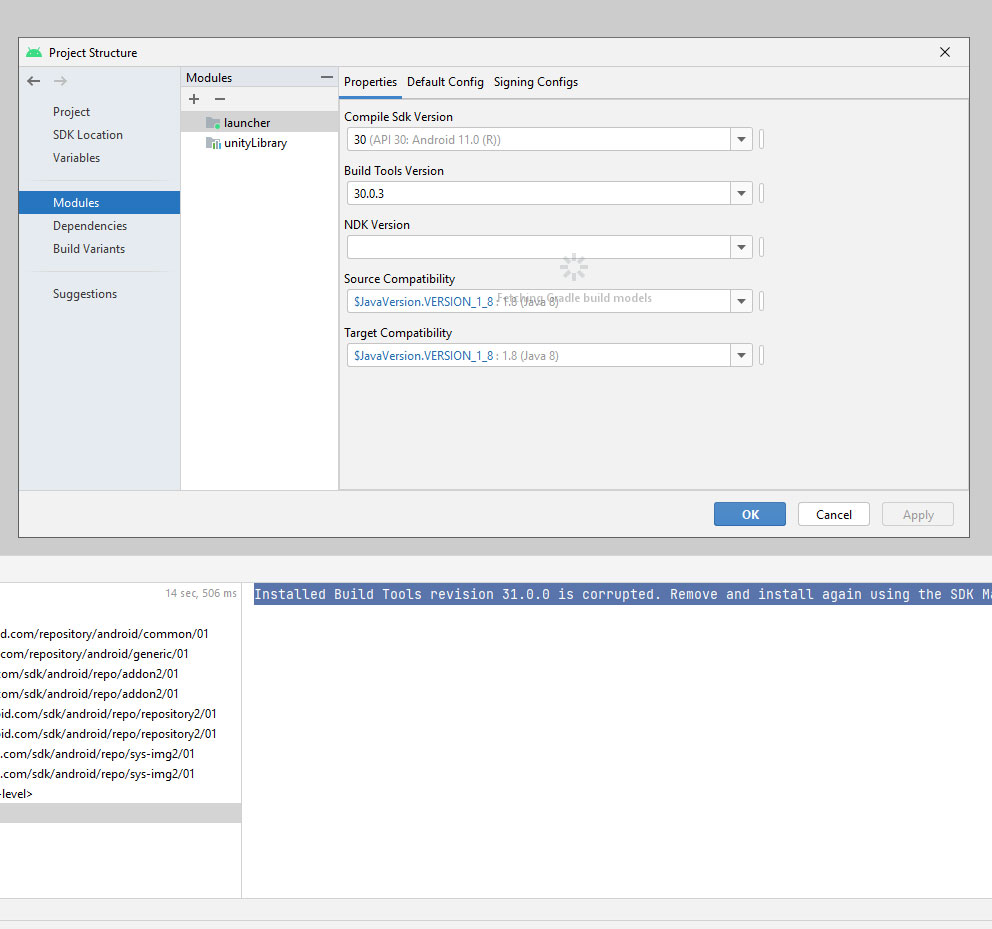
Ok, I tried exporting and got the same error. Upon further googling, the solution seemed to be to install a beta version of android studio. Did that, and got the error
"Installed Build Tools revision 31.0.0 is corrupted. Remove and install again using the SDK Manager."
( I also had gotten a similar error in Unity as well when trying various things to build)
The solutions for this seem to be
uninstall/reinstall build tools 31 - this did not help
use build tools 30? How is this a solution? The reason I’m trying to upgrade is because of google’s new rules where you need to have the latest stuff or your app will be removed if it’s not like 1-2 years up to date. Am I correct in understanding that right now, the latest that can be used for unity is build tools 30, when build tools 32 now exists? Am I missing something?
Okay, trying to get at least something to work I wanted to try with API level 30, which still has resulted in the same error
ok, so I’m really confused now regarding the distinctions between api level/build tools/ platform sdk/ etc - which things do I need to set for it to work and be in compliance with google?
Hi Thomas! You were right, in the modules I only set the launcher and not the unitylibrary, now I set both, now having built with Target API Level set to 32 in in unity
However, now I’m back to the original error,
> Timeout waiting to lock journal cache (C:\Users\user\.gradle\caches\journal-1). It is currently in use by another Gradle instance.
I’ve searched for that error, and it seems it may have been caused by using a VPN for whatever reason, so I disabled mine, re-launched android studio and now got this error
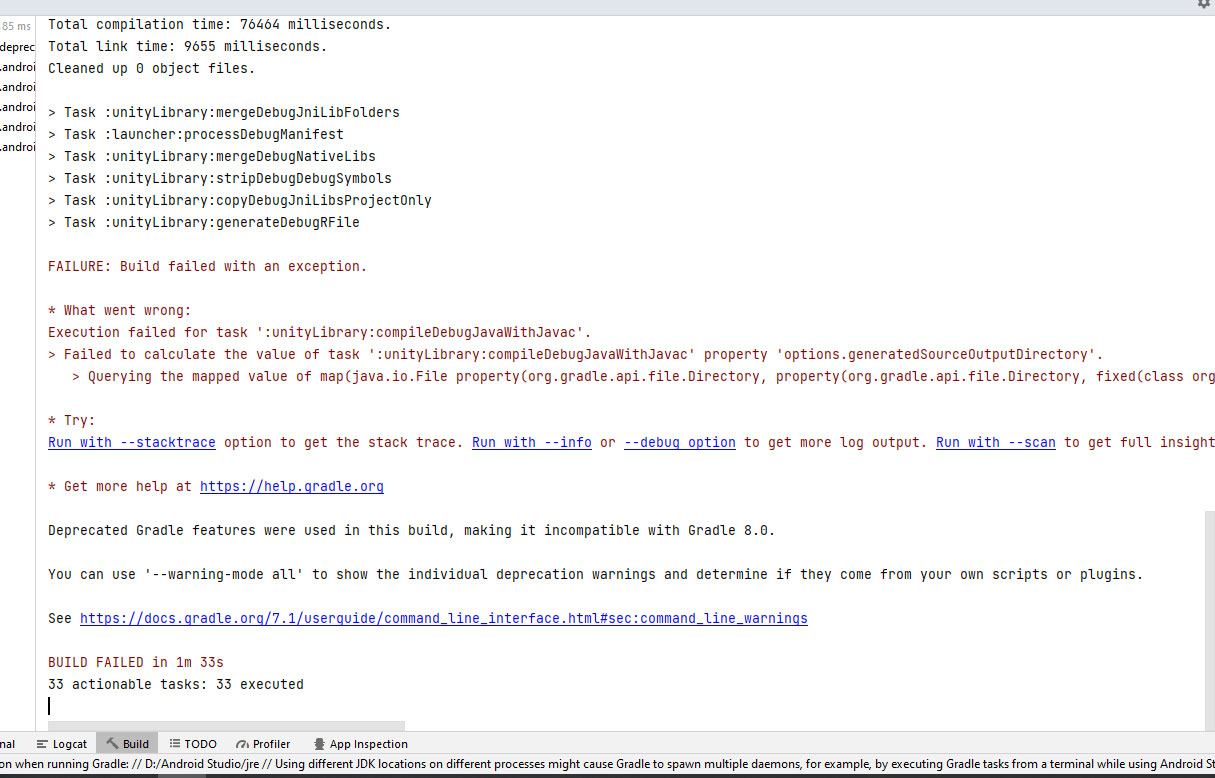
* What went wrong:
Execution failed for task ':unityLibrary:compileDebugJavaWithJavac'.
> Failed to calculate the value of task ':unityLibrary:compileDebugJavaWithJavac' property 'options.generatedSourceOutputDirectory'.
   > Querying the mapped value of map(java.io.File property(org.gradle.api.file.Directory, property(org.gradle.api.file.Directory, fixed(class org.gradle.api.internal.file.DefaultFilePropertyFactory$FixedDirectory, D:\Builds2022\b4-api32\unityLibrary\build\generated\ap_generated_sources\debug\out))) org.gradle.api.internal.file.DefaultFilePropertyFactory$ToFileTransformer@11ff347a) before task ':unityLibrary:compileDebugJavaWithJavac' has completed is not supported

* Try:
searching for this error, it seems to do something with using the wrong gradle? no idea…
Ok, I deleted the .gradle folder, relaunched android studio and got the same error.
Sometimes, it helps to step back a bit, here is what i’d like to accomplish
[current situation / various errors]
???
ability to build an empty test project, preferably from inside Unity, with API 31/32 ( or if that’s not supported yet, with API 30)
Since even with building from gradle, if it will work, will take more time and also actual development/testing will be way longer/more impractical
Do I need to install the latest version of Unity? Might using Unity 2020.1.3 be the problem? Should I do a complete wipe of anything java-related and reinstall?
Ok, tried disabling the firewall/antivirus/VPN, seems the VPN was part of the problem, after disabling it I still got an error described here: https://discussions.unity.com/t/853096
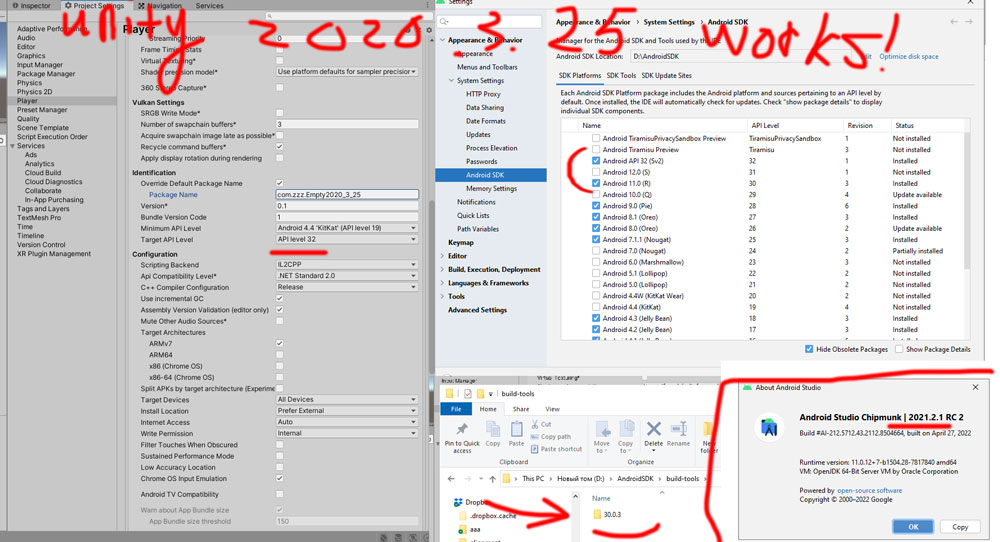
That thread recommended upgrading unity. I made an empty project in unity 2020.3.25 with build target set to 32, and was able to get a successful apk build from inside unity!
Conclusion: Unity 2020.1.3 is no longer supported/no longer works (at least for me it doesn’t) for building up-to-date APK’s - use 2020.3.25 (tested by me) OR later
to anyone reading this later having the same issues, if you are having the “API 31 is corrupted” issue delete it from the android SDK, don’t just rename it as I did - androidSDK is smart and will still find it!
my “settings” are as follows for building using 2020.3.25 for building for free from inside unity
-test with a new empty project first!
Even with VPN/firewall/antivirus enabled, it now works on Windows 10 / no errors!
Aaahghh!!
I was upgrading my project to the new unity, happy in the knowledge that I solved the problem. I got the SAME ERRORS
I then opened the new empty project, hoping to build at least that, and got the SAME ERROR!
Could not determine the dependencies of task ':launcher:compileReleaseJavaWithJavac'.
> Installed Build Tools revision 31.0.0 is corrupted. Remove and install again using the SDK Manager.
Before the issue began reappearing, my firewall asked if Java could have access to some stuff, I clicked “yes” - my theory now, is that I should have clicked NO, since Java is doing some stuff with the gradle the same time as unity
Okay, I figured out what was going on - seems Java sometimes re-creates the file 31.0.0OLDBuild-tools in the AndroidSDK directory, which is especially weird considering that I think I was the one who added “OLD” to the name to make androidSDK ignore it. So, if the error reappears just make sure that the 31.0.0 folder, with whatever other stuff added to the name, didn’t magically-reappear in either AndroidSDK main folder or AndroidSDK/build-tools