We are developing racing game.I have set up waypoints to let player go ahead.
I am stuck at how to add curvy movements on turn ? As you can see on following img I have to add lot of waypoints continuously side by side to give illusion of curve movement yet it is not working properly as player do not move in curve instead it moves robotically.
I don’t know if this is any help for you in this case, but it certainly has helped me a lot with smooth curves between two points.
Here is a little helper function to get points from bezier curve. All it needs is two positions (lets say transforms) and for each position it neets a direction (lets say transform.forward and transform.back as tangents).
// parameter t ranges from 0f to 1f
// this code might not compile!
Vector3 GetBezierPosition(float t)
{
   Vector3 p0 = transformBegin.position;
   Vector3 p1 = p0+transformBegin.forward;
   Vector3 p3 = transformEnd.position;
   Vector3 p2 = p3-transformEnd.back;

// here is where the magic happens!
   return Mathf.Pow(1f-t,3f)*p0+3f*Mathf.Pow(1f-t,2f)*t*p1+3f*(1f-t)*Mathf.Pow(t,2f)*p2+Mathf.Pow(t,3f)*p3;
}
Here is the source I used to make this: Bézier curve - Wikipedia Those p0…p3 points are also visualized behind that link.
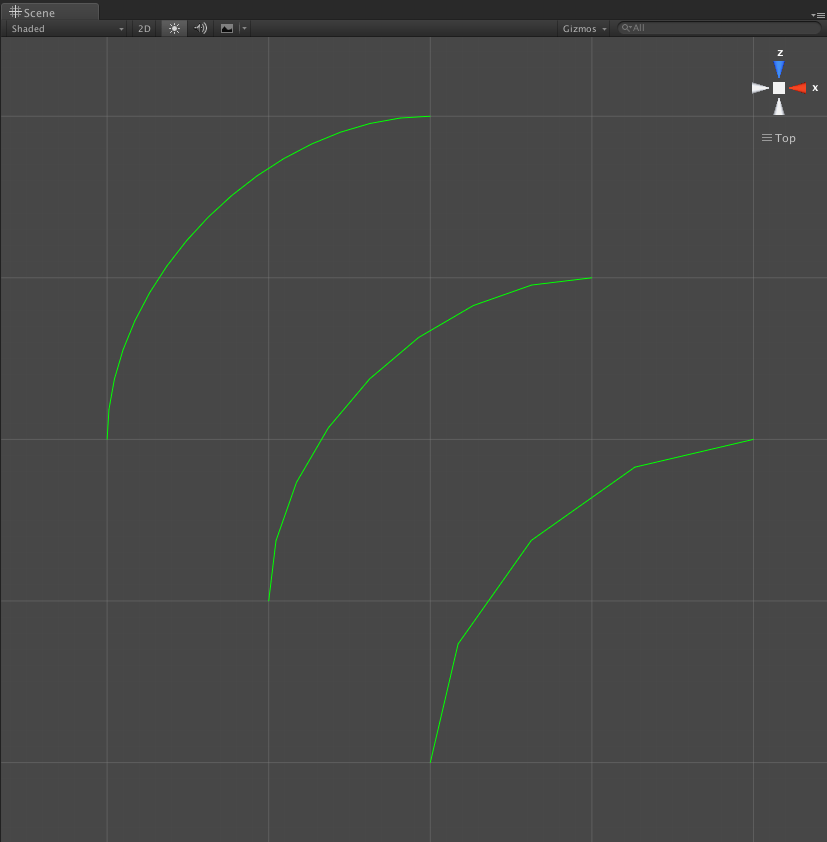
Here is a screenshot of the bezier curve in action.
Top left is used with 1/16th increments in t value. Middle one is 1/8th and bottom is 1/4th. And there are only 2 points (with tangents) that creates each curve.
I came across the problem whilst coding the AI for a car racing game (Not sure if you’re using WheelColliders).
I basically set a minimum distance to the way point value to each AI car before they started to turn to the next waypoint, so they didn’t quite reach the waypoint and “curved” past it.
using UnityEngine;
using System.Collections;

public class AISteering : MonoBehaviour {

    public Transform[] pathPoints;
    public float maxSteer = 15.0f;
    public float distanceFromPoint;
    public WheelCollider wheelFL;
    public WheelCollider wheelFR;

    private int currentPathPoint;


    void Update () {
        Steer();
    }

    void Steer(){
        Vector3 steerVector = transform.InverseTransformPoint(new Vector3(pathPoints[currentPathPoint].position.x,transform.position.y,pathPoints[currentPathPoint].position.z));
        float newSteering = maxSteer * (steerVector.x / steerVector.magnitude);
        wheelFL.steerAngle = newSteering;
        wheelFR.steerAngle = newSteering;

        if (steerVector.magnitude <= distanceFromPoint){
            currentPathPoint ++;
            if (currentPathPoint >= pathPoints.Length)
                currentPathPoint = 0;
        }
    }
}
OP hasn’t been online since 2021 so doubtful you’ll get a reply.
The answer is you’re going to actually have to calculate a curve between two points rather than a straight line and move your object along that curve. There are tutorials on how to do so: https://catlikecoding.com/unity/tutorials/curves-and-splines/ (Old tutorial, but should still work in current day Unity as it did for me).
Otherwise there are probably tools on the asset store, and I think Unity has an experimental package for curves as well.