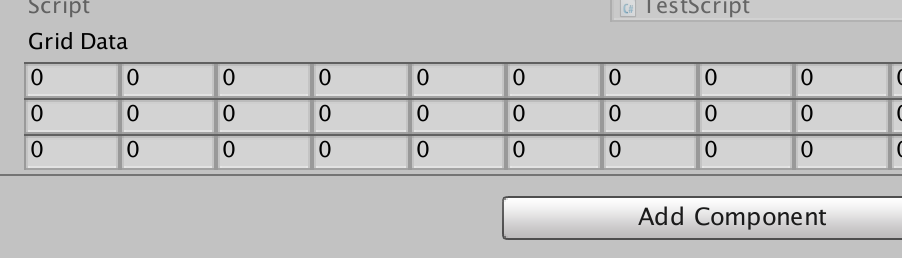
Im testing to see if I can get a CustomPropertyDrawer to work on a Scriptable Object. I can get it working on everything but a Scriptable Object, the 2 image below show one on SC and one on a scene GO. Do I need to do something special for SOs. Please help
using UnityEngine;
using System.Collections;

[System.Serializable]
public class GridData  {

    [System.Serializable]
    public struct rowData{
        public int[] colum;
    }
    public static int numRows =3;
    public static int numColums =15;
    public rowData[] rows = new rowData[numRows];
}
using UnityEngine;
using UnityEditor;
using System.Collections;

[CustomPropertyDrawer(typeof(GridData))]
public class GridDataPropertyDrawer : PropertyDrawer {


    public override void OnGUI(Rect position,SerializedProperty property,GUIContent label){
        EditorGUI.PrefixLabel(position,label);
        Rect newposition = position;
        newposition.y += 18f;
        SerializedProperty data = property.FindPropertyRelative("rows");
        //data.rows[0][]
        for(int j=0;j< GridData.numRows;j++){
            SerializedProperty row = data.GetArrayElementAtIndex(j).FindPropertyRelative("colum");
            newposition.height = 18f;
            if(row.arraySize !=  GridData.numColums)
                row.arraySize =  GridData.numColums;
            newposition.width = position.width/ GridData.numColums;
            for(int i=0;i< GridData.numColums;i++){
                EditorGUI.PropertyField(newposition,row.GetArrayElementAtIndex(i),GUIContent.none);
                newposition.x += newposition.width;
            }

            newposition.x = position.x;
            newposition.y += 18f;
        }
    }

    public override float GetPropertyHeight(SerializedProperty property,GUIContent label){
        return 18f *  GridData.numRows + 18f;
    }
}
using System.Collections;
using System.Collections.Generic;
using UnityEngine;
using UnityEditor;


[CreateAssetMenu(menuName="ScriptableObject Assets/Packages/Biodome Package")]
public class BiodomePackageData : ScriptableObject {

    public float maxLengthM =50;
    [SerializeField]private BioTileData[] tiles;
    public BioTileData[] Tiles{get {return tiles;}}

    //
    // TEST
    public GridData gridData;
    //public GridData GridData{ get { return gridData; } }
    //[SerializeField]private BioPropsData[] props;
    //public BioPropsData[] Props{get {return props;}}

}
Property drawers should work fine in SOs. In your SO, gridData’s type isn’t actually a subclass of GridData, is it? If so, you may need to change this:
[CustomPropertyDrawer(typeof(GridData))]
to this:
[CustomPropertyDrawer(typeof(GridData), true)]
to allow the custom property drawer to apply to subclasses, too.
BTW, rather than using 18f, you may want to use EditorGuiUtility.singleLineHeight. This helps future-proof your code in case Unity changes the height of its editor font at some point.
Still no luck , the code above is everything no other inheritance. Also strange that EditorGuiUtility.singleLineHeight is not found, is this from using UnityEditor ?.
Maybe Im not understanding something. So when I create my SO from the menu and select it , I should see the
CustomPropertyDrawer implemented or do I have to implement my SO through momobehaviour to see it.
When you create your SO, it should automatically use the custom property drawer. Sorry, I don’t know why it’s not. Maybe try a simpler example with just one field, and pare it down until it works?
Thanks so much for this, ok I tested it and im not sure what to make of it.
When I recreated your script it behaved the same way (works on GO not on SC)
When I imported your test into my project it works. I eliminate folder structure by moving your equivalent script to match mine. This didn’t change anything.
I removed all the code from MySO and added in public GridData gridData; and it works
OK so then I replace the name and all the code with BiodomePackageData and it worked.
I remove the test you gave me leaving my new but the same BiodomePackageData and it worked
So I dont know why this is working but essentially all I have now is your imported mySO script renamed to BiodomePackageData with a copy past from the existing BiodomePackageData SO and removing my old BiodomePackageData SO … and it works … lol