# "Default folder path for new scripts" option in settings
**URL:** https://discussions.unity.com/t/default-folder-path-for-new-scripts-option-in-settings/902253
**Category:** Scripting
**Tags:** Feedback
**Created:** [December 6, 2022, 7:59am UTC](https://discussions.unity.com/t/default-folder-path-for-new-scripts-option-in-settings/902253 "2022-12-06T07:59:18Z")
**Posts on this page:** 20
**Page:** 1
### Author:  [@mfatihbarut](https://discussions.unity.com/u/mfatihbarut)
#### Post date: [December 6, 2022, 7:59am UTC](https://discussions.unity.com/t/default-folder-path-for-new-scripts-option-in-settings/902253/1 "2022-12-06T07:59:18Z")
Hi,
We definitely need an option for “Default folder path for new scripts”
Thank you
---
### Author:  [@BABIA\_GameStudio](https://discussions.unity.com/u/BABIA_GameStudio)
#### Post date: [December 6, 2022, 8:24am UTC](https://discussions.unity.com/t/default-folder-path-for-new-scripts-option-in-settings/902253/2 "2022-12-06T08:24:38Z")
> [@mfatihbarut](#):
>
> Hi,
> We definitely need an option for “Default folder path for new scripts”
> Thank you
Why do we? What if I want to categorise my scripts based on the type or prefab it relates to? This would make a default folder useless as I would have multiple places where I want my scripts to be and if there is a default path I would be having to constantly change it to match where I actually want my script to be.
It’s quicker just to go to the right asset folder and right-thinking create script, surely?
---
### Author:  [@mfatihbarut](https://discussions.unity.com/u/mfatihbarut)
#### Post date: [December 6, 2022, 8:50am UTC](https://discussions.unity.com/t/default-folder-path-for-new-scripts-option-in-settings/902253/3 "2022-12-06T08:50:11Z")
you don’t use this feature then.
---
### Author:  [@spiney199](https://discussions.unity.com/u/spiney199)
#### Post date: [December 6, 2022, 9:06am UTC](https://discussions.unity.com/t/default-folder-path-for-new-scripts-option-in-settings/902253/4 "2022-12-06T09:06:36Z")
People use the ‘Add Component’ new script menu to make scripts? I thought only newbies did that.
Most users will be making them with the right-click menu in the folder they intend to live in, and have plenty of different script templates set up to speed up the process.
If you’re dumping all your scripts in one folder… that’s terrible project management sorry.
---
### Author:  [@mfatihbarut](https://discussions.unity.com/u/mfatihbarut)
#### Post date: [December 10, 2022, 4:46am UTC](https://discussions.unity.com/t/default-folder-path-for-new-scripts-option-in-settings/902253/5 "2022-12-10T04:46:54Z")
Branching for scripts is also pain in the as, even though it is my principle as Programmer, I don’t use it for my Unity projects.
---
### Author:  [@ccfoo242](https://discussions.unity.com/u/ccfoo242)
#### Post date: [June 25, 2023, 12:26am UTC](https://discussions.unity.com/t/default-folder-path-for-new-scripts-option-in-settings/902253/6 "2023-06-25T00:26:11Z")
These replies are so disappointing. “only noobs do that”, “my process is uber complicated”
How about when you are just iterating or following a tutorial? Do you make sure all your code uses namespaces and setup asmdef’s? It’s a simple request and a simple feature to implement. Its fine if you are so AAA that this is not for you. And I’m sure people who land on this page appreciate the help you didn’t provide in your responses. 🙄
---
### Author:  [@spiney199](https://discussions.unity.com/u/spiney199)
#### Post date: [June 25, 2023, 12:36am UTC](https://discussions.unity.com/t/default-folder-path-for-new-scripts-option-in-settings/902253/7 "2023-06-25T00:36:49Z")
> [@ccfoo242](#):
>
> How about when you are just iterating or following a tutorial? Do you make sure all your code uses namespaces and setup asmdef’s?
Honestly, yes, because sometimes a tutorial or testing becomes a prototype that leads to a proper project. Might as well always practice good project discipline.
---
### Author:  [@AldeRoberge](https://discussions.unity.com/u/AldeRoberge)
#### Post date: [July 27, 2023, 8:02pm UTC](https://discussions.unity.com/t/default-folder-path-for-new-scripts-option-in-settings/902253/8 "2023-07-27T20:02:37Z")
Almost two years later, this is still very much a problem.
Especially with **assembly definition files** (.asmdef), the scripts created by default using the **Add New Component** window are created at the **root** of the Assets folder.
This wouldn’t be much of a problem, except that we nowadays usually structure our projects this way :
Assets/Project/Scripts
Meaning that it’s the scripts are included in the Assembly-CSharp.dll by default, meaning the recompilation is very slow. Then moving those scripts requires another recompilation.
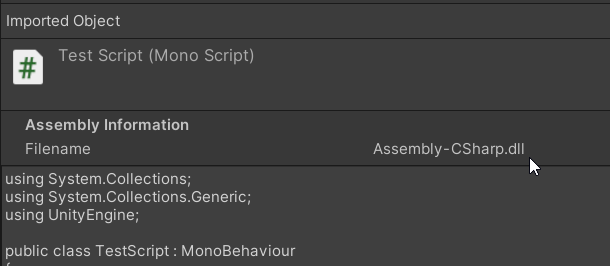
I wish Unity would also enforce **Third Party assets to use the “Plugins”** folder, to differentiate from your scripts and the downloaded assets. It’s hard to stay organized when the root of the Assets folder contains newly created scripts + third party assets.
1. Allow users to choose where the scripts are created when using the Add New Component window (right now this is hardcoded in AddComponentWindow’s NewScriptElement from UnityEngine.dll.
2. Enforce or highly suggest third party plugins to use the “Assets/Plugins/” folder
3. Enforce or highly suggest third party plugins to use .asmdef files
This would greatly help to stay organized.
I agree that this is only a problem if you use the New Component window, but it’s very convenient for fast prototyping.

Other people asking the same thing :
>
> [@Change Default Script Folder](https://discussions.unity.com/t/change-default-script-folder/92375):
>
> Upon creating a new script through the Unity Editor, it places that script in /Assets folder. I want to place that script in /Assets/Scripts folder instead. Is there a property I can change to set the default folder for scripts created through the Unity Editor? Edit: I just want to clarify my process of creating a new script: I’m adding the new script through the inspector via the “Add Component” button. When I create the script from there it seems to default to /Assets folder. Is there a way …
---
### Author:  [@ZanthousDevelopment](https://discussions.unity.com/u/ZanthousDevelopment)
#### Post date: [September 7, 2023, 6:12pm UTC](https://discussions.unity.com/t/default-folder-path-for-new-scripts-option-in-settings/902253/9 "2023-09-07T18:12:36Z")
Would really like this added as well
> just use the right click instead
I generally found myself avoiding this since it has 10000000 options and you have to click through Create \> to get to it, on top of looking for a location to put it. The extra organization is good sometimes, but a lot of the time I just want this to be super frictionless, especially for smaller projects.
That being said, I just made a shortcut for making a script so maybe I can get used to it.
---
### Author:  [@tdlk](https://discussions.unity.com/u/tdlk)
#### Post date: [October 31, 2023, 3:29am UTC](https://discussions.unity.com/t/default-folder-path-for-new-scripts-option-in-settings/902253/10 "2023-10-31T03:29:28Z")
Would like to see this as well!
---
### Author:  [@PHUNMUNHONG](https://discussions.unity.com/u/PHUNMUNHONG)
#### Post date: [November 21, 2023, 7:24am UTC](https://discussions.unity.com/t/default-folder-path-for-new-scripts-option-in-settings/902253/11 "2023-11-21T07:24:41Z")
Hard to imagine this is still not an option.
---
### Author:  [@Dentarth](https://discussions.unity.com/u/Dentarth)
#### Post date: [February 19, 2024, 10:28pm UTC](https://discussions.unity.com/t/default-folder-path-for-new-scripts-option-in-settings/902253/12 "2024-02-19T22:28:04Z")
> [@spiney199](#):
>
> People use the ‘Add Component’ new script menu to make scripts? I thought only newbies did that.
>
> Most users will be making them with the **_right-click menu_** in the folder they intend to live in, and have plenty of different script templates set up to speed up the process.
Using a mouse? I thought only newbies did that.
Anything would be better than new scripts defaulting to `/Assets/`. If it defaulted to the current open folder, all the better, but I’d settle for a custom static folder like `/Assets/Scripts/`so at least they’re where I’d expect.
---
### Author:  [@phunmung](https://discussions.unity.com/u/phunmung)
#### Post date: [March 30, 2024, 3:42pm UTC](https://discussions.unity.com/t/default-folder-path-for-new-scripts-option-in-settings/902253/13 "2024-03-30T15:42:29Z")
Hard to imagine this is still not an option.
---
### Author:  [@Marcelpace](https://discussions.unity.com/u/Marcelpace)
#### Post date: [June 8, 2024, 7:31am UTC](https://discussions.unity.com/t/default-folder-path-for-new-scripts-option-in-settings/902253/14 "2024-06-08T07:31:17Z")
> [@spiney199](#):
>
> People use the ‘Add Component’ new script menu to make scripts? I thought only newbies did that.
>
> Most users will be making them with the right-click menu in the folder they intend to live in, and have plenty of different script templates set up to speed up the process.
>
> If you’re dumping all your scripts in one folder… that’s terrible project management sorry.
It really depends on the size of the project, doesn’t it?
---
### Author:  [@dumeng](https://discussions.unity.com/u/dumeng)
#### Post date: [June 12, 2024, 2:19am UTC](https://discussions.unity.com/t/default-folder-path-for-new-scripts-option-in-settings/902253/15 "2024-06-12T02:19:58Z")
I would like I can decide change the folder in the create script inputbox.
i.e. when I type `Scripts/Scene1/MyScript`, it will create a new script named with `MyScript` placed in `Scripts/Scene1` folder. Better have autocompletion for the folder name when I type.
But at current I can only type the script name, so to the root folder.
---
### Author:  [@Ryiah](https://discussions.unity.com/u/Ryiah)
#### Post date: [June 12, 2024, 3:27am UTC](https://discussions.unity.com/t/default-folder-path-for-new-scripts-option-in-settings/902253/16 "2024-06-12T03:27:17Z")
> [@phunmung](#):
>
> Hard to imagine this is still not an option.
Because it’s additional work for a feature that only saves time once per script and only in the case that you create the script in this fashion. IMO where a feature that changes the location of a script would have real benefit is if it enforced folder structure based off of namespace and/or assembly definitions.
On the bright side it’s not that difficult to detect script compilation and implement code to move the file ourselves (or with an AI as is the case with this proof-of-concept). This script was briefly tested in Unity 2023.1. I created a script and played around with the namespace for a bit. Whenever it recompiles it moves the script.
Script to automatically enforce namespace folder structure - GPT-4o
```auto
using System.IO;
using UnityEditor;
using UnityEngine;
public class ScriptOrganizer : AssetPostprocessor
{
static void OnPostprocessAllAssets(string[] importedAssets, string[] deletedAssets, string[] movedAssets, string[] movedFromAssetPaths)
{
foreach (string asset in importedAssets)
{
if (asset.EndsWith(".cs"))
{
OrganizeScript(asset);
}
}
}
private static void OrganizeScript(string assetPath)
{
string assetText = File.ReadAllText(assetPath);
string namespaceName = GetNamespace(assetText);
if (!string.IsNullOrEmpty(namespaceName))
{
string newFolderPath = Path.Combine("Assets/Scripts", namespaceName.Replace('.', '/'));
if (!Directory.Exists(newFolderPath))
{
Directory.CreateDirectory(newFolderPath);
}
string newAssetPath = Path.Combine(newFolderPath, Path.GetFileName(assetPath));
if (assetPath != newAssetPath)
{
AssetDatabase.MoveAsset(assetPath, newAssetPath);
Debug.Log($"Moved {assetPath} to {newAssetPath}");
}
}
}
private static string GetNamespace(string scriptText)
{
const string namespaceKeyword = "namespace ";
int namespaceIndex = scriptText.IndexOf(namespaceKeyword);
if (namespaceIndex != -1)
{
int namespaceStart = namespaceIndex + namespaceKeyword.Length;
int namespaceEnd = scriptText.IndexOfAny(new[] { '{', ' ' }, namespaceStart);
if (namespaceEnd != -1)
{
return scriptText.Substring(namespaceStart, namespaceEnd - namespaceStart).Trim();
}
}
return null;
}
}
```
---
### Author:  [@spiney199](https://discussions.unity.com/u/spiney199)
#### Post date: [June 12, 2024, 4:27am UTC](https://discussions.unity.com/t/default-folder-path-for-new-scripts-option-in-settings/902253/17 "2024-06-12T04:27:39Z")
Really, what would be a better addition is a pop-up window that lets you select where the new script goes. Hell, even options for what type of script it is (monobehaviour, scriptable object, etc), namespaces, usings, etc etc, with presets!
And I’m sure there’s a few people here that have made that for themselves. Sounds like a fun editor tool to make…
> [@Marcelpace](#):
>
> It really depends on the size of the project, doesn’t it?
I mean most projects are going to have more than a dozen or so script. At which point you probably want to organise your scripts into meaning folders for sanity’s sake.
But I’ll admit my comments from two years ago were a bit arsey. But I don’t think Unity should be adding features to reinforce bad practices.
---
### Author:  [@TharosTheDragon](https://discussions.unity.com/u/TharosTheDragon)
#### Post date: [December 26, 2024, 12:33pm UTC](https://discussions.unity.com/t/default-folder-path-for-new-scripts-option-in-settings/902253/18 "2024-12-26T12:33:05Z")
Having a better default script folder than the root does not mean people aren’t organizing their scripts. I imagine people are creating the script and then looking for it so they can move it to its proper place, and are then surprised to find it in the root of all places. They’re annoyed at having their time wasted by nonsensical behavior on Unity’s part, so then they come to a post like this to voice their opinion that the Unity team should fix it. And then people like you come along and argue that obviously wrong behavior shouldn’t be fixed??? Thanks for the contribution.
If you find that only noobs are using a feature, maybe it’s because the feature is broken. If it worked correctly then it might be a different story.
---
### Author:  [@fibonaut](https://discussions.unity.com/u/fibonaut)
#### Post date: [February 17, 2025, 11:42pm UTC](https://discussions.unity.com/t/default-folder-path-for-new-scripts-option-in-settings/902253/19 "2025-02-17T23:42:39Z")
No wonder Unity is losing market share with the upcoming cohort of game devs when reasonable feature requests are responded to with such dismissal.
People have already taken more time arguing in this thread than it would take to implement this feature.
---
### Author:  [@Neogene](https://discussions.unity.com/u/Neogene)
#### Post date: [October 16, 2025, 6:09am UTC](https://discussions.unity.com/t/default-folder-path-for-new-scripts-option-in-settings/902253/20 "2025-10-16T06:09:38Z")
From 6000.2 a component created by Add component will request where to save the script…each time…
Not the best solution (default folder option (on off) in the project settings is still the better usability option)…
[Next page](https://discussions.unity.com/t/default-folder-path-for-new-scripts-option-in-settings/902253.md?page=2)