# DrawDefault for PropertyDrawers?
**URL:** https://discussions.unity.com/t/drawdefault-for-propertydrawers/926475
**Category:** UI Toolkit
**Tags:** UI-Toolkit, Question
**Created:** [August 15, 2023, 6:31pm UTC](https://discussions.unity.com/t/drawdefault-for-propertydrawers/926475 "2023-08-15T18:31:26Z")
**Posts on this page:** 7
**Page:** 1
### Author:  [@backwheelbates](https://discussions.unity.com/u/backwheelbates)
#### Post date: [August 15, 2023, 6:31pm UTC](https://discussions.unity.com/t/drawdefault-for-propertydrawers/926475/1 "2023-08-15T18:31:26Z")
Hi all,
I just wanted to stick a button or two on top of a class (or on each element of a class in a list).
With an Editor script using OnInspectorGUI, I can easily add some buttons and put “DrawDefaultInspector()” at the bottom to continue drawing normally.
Is there a property drawer equivalent for this?
Thanks!
---
### Author:  [@spiney199](https://discussions.unity.com/u/spiney199)
#### Post date: [August 15, 2023, 11:51pm UTC](https://discussions.unity.com/t/drawdefault-for-propertydrawers/926475/2 "2023-08-15T23:51:06Z")
Probably just using PropertyField and supplying the serialised property the property drawer gives you.
---
### Author:  [@backwheelbates](https://discussions.unity.com/u/backwheelbates)
#### Post date: [August 16, 2023, 7:05am UTC](https://discussions.unity.com/t/drawdefault-for-propertydrawers/926475/3 "2023-08-16T07:05:54Z")
Thanks for the reply @spiney199 .
It looks like Im not the first to run into this.
> [@Property Drawers](https://discussions.unity.com/t/724398):
>
> Hello! I was wondering if there’s a (new? better?) way to implement property drawers using UIElements instead of the good ol’ IMGUI. Thanks!
> [@UIElements Button](https://discussions.unity.com/t/746598):
>
> I am trying to wrap my head around this concept. So I was wondering, if I make a button like so VisualElement root = rootVisualElement; StyleSheet styleSheet = AssetDatabase.LoadAssetAtPath\("Assets/Scripts/Editor/UIElements/ShaderSelector.uss"); VisualElement but = new Button(); but.styleSheets.Add(styleSheet); but.name = "fred"; root.Add(but); Is there anyway to add Text to the Button via code? ie Do I have to use .UXML to put in text on the button? Please clarify.
I havent gotten one of the solutions to work yet without freezing Unity.
---
### Author:  [@spiney199](https://discussions.unity.com/u/spiney199)
#### Post date: [August 16, 2023, 8:55am UTC](https://discussions.unity.com/t/drawdefault-for-propertydrawers/926475/4 "2023-08-16T08:55:16Z")
Right, a property field would just invoke the property drawer and go infinite…
In your instance I think you want a DecoratorDrawer instead, actually, now that I remember them.
---
### Author:  [@oscarAbraham](https://discussions.unity.com/u/oscarAbraham)
#### Post date: [August 16, 2023, 5:31pm UTC](https://discussions.unity.com/t/drawdefault-for-propertydrawers/926475/5 "2023-08-16T17:31:55Z")
Hi. What version of Unity are you using?
---
### Author:  [@backwheelbates](https://discussions.unity.com/u/backwheelbates)
#### Post date: [August 16, 2023, 6:27pm UTC](https://discussions.unity.com/t/drawdefault-for-propertydrawers/926475/6 "2023-08-16T18:27:30Z")
Im on 2022.2.15 @oscarAbraham
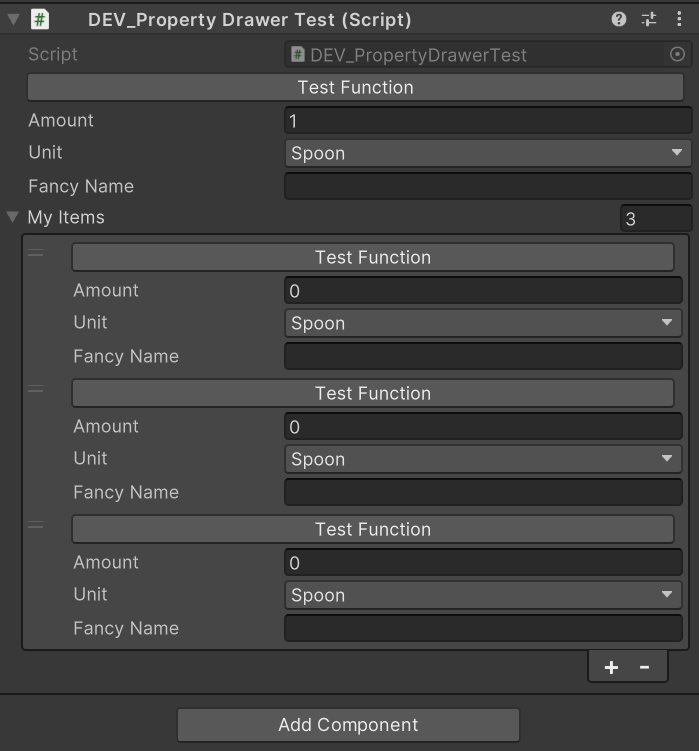
I did a test manually by using CreatePropertyGUI, its actually not to difficult to use this, way simpler than OnInspectorGUI. Since I only wanted to add a button and not really change anything, I dont want to keep updating the property drawer every time I change the class.
Id like the button to call a function on the specific data of that object/instance.
@spiney199 , is this something that DecoratorDrawers can do?
---
### Author:  [@spiney199](https://discussions.unity.com/u/spiney199)
#### Post date: [August 16, 2023, 10:52pm UTC](https://discussions.unity.com/t/drawdefault-for-propertydrawers/926475/7 "2023-08-16T22:52:55Z")
> [@backwheelbates](#):
>
> Id like the button to call a function on the specific data of that object/instance. @spiney199 , is this something that DecoratorDrawers can do?
Actually looking at the docs, you don’t get access to the serialised property for some reason?? So I guess not.
This is why I use Odin. Unity’s inspector tools just leave too much to be desired.