# \[easy bookmarks\]
**URL:** https://discussions.unity.com/t/easy-bookmarks/926410
**Category:** Community Showcases
**Tags:** Asset-Store-Assets, Conversation
**Created:** [August 15, 2023, 8:40am UTC](https://discussions.unity.com/t/easy-bookmarks/926410 "2023-08-15T08:40:11Z")
**Posts on this page:** 20
**Page:** 1
### Author:  [@Euricius](https://discussions.unity.com/u/Euricius)
#### Post date: [August 15, 2023, 8:40am UTC](https://discussions.unity.com/t/easy-bookmarks/926410/1 "2023-08-15T08:40:11Z")

**[\>\> Get Easy Bookmarks \<\<](https://assetstore.unity.com/packages/slug/256944)**
How much time do you spend navigating complex Project or Hierarchy structures? **Easy Bookmarks** significantly speeds up and simplifies the dev process.
**Easy Bookmarks** designed for efficient project navigation. With this powerful tool, you can easily create and organize bookmarks for:
- assets
- scene objects (without scene modifications)
- dynamically created objects
- subassets
- components
- folders

**[\>\> Empower Unity \<\<](https://assetstore.unity.com/packages/slug/256944)**
---
### Author:  [@Lars-Steenhoff](https://discussions.unity.com/u/Lars-Steenhoff)
#### Post date: [August 18, 2023, 6:34pm UTC](https://discussions.unity.com/t/easy-bookmarks/926410/2 "2023-08-18T18:34:39Z")
I just bought the bookmarks and its really nice!
If you don’t mind I have a few suggestions to make it even better
I would remove the blue color of the text of bookmarks and make it white like the rest of unity. I would only use blue for prefabs, just all the same as in rest of unity.
Next is the gear icon, at this moment it’s only used for renaming and delete.
Renaming and delete is also possible with right click menu, so right now I would remove the gear icon.
 Add keyboard short cut for deleting. ( Delete key / backspace key )
and for rename ( Enter Key when item is selected )
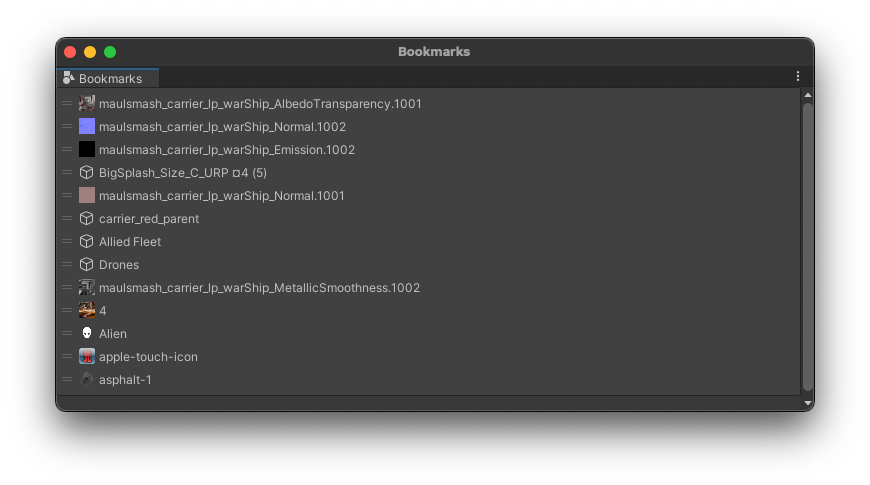
Last but not least, I would love to see a grid view with larger icons ( same slider as in project view slide to the left make list view, slide to the right same grid view and more to the right larger icons for grid view )
This will help me see textures I added to bookmarks
( without the folders view of the project window. just the right part of it )
Thanks I hope this feedback is useful
  
---
### Author:  [@Lars-Steenhoff](https://discussions.unity.com/u/Lars-Steenhoff)
#### Post date: [August 18, 2023, 6:47pm UTC](https://discussions.unity.com/t/easy-bookmarks/926410/3 "2023-08-18T18:47:18Z")
Further testing I found one thing that looks unwanted, when you drag an item from inside the bookmarks and drop it again inside the bookmarks it registers it twice, ( and adds its again when you do it again ) I would make an item appear only one time in the bookmarks window.

I also changed the gear icon for an X ( d\_winbtn\_win\_close\_a ) as I will try to assign the delete function to the icon directly.
---
### Author:  [@Euricius](https://discussions.unity.com/u/Euricius)
#### Post date: [August 18, 2023, 7:11pm UTC](https://discussions.unity.com/t/easy-bookmarks/926410/4 "2023-08-18T19:11:19Z")
> [@Lars-Steenhoff](#):
>
> I just bought the bookmarks and its really nice!
> If you don’t mind I have a few suggestions to make it even better
>
> I would remove the blue color of the text of bookmarks and make it white like the rest of unity. I would only use blue for prefabs, just all the same as in rest of unity.
>
> Next is the gear icon, at this moment it’s only used for renaming and delete.
> Renaming and delete is also possible with right click menu, so right now I would remove the gear icon.
>
> Add keyboard short cut for deleting. ( Delete key / backspace key )
> and for rename ( Enter Key when item is selected )
>
> Last but not least, I would love to see a grid view with larger icons ( same slider as in project view slide to the left make list view, slide to the right same grid view and more to the right larger icons for grid view )
>
> This will help me see textures I added to bookmarks
>
> ( without the folders view of the project window. just the right part of it )
>
> Thanks I hope this feedback is useful
Thank you so much for this detailed review and cool suggestions! I will definitely include most of the suggestions in the next update
---
### Author:  [@Euricius](https://discussions.unity.com/u/Euricius)
#### Post date: [August 18, 2023, 7:13pm UTC](https://discussions.unity.com/t/easy-bookmarks/926410/5 "2023-08-18T19:13:11Z")
> [@Lars-Steenhoff](#):
>
> Further testing I found one thing that looks unwanted, when you drag an item from inside the bookmarks and drop it again inside the bookmarks it registers it twice, ( and adds its again when you do it again ) I would make an item appear only one time in the bookmarks window.
>
> I also changed the gear icon for an X ( d\_winbtn\_win\_close\_a ) as I will try to assign the delete function to the icon directly.
Nice catch! I’ll also fix this in the next update
---
### Author:  [@Lars-Steenhoff](https://discussions.unity.com/u/Lars-Steenhoff)
#### Post date: [August 18, 2023, 7:31pm UTC](https://discussions.unity.com/t/easy-bookmarks/926410/6 "2023-08-18T19:31:41Z")
> [@Euricius](#):
>
> Thank you so much for this detailed review and cool suggestions! I will definitely include most of the suggestions in the next update
Thanks thats awesome!
---
### Author:  [@Lars-Steenhoff](https://discussions.unity.com/u/Lars-Steenhoff)
#### Post date: [August 19, 2023, 8:20am UTC](https://discussions.unity.com/t/easy-bookmarks/926410/7 "2023-08-19T08:20:04Z")
And one more thing I found that may be a bit harder to address, when I have hierarchy items stored as bookmarks and I save the scene under a new name ( save as ) then all bookmarks still reference the previous saved scene.
Ideally opening the old or the new scene would still allow the same bookmarks to the reference the hierarchy items depending on which one is open, but then unity allows two scenes to be open at the same time making it even harder.
---
### Author:  [@Euricius](https://discussions.unity.com/u/Euricius)
#### Post date: [August 19, 2023, 8:52am UTC](https://discussions.unity.com/t/easy-bookmarks/926410/8 "2023-08-19T08:52:52Z")
> [@Lars-Steenhoff](#):
>
> And one more thing I found that may be a bit harder to address, when I have hierarchy items stored as bookmarks and I save the scene under a new name ( save as ) then all bookmarks still reference the previous saved scene.
>
> Ideally opening the old or the new scene would still allow the same bookmarks to the reference the hierarchy items depending on which one is open, but then unity allows two scenes to be open at the same time making it even harder.
Thanks for the testing and suggestions.
I will think about how to implement this in an understandable way
---
### Author:  [@bvonline](https://discussions.unity.com/u/bvonline)
#### Post date: [August 26, 2023, 6:43am UTC](https://discussions.unity.com/t/easy-bookmarks/926410/9 "2023-08-26T06:43:04Z")
Regarding the gear icon: in cas there are only a few functions available like renaming and delete, it could be an option to show symbols instead of having to open the right-click-menu. Deleting and item by just “Del” or “Backspace” could keept it easy, yes - that might be a different UI Scheme functionality, maybe it could be set up in the menu to choose the wanted UI.
Note: I wrote you an e-mail regarding the currend developement status.
---
### Author:  [@Lars-Steenhoff](https://discussions.unity.com/u/Lars-Steenhoff)
#### Post date: [August 26, 2023, 6:54am UTC](https://discussions.unity.com/t/easy-bookmarks/926410/10 "2023-08-26T06:54:41Z")
> [@bvonline](#):
>
> Regarding the gear icon: in cas there are only a few functions available like renaming and delete, it could be an option to show symbols instead of having to open the right-click-menu. Deleting and item by just “Del” or “Backspace” could keept it easy, yes - that might be a different UI Scheme functionality, maybe it could be set up in the menu to choose the wanted UI.
The gear icon is replaced already, for an x to delete, very easy now.
---
### Author:  [@bvonline](https://discussions.unity.com/u/bvonline)
#### Post date: [August 26, 2023, 9:29am UTC](https://discussions.unity.com/t/easy-bookmarks/926410/11 "2023-08-26T09:29:34Z")
> [@Lars-Steenhoff](#):
>
> The gear icon is replaced already, for an x to delete, very easy now.
You got my mail?
---
### Author:  [@Euricius](https://discussions.unity.com/u/Euricius)
#### Post date: [August 26, 2023, 9:35am UTC](https://discussions.unity.com/t/easy-bookmarks/926410/12 "2023-08-26T09:35:17Z")
> [@bvonline](#):
>
> You got my mail?
Yes-yes, I will reply soon.
Thanks for your email (thumbs-up)
---
### Author:  [@Euricius](https://discussions.unity.com/u/Euricius)
#### Post date: [August 26, 2023, 9:50am UTC](https://discussions.unity.com/t/easy-bookmarks/926410/13 "2023-08-26T09:50:26Z")
> [@bvonline](#):
>
> Regarding the gear icon: in cas there are only a few functions available like renaming and delete, it could be an option to show symbols instead of having to open the right-click-menu. Deleting and item by just “Del” or “Backspace” could keept it easy, yes - that might be a different UI Scheme functionality, maybe it could be set up in the menu to choose the wanted UI.
>
> Note: I wrote you an e-mail regarding the currend developement status.
Hi!
Thanks for your suggestions. As [Lars-Steenhoff](https://forum.unity.com/members/lars-steenhoff.1854/) already said, gear icon already replaced with X icon and related functionality. This improvement (and bunch of others) will be released in next update soon.
And thanks for your email, I’ve already answered 🙂
---
### Author:  [@OU-dFun](https://discussions.unity.com/u/OU-dFun)
#### Post date: [August 28, 2023, 10:43am UTC](https://discussions.unity.com/t/easy-bookmarks/926410/14 "2023-08-28T10:43:18Z")
New **[Easy Bookmarks](https://assetstore.unity.com/packages/tools/utilities/easy-bookmarks-256944)** features and fixes have arrived 🙂
**What’s new:**
- Implemented double click to frame bookmarked object in the Scene View and to open bookmarked asset
- Added possibility to Drag&Drop Component bookmarks from the Bookmark window
- Implemented button to quick delete bookmark - _thanks [Lars-Steenhoff](https://forum.unity.com/members/lars-steenhoff.1854/) and [bvonline](https://forum.unity.com/members/bvonline.6889454/) for suggestion_
- Added keyboard shortcuts to remove bookmarks - _thanks [Lars-Steenhoff](https://forum.unity.com/members/lars-steenhoff.1854/) and [bvonline](https://forum.unity.com/members/bvonline.6889454/) for suggestion_
- Fixed duplicate bookmarking on Drag&Drop object from the Bookmark window - _thanks [Lars-Steenhoff](https://forum.unity.com/members/lars-steenhoff.1854/) for catched issue_
- Improved bookmark name color - _thanks [Lars-Steenhoff](https://forum.unity.com/members/lars-steenhoff.1854/) for suggestion_
---
### Author:  [@Lars-Steenhoff](https://discussions.unity.com/u/Lars-Steenhoff)
#### Post date: [August 28, 2023, 6:27pm UTC](https://discussions.unity.com/t/easy-bookmarks/926410/15 "2023-08-28T18:27:43Z")
> [@OU-dFun](#):
>
> New **[Easy Bookmarks](https://assetstore.unity.com/packages/tools/utilities/easy-bookmarks-256944)** features and fixes have arrived 🙂
Great update ! Thanks
---
### Author:  [@bvonline](https://discussions.unity.com/u/bvonline)
#### Post date: [August 30, 2023, 4:55pm UTC](https://discussions.unity.com/t/easy-bookmarks/926410/16 "2023-08-30T16:55:28Z")
Here are some suggestions as promised after having a look on it (will add more if I see any other things which could be optimized):
**Subcategories**
For each group, I would prefer additional subcategory headlines, which could be added by mouse rightclick → Add “Subcategory” or Remove “Subcategory”. This would just be a visual headline for the links added to this subcategory by dragging / dropping links in it (below the headline) as usual like dragging / dropping links to different positions. Note: it is not needed to be able to open / close that subcategory, as it might overcomplicate it. But this could be an option to help to just quickly have a better overview of the links (as most users will not have that much space on the monitor), and it could prevent the user to get distracted by too much mixed links. The dropdown icon could be on the right, it could be a triangle showing if the subcategory is opened or not (showing up / down). In general, it should be still possible to have no subcategory headlines.
**Locking Links**
To lock the complete saved links in the list, I would recommend to add an option to lock all links, so that the “x” to delete the bookmarks disappears. This function could be addet to the Bookmarks tab (right mouse click). This would prevent users from accidentally deleting links they added and also give some little bit more space.
I will get back to you as soon as I have some other recommondations. Overall, it is a great tool and I feel I will use this in any project since now. Thanks!
---
### Author:  [@Lars-Steenhoff](https://discussions.unity.com/u/Lars-Steenhoff)
#### Post date: [August 30, 2023, 4:58pm UTC](https://discussions.unity.com/t/easy-bookmarks/926410/17 "2023-08-30T16:58:16Z")
> [@bvonline](#):
>
> Here are some suggestions as promised after having a look on it (will add more if I see any other things which could be optimized):
>
> **Subcategories**
>
> For each group, I would prefer additional subcategory headlines, which could be added by mouse rightclick → Add “Subcategory” or Remove “Subcategory”. This would just be a visual headline for the links added to this subcategory by dragging / dropping links in it (below the headline) as usual like dragging / dropping links to different positions. Note: it is not needed to be able to open / close that subcategory, as it might overcomplicate it. But this could be an option to help to just quickly have a better overview of the links (as most users will not have that much space on the monitor), and it could prevent the user to get distracted by too much mixed links. The dropdown icon could be on the right, it could be a triangle showing if the subcategory is opened or not (showing up / down). In general, it should be still possible to have no subcategory headlines.
>
> **Locking Links**
>
> To lock the complete saved links in the list, I would recommend to add an option to lock all links, so that the “x” to delete the bookmarks disappears. This function could be addet to the Bookmarks tab (right mouse click). This would prevent users from accidentally deleting links they added and also give some little bit more space.
>
> I will get back to you as soon as I have some other recommondations. Overall, it is a great tool and I feel I will use this in any project since now. Thanks!
If there was undo after deleting with x there would be no risk of accidental deletion
---
### Author:  [@Euricius](https://discussions.unity.com/u/Euricius)
#### Post date: [August 30, 2023, 6:09pm UTC](https://discussions.unity.com/t/easy-bookmarks/926410/18 "2023-08-30T18:09:58Z")
> [@bvonline](#):
>
> Here are some suggestions as promised after having a look on it (will add more if I see any other things which could be optimized):
>
> **Subcategories**
>
> For each group, I would prefer additional subcategory headlines, which could be added by mouse rightclick → Add “Subcategory” or Remove “Subcategory”. This would just be a visual headline for the links added to this subcategory by dragging / dropping links in it (below the headline) as usual like dragging / dropping links to different positions. Note: it is not needed to be able to open / close that subcategory, as it might overcomplicate it. But this could be an option to help to just quickly have a better overview of the links (as most users will not have that much space on the monitor), and it could prevent the user to get distracted by too much mixed links. The dropdown icon could be on the right, it could be a triangle showing if the subcategory is opened or not (showing up / down). In general, it should be still possible to have no subcategory headlines.
>
> **Locking Links**
>
> To lock the complete saved links in the list, I would recommend to add an option to lock all links, so that the “x” to delete the bookmarks disappears. This function could be addet to the Bookmarks tab (right mouse click). This would prevent users from accidentally deleting links they added and also give some little bit more space.
>
> I will get back to you as soon as I have some other recommondations. Overall, it is a great tool and I feel I will use this in any project since now. Thanks!
Thanks for suggestions!
---
### Author:  [@Euricius](https://discussions.unity.com/u/Euricius)
#### Post date: [August 30, 2023, 6:12pm UTC](https://discussions.unity.com/t/easy-bookmarks/926410/19 "2023-08-30T18:12:13Z")
> [@Lars-Steenhoff](#):
>
> If there was undo after deleting with x there would be no risk of accidental deletion
Yes, I plan to implement undo functionality in one of the next updates
---
### Author:  [@SirKnightDragoon](https://discussions.unity.com/u/SirKnightDragoon)
#### Post date: [September 1, 2023, 5:34pm UTC](https://discussions.unity.com/t/easy-bookmarks/926410/20 "2023-09-01T17:34:38Z")
Hi, I find this Asset very interesting. Only one feature is missing to convince me.
Add GridView option instead of list. Without forgetting the preview image.
This is very useful when doing level design.
[Next page](https://discussions.unity.com/t/easy-bookmarks/926410.md?page=2)