# Failed to load window layout (197404)
**URL:** https://discussions.unity.com/t/failed-to-load-window-layout-197404/197404
**Category:** Questions & Answers
**Created:** [October 16, 2017, 2:46am UTC](https://discussions.unity.com/t/failed-to-load-window-layout-197404/197404 "2017-10-16T02:46:42Z")
**Posts on this page:** 4
**Page:** 1
### Author:  [@lilinjie](https://discussions.unity.com/u/lilinjie)
#### Post date: [October 16, 2017, 2:46am UTC](https://discussions.unity.com/t/failed-to-load-window-layout-197404/197404/1 "2017-10-16T02:46:42Z")
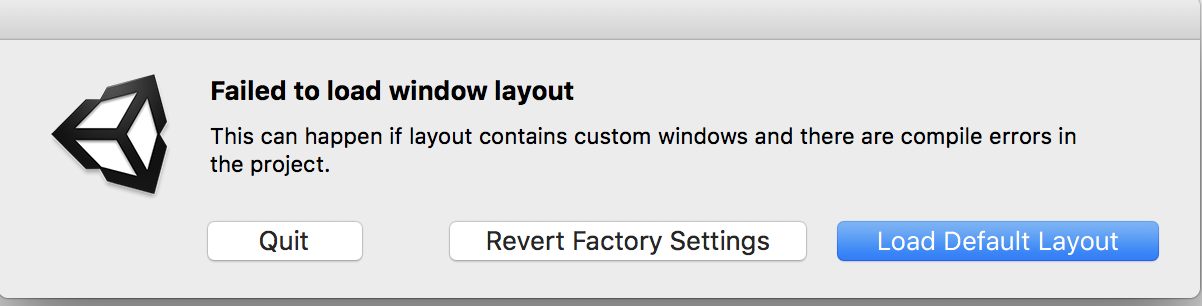
System:
macOS High Sierra
MacBook Pro ( 13-inch, 2016, Two Thunderbolt 3 ports )
I installed Unity 5.1.2f1, 5.5.2f1, 2017.2.0f3, when I open Unity it show the above window. On “Failed to load window layout” window only can quit, when press other it always return to “Failed to load window layout” window. But Unity 2017.2.0f3 can press “Load Default Layout” or “Revert Factory Settings” to open unity.
I have reinstalled all unity, delete “ProjectSettings” or “CurrentLayout.dwlt”, create a new Unity project, neither have effect. I have tryed Delete the following folders or files:
> /Applications/Unity
> ~/Library/Application Support/Unity
> ~/Library/Caches/com.unity3d.\*
> ~/Library/Logs/Unity
> ~/Library/Preferences/Unity
> ~/Library/Preferences/com.unity3d.\*
> ~/Library/Unity
> ~/Library/Preferences/com.OverTheEdge.BugReporter.plist
> ~/Library/Preferences/dk.Otee.\*
> /Library/Application Support/Unity
> (License file is here…prolly best to
> leave it alone, or return your license
> first before deleting)
> /Library/Application Support/PACE
> Anti-Piracy
Don’t solve my problem.
Editor.log
> error getting directory contents
> /Applications/Unity/Unity.app/Contents/Resources/ScriptTemplates
> error getting directory contents
> /Applications/Unity/Standard Assets
> error getting directory contents
> /Users/linjieli/Library/Preferences/Unity/Editor-5.x/Layouts
> at UnityEditor.ContainerWindow.Show
> (ShowMode showMode, Boolean
> loadPosition, Boolean
> displayImmediately) [0x000a3] in
> /Users/builduser/buildslave/unity/build/Editor/Mono/ContainerWindow.cs:91
> at
> UnityEditor.WindowLayout.LoadWindowLayout
> (System.String path, Boolean
> newProjectLayoutWasCreated) [0x001e0]
> in
> /Users/builduser/buildslave/unity/build/Editor/Mono/GUI/WindowLayout.cs:540
> UnityEngine.Debug:Internal\_Log(Int32,
> String, Object)
> UnityEngine.Debug:LogError(Object)
> UnityEditor.WindowLayout:LoadWindowLayout(String,
> Boolean) (at
> /Users/builduser/buildslave/unity/build/Editor/Mono/GUI/WindowLayout.cs:561)
> (Filename:
> /Users/builduser/buildslave/unity/build/Editor/Mono/GUI/WindowLayout.cs
> Line: 561)
Reference: [https://forum.unity.com/threads/uninstalling-unity-on-mac.395154/](https://forum.unity.com/threads/uninstalling-unity-on-mac.395154/)
---
### Author:  [@Adam-Buckner](https://discussions.unity.com/u/Adam-Buckner)
#### Post date: [October 16, 2017, 1:04pm UTC](https://discussions.unity.com/t/failed-to-load-window-layout-197404/197404/2 "2017-10-16T13:04:58Z")
I would contact unity support. If you have a new project that won’t open and gives you that warning, you have a unique and special problem. I have never seen that and no one has yet reported it.
---
### Author:  [@partidosolo](https://discussions.unity.com/u/partidosolo)
#### Post date: [September 17, 2020, 1:58pm UTC](https://discussions.unity.com/t/failed-to-load-window-layout-197404/197404/3 "2020-09-17T13:58:13Z")
@Adam-Buckner, is a great idea. I have the same problem, and i will soon contact Unity Support.
---
### Author:  [@ahmedaniss](https://discussions.unity.com/u/ahmedaniss)
#### Post date: [November 26, 2020, 11:17pm UTC](https://discussions.unity.com/t/failed-to-load-window-layout-197404/197404/4 "2020-11-26T23:17:47Z")
problem fixed here : [Failed to load window layout in Unity - YouTube](https://youtu.be/Av9zt1gcpqc)