Deleting and re importing worked, thank you!
2 Likes
Hey there,
I am trying to use the standalone version of this in 2017.4.29, and while it works in the editor it completely breaks my builds. Having it imported causes my builds to freeze after the splash screens. This is happening on Windows x86 and x86_64 builds.
Hi
Are you building with IL2CPP?
Do you see any entries in the player-log?
So long,
Stefan
I am not building with IL2CPP, and unfortunately the log doesn’t have anything useful in it.
We just did a test with Unity 2017.4 and it runs flawless on our side.
Can you please create a new, empty project, import FB, add “ExamplesSync” to the build and then build and run it; what happens?
Well, it seems that the issue has somehow resolved itself. I also learned that while the Windows build was broken, the Mac and Linux builds were working fine. I’m not sure what to make of this but hopefully it won’t be a problem anymore. My project is fairly large so who knows what could have been causing it to crash. Heck it could have been just needing to restart Unity.
1 Like
Thx Stefan for providing this tool. This plugin was essential for creating and using my soft!
1 Like
You’re welcome, I’m happy when our tools are used in a real product!
Btw, your application looks great, I wish you all the best with it!
Have a nice weekend!
Cheers
Stefan
Hi Stefan,
Thank you for a great plugin.
On Linux (debian) the dialogs are opened minimized and sometimes behind the unity application.
Is there anything I can do to fix that?
Also, On windows, Open folder open a file selection dialog:
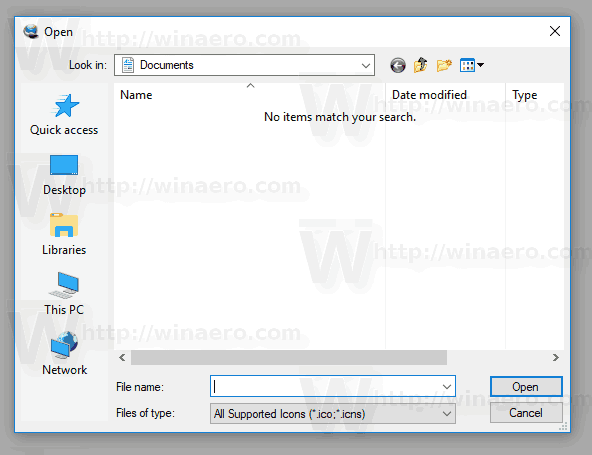
And not the folder selection dialog:

Do I do something wrong?
Thanks
Yinon
Hi Yinon
About Linux: unfortunately, every Linux distro has it’s own quirks, so our the possibilities are fairly limited. On top of that, Unity’s Linux support isn’t that great and it changes all the time  It works on Ubuntu 18.04 and built with Unity 2017.4.
Anyway, in the PRO version, we included the whole source, so you’re able to test and modify it.
The folder selector in the free version is indeed a file selector. This is due the used libraries (btw. Unity’s own Editor folder browser works the same way).
Anyway, I can only once more refer to the PRO version. It contains a purely native implementation (no Okii.Dialogs.dll), works with IL2CPP and has the “real”-folder selector.
I hope this helps you further.
Cheers
Stefan
Hi,
we bought the Pro Version and added it to our Project. We are using IL2CPP and get a crash in the compiled App when calling FileBrowser.OpenSingleFile. Targetplatform is Windows. Have you any tipps for us (we have deleted the prefabs and ui folder).
Thank you!
… The Logfile does not give any hint, even in development mode…
After checking some other log file, I found:
ERROR: SymGetSymFromAddr64, GetLastError: ‘Es wurde versucht, auf eine unzulässige Adresse zuzugreifen.’ (Address: 000B1015)
0x000B1015 (MY-PROGRAM) (function-name not available)
ERROR: SymGetSymFromAddr64, GetLastError: ‘Es wurde versucht, auf eine unzulässige Adresse zuzugreifen.’ (Address: 000B11D9)
0x000B11D9 (MY-PROGRAM) (function-name not available)
We are using unity 2019.2.0f1
Hi Zapan
We’ve just tested it with Unity 2019.2.0 and you’re unfortunately totally right, FB is crashing with IL2CPP
We have to investigate this, but I suspect that it’s because Unity 2019.2.0 is the new version of the 2019.2-line and seems to be buggy as usual with Unity’s first release.
We recommend to use 2019.1.13 (or even better 2018.4.5 (LTS)).
Anyway, please give us some time to analyze it further.
So long,
Stefan
Testing the free version on 2017 LTS [old I know], Unity windows standalone often errors on closing the FileBrowser dialogue - “An abnormal situation has occurred: the PlayerLopp internal function had been called recursively…”.
This is not unique to this file browser and may be a Unity bug to do with launching native dialogues, but if anyone has seen this issue and fixed it I would like to know!
Thank you for the Feedback. Before we bought your plugin, we were using the base standardFileBrowser like you are referencing. However, this will also crash under il2cpp conditions. Using 2019.1.13 is currently not possible for us, as we need some of the newer features. Please let us know if you have an update for us and/or if we can help you by finding the issue.
Hi Andy
Which Unity version are you exactly using?
So long,
Stefan
Hello again
I will take a close look in the next 48h.
Stay tuned,
Stefan
2017.4.29 I have yet to find a minimal recreation though, but it relates to any file browser asset we try in our app.
Hi, do you have any news for us? 