Hello! Is there any info anywhere on the new Forward+ rendering feature in the latest beta? I can’t find any documentation anywhere on how it works, what the restrictions are, how to profile it etc. It seems to work great in a test scene, and I can add loads of point lights etc to a scene with all of them rendering, but I did notice a warning that says ‘Orthograpthic Cameras are not supported in Forward+ mode’… but it seems to work anyway! What are the drawback/restrictions of using an Orthographic camera, and is there any possibility this will be ‘properly’ supported in the future as this is the kind of camera I’d be wanting to use for my project!
If you want a run-down of how it works, check out: Forward vs Deferred vs Forward+ Rendering with DirectX 11 | 3D Game Engine Programming
Basically, it’s just forward rendering with much better light culling. So it lets you do MSAA, have better control over emission/lightmaps/AO, have more advanced material types, etc. All the advantages of forward rendering without looping through every light for every pixel.
I don’t know about the orthographic camera restriction. I’m guessing Unity just hasn’t implemented the culling phase for it. There’s no technical reason they couldn’t support it.
I wanted to use an orthographic camera in my game (top-down/RPG), but found that too many shaders/assets/features didn’t support it correctly. Eventually, I relented and switched to perspective with a very low FOV (and far away). There’s very little visual difference between a camera with an FOV of like 2.5 and an orthographic camera (other than screwing the pooch on your near/far planes if you’re not careful)
This is basically what I do to set my camera position, which is an “almost-orthographic” look. Set the camera to perspective and set the field of view to like 2.5. Then…
public static void setupPerspectiveFromOrthoParams(Camera camera, Vector3 lookAt, float rotationX, float rotationY, float orthographicSize)
{
    Transform transform = camera.transform;
    Quaternion rotation = Quaternion.Euler(rotationX, rotationY, 0);
    Vector3 direction = rotation * Vector3.forward;
    float distance = orthographicSize * (1 / Mathf.Tan(camera.fieldOfView * .5f * Mathf.Deg2Rad));
    transform.position = new Ray(lookAt, direction).GetPoint(-distance);
    transform.rotation = rotation;
}
The main reason to go full orthographic is if you have a prerendered background and 3D characters (eg Bauldur’s Gate style).
1 Like
We’ll be adding some more documentation around this feature for sure. The in-view light limits are the same for now (256 for desktop, 32 for >= GLES 3.1, 16 otherwise). These are not necessarily fixed forever, we’re just taking it one step at a time. Besides that, there are no limits for lights per object or pixel. This allows instancing to work better, as it’s not limited to 8 lights for the whole instanced draw, and procedural draws can actually get more than just the directional light. The same goes for rendering in DOTS.
Orthographic is currently not supported due to the culling not being implemented for it, but it will be later on. So the drawback is just that it doesn’t work right now 
4 Likes
Alright, that’s great news! Is there any idea when the light culling will be supported for orthographic cameras? Sadly I’m not able to use the perspective camera as suggested above for a bunch o’ reasons. What happens right now when I use the Forward+ mode and have say, 16 lights in view in orthographic mode? Does every material shader render as if it has the maximum number of lights affecting it?
When is XR support for Forward+ likely to land? Specifically SPI.
Also looking for an ETA on XR support for Forward+ and cannot find any info. Any news?
// Wildstyle
Oh it doesnt work in XR? To be honest, I feel like the primary use case for Forward+ would litterally be in XR, so I hope they add support soon. I genuinely thought that XR would have been the direct reason they wanted to add this renderer.
1 Like
We don’t have an ETA, but we are working on it
1 Like
I feel Forward+ has been released under false pretenses - the feature seems more like it is in Beta right now.
First off: huge fan of Forward+!!!
However, I would like to know the best place to give feedback for it. I have some notes:
- Depth Priming Mode is incompatible with MSAA
- Use Rendering Layers for Lights simply doesn’t work, neither does the Culling Mask on Lights themselves
- Orthographic Camera Support (but that has been mentioned earlier in this thread)
If these get fixed I really don’t see why I would ever need Forward or Deferred again (perhaps just Forward for more performant Quality Settings), so I would love to see these issues fixed!
@CaseyHofland I appreciate the interest in Forward+ 
Are you seeing this issue only for Forward+? Because it shouldn’t be affected by that, but I won’t rule it out of course
This was fixed this week, and will be backported to 2022.2. Can’t say which version yet though.
Barring potential issues, I’ve finished up development of XR support and am currently working on landing that. Orthographic support is next up, and I’ve already worked out most of the math needed for the culling. Not sure whether it can be backported yet.
5 Likes
So here is a scene with MSAA set to 8x and Forward Plus Renderer Depth Priming Mode to Forced

Nothing wrong here, but now we add decals:
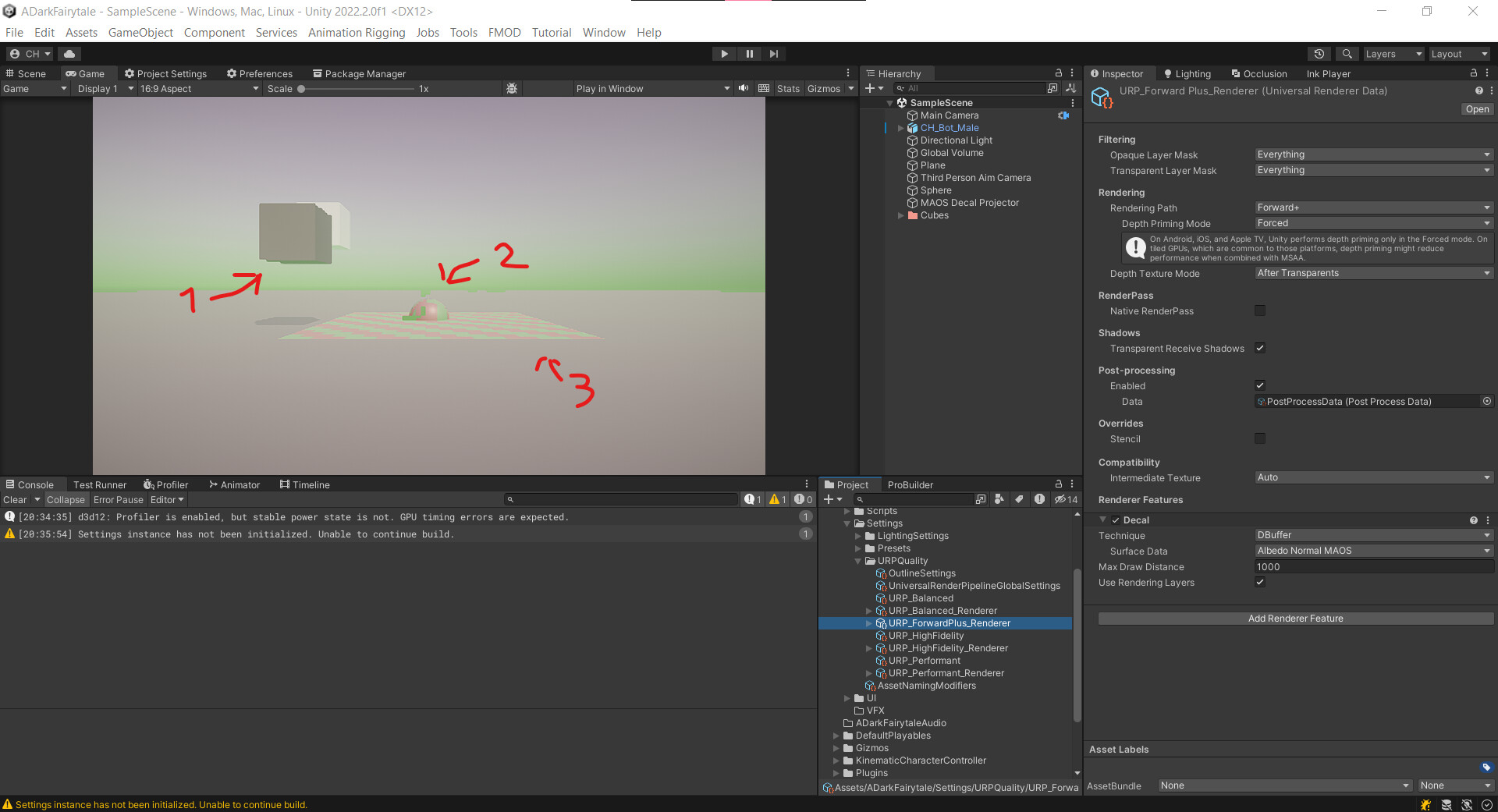
- Jagged edges
- Overdraw
- Color is off (the decal is brighter than shown here)
Add Screen Space Ambient Occlusion aaaand:

Mr. Game & Watch is back in town. (note: the white cube is transparent and as to my understanding not part of depth priming)
Turn Depth Priming Mode off, we get:

Scene looks great, jagged decal is in this case because of mipmaps
So there’s definitely something funky going on. Hope that this gets picked up: even though “not having depth priming mode” is perfectly fine, it lost me an hour of debugging so a comment in the documation at least would be appreciated.
That’s great to hear! Even though there’s no ETA yet, should we expect this closer to “will be backported this month” or “will be backported 3 months from now”? Regardless: kudos! Just asking so I can make plans for our current project.
Kudos again! At least that’s fixable by giving any orthographic cameras a Forward renderer.
1 Like
Does this mean you’ll have an ETA on XR release soon?
Pretty excited to try this out, could be a silver bullet for my project right now. I’m using Deferred, so am keen to try out Forward+.
Best Regards,
Will
1 Like
@CaseyHofland Yikes, that does not look good. Could I get you to submit a bug report on it? Then we’ll get it fixed
The backport PR is created and is being tested at the moment. Hard to give an estimate as it depends on a number of things at this point, and isn’t tied to a particular patch version yet.
No ETA yet, but the current status is that it’s being tested
1 Like
I’ve play a bit with forward+ few month ago and really like the result.
In a 100-ish point lights scene the performance is better than deffered.
2 Likes
Is this supposed to work on IOS? If so, its broken.
Critical bug here.
Hybrid per instance property if it connected somehow to color-based nodes in shader graph makes material pink.
Unity 2022.2.8f.
This makes it impossible to change material properties from ecs systems. Has anyone come across?
I’ll take a look and see how it looks on my end
This sounds more like an issue with Entities Graphics or Shader Graph than Forward+. Can you try making a thread in the Shader Graph forum?
1 Like
I already wrote to ECS Graphics. Since the same problem with the Universal Render Pipeline/ Complex Lit shader.
Bug - Forward+ is incompatible with URP/Complex lit shader in DOTS. - Unity Forum
I just want to write that I am excited to try out Forward+, but my project is VR. I’m hoping VR compatibility will at least land in the 2022 LTS.
I’ve found that Forward with Depth Priming works very well in my project, but it can’t handle the number of lights that I need, so I have to use Deferred. Deferred seems to perform worse in general than Forward, so I’m very excited for Forward+ in URP!
I’ve tried the Depth Texture with Deferred but it doesn’t seem to help in any way, whereas Depth Priming saves a good chunk of time.