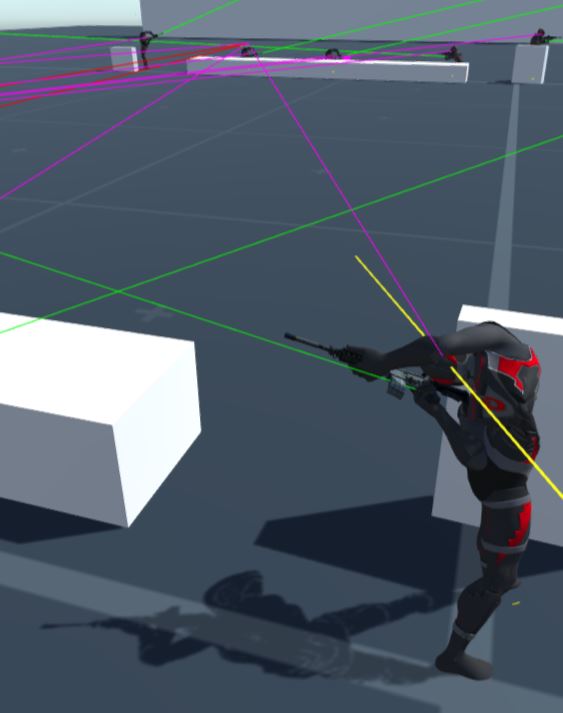
headache with child rotation

Hello guys, i have a serious problem with retargetting a bone on my character to make it facing a target.

My character is facing the Z axis, when i use transform.lookAt(enemy), No problem everything is fine.

Now, i juste want the upperbody to look at the target.

The big issue is that the body part is not facing the Z axis but the -Y axis like in the screen :

So i have tryed a bunch of things but nothing works.

void LateUpdate()
{
//doesn't work
Quaternion lookRotation = Quaternion.LookRotation(target - torso.transform.position);
          torso.transform.LookAt(lookRotation );

//nope too
Quaternion lookRotation = Quaternion.LookRotation (target - torso.transform.position);
   torso.transform.position *= lookRotation;
}

I hope some Quaternion expert would help me !

Thanks for reading

no one ?

Take a look at this. Try using Vector3.right (not sure which one off the top of my head, you might wanna also try Vector3.forward as well) as the second parameter.

I give it a try tomorow thanks for the suggestion

1 Like

Might be relevant. You’re using different bones but I’m not sure if the issue I had is the case for other bones… I submitted a reproducible bug, came back “working as intended” despite being literally mathematically incorrect on the native side.

To fix this rotation you’re going to need you use a couple Quaternion.FromToRotation() calls and multiply them together (multiplying Quaternions is how you add them together). And the Order you multiply the quaternions matters.

so what you need to do is find the rotations needed to get from a normal forward z, right x, and up y (z,x,y) to get the orientaion you have on that spine, forward -y, right z, up -x (-y,z,-x).

from (z,x,y) → (-y,z,-x). this can be achieved in two 90 degree rotations.
(z,x,y) → (z,y,-x): rotate along the z axis CW making y right and -x up
(z,y,-x) → (-y,z,-x): rotate along the x axis CCW making -y foward and z right

so there’s a simple pattern happening here (which is a known rule in Quaternion and Complex number math). when you rotate 90 degrees about an axis the other two terms swap places after one of those terms is multiplied by -1. when rotating clockwise the first term is multiplied by -1 before swapping. while rotating counter clockwise the second term is multiplied by -1 before swapping. This is why the order matters when you multiply quaternions together.

so the first rotation declares that my Up is now at my Right
the second rotation declares that my Right is now at my Back

thus the code used to get the same correction should be this

Quaternion correction;
void Awake()
{
    //unity will figure out the axis its rotating around (i.e transform.forward) and
    // the angle it rotates about (90 degrees) and save that rotation
    correction = Quaternion.FromToRotation(Vector3.Up,Vector3.Right);

    //we now find the other rotation and multiply them together (which in Quaternion terms is adding the rotations)
    correction = correction * Quaternion.FromToRotation(Vector3.Right,Vector3.Back);
}

now you can simply use the LookRotation like before but then multipliy in the correction rotation

Quaternion lookRotation = Quaternion.LookRotation(target - torso.transform.position) * correction;

If your curious behind the concept of Quarternions, Numberphile has a nice video that conveys Quaternions in a simple manner plus a little bit of its history

First of all happy new year everybody !

Tryed

                Vector3 target = soldat.targetSoldat.points.torso.transform.position;
                soldat.points.torso.transform.LookAt(target, Vector3.forward);

(and Vector.Right & Left) and do this weird thing :

2904133--213876--rotationBug.JPG
(the real target is the red line, the green line is the actual forward)

I tried too the solution of @JoshuaMcKenzie it’s do not look bad, but there is like a 90° problem, like in the screen :

2904133--213883--rotation2.JPG

So i have changed the axis, but the problem is still there with a 90° problem in another direction. I’m going to look at your video to see if i can understand more about quaternion

thanks for the link @LaneFox , i’m going to test with Animator.SetIKRotation and come back to you

So… i have found a partial response at my problem after a long debug…

resume :

First : i make my character face the target (i would only the body but i can’t find a solution)
Second : i made my body look on the Z axis the target

If someone could explain what i have done…

                Vector3 target = soldat.targetSoldat.points.head.transform.position;
                Transform completeCharacter = soldat.transform;
                Transform bodyPlayer = soldat.points.torso.transform;

                target.y = completeCharacter.position.y;
                completeCharacter.LookAt(target, soldat.transform.up);

                target = soldat.targetSoldat.points.head.transform.position;
                Vector3 difference = bodyPlayer.position - target ;
                var quaternionToTarget = Quaternion.LookRotation(difference, bodyPlayer.transform.up);

                quaternionToTarget.eulerAngles = new Vector3(0, 0, -quaternionToTarget.eulerAngles.x);
                bodyPlayer.localRotation = bodyPlayer.localRotation * quaternionToTarget;