I’ve been looking around, but everything I found that has an answer is out of date, and makes reference to the old layout of the animator window.
What I currently have, is 3 animation states (Idle, Run, Jump). The one I have a problem with is Run, as I have it set to play whenever I press “A” or “D”, and stop playing either when I am no longer pressing it, or if the player collides with a wall. But When I am running in one direction, the animation plays only ones, and then returns to the idle state.
So basically:
When I stand I’m in he idle state.
When I move the Run animation plays, and goes back to idle, even when I’m still moving.
Can anyone tell me how I would make the Run state/animation loop, instead of just playing once?
No, the transitions are fine. The issue is that once the running animation finishes playing, it just stays at the last frame while my character is moving, instead of looping the animation until the character stops. When I stop moving the character changes to the idle animation like it should.
I’ll double check my animation when I get home (writing this from a college computer), and make sure I have the loop time checked, like Dick-Sledge said.
Apologies everyone, it seems that I have gotten the whole problem wrong. When I wrote this thread, I was going off of my memory, about what the problem was. And now after going into my project, I saw that what I originally wrote, isn’t actually the problem.
However, the problem is what DavidGeoffroy originally assumed, which is that as soon as the Run animation finishes, it does back to the Idle animation. The reason I thought it was what I wrote, is because when the Idle animation finished, it froze, but I solved it now by checking “Loop Time”.
I have a parameter called “Run”, and it is set to true when the player clicks either “A” or “D” (left/right movement keys), and if the person isn’t pressing them (the person has let go of that key) the parameter is set back to false, switching the animation states from Run to Idle. It is also set to false if the player collides with anything to the left or to the right.
Despite all this, the animation still goes back to Idle, after the Run animation finishes.
P.S. I have also checked “Loop Time” for the Run animation.
I know I’m kind of late to the party, but I bumped into this case too, i.e. walk state not looping even when animation loop time was checked and there was no fulfilled condition to leave the state and go back to idle.
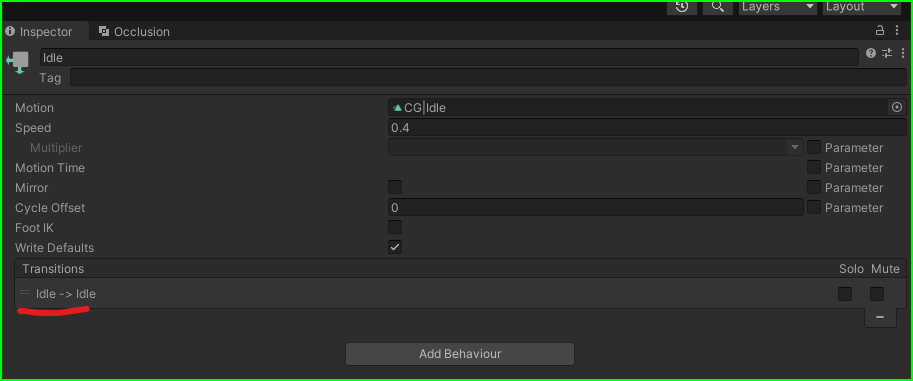
In my case making a transition from walk state back to itself did the trick, but it’s not really intuitive this way. If I have a state which has a one-way exit and with a condition that I do not fulfill by an action then the animation with loop time set to true should keep playing, but someone might come up with an argument why it’s not like that.
Edit: giving it a bit more thought, I think it basically comes down to how much control do we want over our states, so I understand if the current design of how it works is considered as optimal for others in various games. In my current project I’d be OK with a state looping automatically with looped animation unless I specifically tell it to switch states.
Can you please file a bug with your particular example?
Loop time is supposed to make your Animation loop. If it doesn’t, then either you have configured your State Machine incorrectly in a subtle way, or there is a bug. There are enough variables at play that it’s not possible to diagnose without looking at your whole state machine and potentially running it to figure out what’s wrong.