I have a shader that I wrote for character customization. This shader worked fine in Unity 4. And it works fine in Unity 5 with one exception… The shadows that are cast from it are wrong - light shines through in spots that follow certain parts of the texture/model:
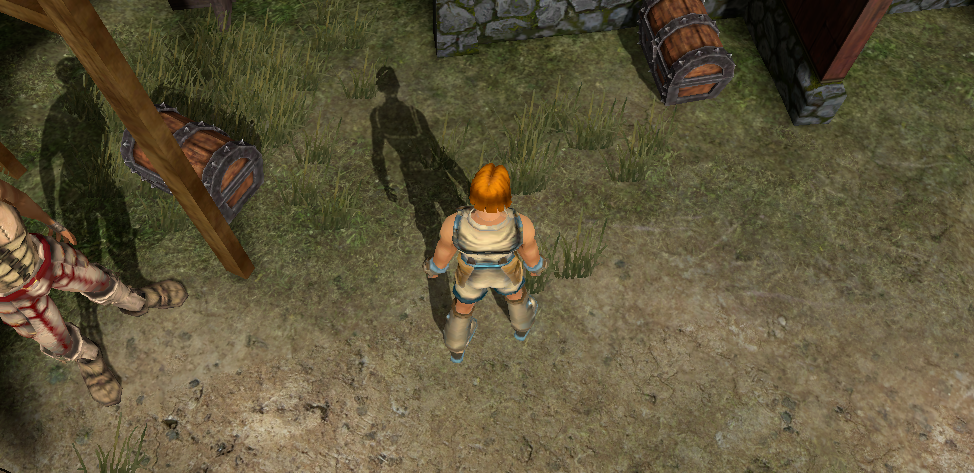
This is even worse with the shadow texture resolution is lower:
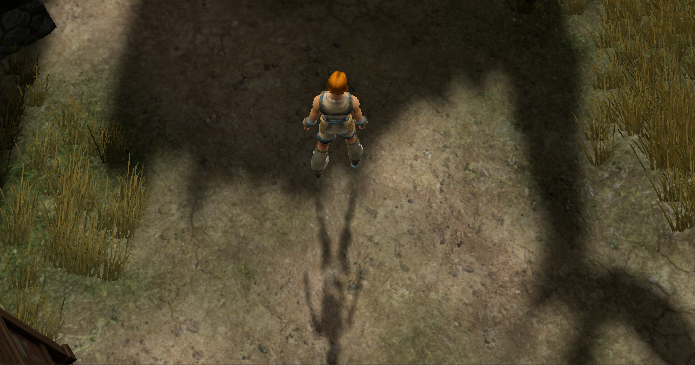
It doesn’t appear to have anything to do with the texture, as a cube with the standard shader and texture looks correct.
The shader is defined opaque, but I always thought the shadow would be cast with a dummy material anyway. Is that no longer the case?
The shader is defined like this:
Shader"Custom/CharShader" {
Properties {
_MainTex (“Texture”, 2D) = “white” {}
_MaskTex (“MaskTex (RGBA)”, 2D) = “black” {}
_EyeColor (“EyeColor”, Color) = (0.5,0.5,0.5,1)
_SkinColor (“SkinColor”, Color) = (0.5,0.5,0.5,1)
_HairColor (“HairColor”, Color) = (0.5,0.5,0.5,1)
_AccentColor(“AccentColor”, Color) = (0.5,0.5,0.5,1)
_LightFactor(“LightingFactor”,float) = 2.0
_ShadeMult (“ShadeMult”,float) = 0.5
_ShadeAdd (“ShadeAdd”,float ) = 0.5
_AccentStrength (“AccentStrength”,float) = 0.0
}
SubShader {
Tags { “RenderType” = “Opaque” }
… // shader itself deleted for brevity, but fallback is “diffuse”.
Any idea what could be causing this?
