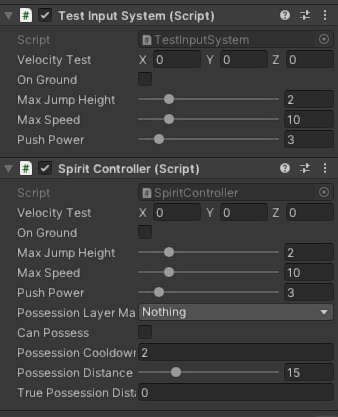
My project has 2 players, a human, and a spirit. They both have a custom PlayerController that has some similar behavior and then some extra different methods for each.
I thought about creating a parent class for PlayerController (Monobehaviour), and then 2 child classes one for each character.
Now when inheriting, the child components also shows the serialized fields in the inspector (check image).
I was wondering if there was a way to only show the fields in the inspector in the parent class when using inheritance.
Maybe I am thinking about this incorrectly and inheritance is a bit obsolete here since I could just create a separate script for each, but I would just be repeating code.
Any suggestions?
using System;
using System.Collections;
using UnityEngine;
using UnityEngine.InputSystem;

public class ParentController: MonoBehaviour
{

    public CharacterController Controller { get; private set; }
    protected PlayerInputAction InputAction { get; private set; }

    [SerializeField] public Camera PlayerCamera { get; set; }

    private float _ySpeed;
    private Vector2 _playerInput;

    [SerializeField] private Vector3 _velocityTest;
    [SerializeField] private bool _onGround;
    [SerializeField, Range(0f, 10f)] private float _maxJumpHeight = 2f;
    [SerializeField, Range(0f, 50f)] private float _maxSpeed = 10f;
    [SerializeField, Range(0f, 25f)] private float _pushPower = 3f;

    void Awake()
    {
        Controller = GetComponent<CharacterController>();
        InputAction = new PlayerInputAction();
        InputAction.Player.Enable();

        //X
        InputAction.Player.Jump.performed += Jump;
    }

    //Default values
    void Start()
    {
        _maxJumpHeight = 2f;
        _maxSpeed = 10f;
    }
    void Update()
    {
        //_onGround = Controller.isGrounded; // inspector debuggging
        calculateVelocity();
        applyGravity();

    }
    void OnControllerColliderHit(ControllerColliderHit hit)
    {
        MovePushableObject(hit.collider.attachedRigidbody, hit);
    }

    public void Jump(InputAction.CallbackContext context)
    {
        if (Controller.isGrounded)
            _ySpeed += Mathf.Sqrt(_maxJumpHeight * -2.0f * Physics.gravity.y);
    }

    private void applyGravity()
    {
        _ySpeed += Physics.gravity.y * Time.deltaTime;

        //if we set it to zero the Controller.isGrounded property does not work as intended so we must set it to a small negative value
        if (Controller.isGrounded)
        {
            _ySpeed = -0.01f;
        }
    }
    public void calculateVelocity()
    {
        //get player input
        //get PlayerCameras forward and right vectors
        //multiply input X vector by PlayerCamera right vector
        //multiply input Z vector by PlayerCamera forward vector
        //add these two vectors

        _playerInput = InputAction.Player.Movement.ReadValue<Vector2>();

        Vector3 forward = PlayerCamera.transform.forward;
        Vector3 right = PlayerCamera.transform.right;
        forward.y = 0;
        right.y = 0;
        forward = forward.normalized;
        right = right.normalized;

        Vector3 forwardRelativeVerticalInput = forward * _playerInput.y;
        Vector3 rightRelativeVerticalInput = right * _playerInput.x;

        Vector3 PlayerCameraRelativeMovement = forwardRelativeVerticalInput + rightRelativeVerticalInput;

        float magnitudeTest = Mathf.Clamp01(PlayerCameraRelativeMovement.magnitude) * _maxSpeed;

        PlayerCameraRelativeMovement.Normalize();
        _velocityTest = PlayerCameraRelativeMovement * magnitudeTest;
        _velocityTest.y = _ySpeed;
        _velocityTest = AdjustvelocityToSlope(_velocityTest);

        Controller.Move(_velocityTest * Time.deltaTime);
    }

    private Vector3 AdjustvelocityToSlope(Vector3 velocity)
    {
        Debug.DrawRay(transform.position, Vector3.down);

        var ray = new Ray(transform.position, Vector3.down);

        if (Physics.Raycast(ray, out RaycastHit hitInfo, 2f))
        {
            var rotation = Quaternion.FromToRotation(Vector3.up, hitInfo.normal);
            var adjustedvelocity = rotation * velocity;

            //only adjust the _velocity if were moving down a slope which means out Y component of velocity must be negative, otherwise dont change velocity
            if (adjustedvelocity.y < 0)
            {
                return adjustedvelocity;
            }
        }
        return velocity;
    }

    //Since we use characterControllers we need to code manually rigidbodies being pushed by Rory
    private void MovePushableObject(Rigidbody body, ControllerColliderHit hit)
    {
        // no rigidbody nothing happens
        if (body == null || body.isKinematic)
        {
            return;
        }

        Vector3 pushDir = new Vector3(hit.moveDirection.x, 0, hit.moveDirection.z);

        //apply the push

        body.AddForce(pushDir * _pushPower, ForceMode.Force);
    }


    protected IEnumerator Cooldown(float cooldownTime, Action<bool> callback)
    {
        callback(false);
        yield return new WaitForSeconds(cooldownTime);
        callback(true);
    }


}
Child Class:
using System;
using System.Collections;
using System.Collections.Generic;
using UnityEngine;
using UnityEngine.InputSystem;

public class SpiritController : PlayerController
{
    [SerializeField] private LayerMask _possessionLayerMask;
    [SerializeField] private bool _canPossess;
    [SerializeField] private float _possessionCooldown = 2f;
    [SerializeField, Range(10f, 30f)] private float _possessionDistanceFromCamera = 15f;
    [SerializeField] private float _truePossessionDistanceFromPlayer; //value not starting on camera but starting from player

    public event Action<possessionEventArgs> possessionSucessfull;
    public Action possessionFailed;

    // Start is called before the first frame update
    void Awake()
    {
        //R1
        InputAction.Player.Possess.performed += tryPossession;
    }

    void Start()
    {
        _canPossess = true;
        _possessionDistanceFromCamera = 15f;
    }

    // Update is called once per frame
    void Update()
    {
        _truePossessionDistanceFromPlayer = _possessionDistanceFromCamera - Vector3.Distance(PlayerCamera.transform.position, transform.position) - Controller.radius;
    }
    //When clicking R1
    //casts an array from the camera so that the direction is correctly aligned with the crosshair
    //if collides with a possessable enemy invokes event, that sends as an argument the gameObject that was hit
    //if does not collide send an event to UI to spawn text on screen
    private void tryPossession(InputAction.CallbackContext context)
    {
        if (_canPossess)
        {
            StartCoroutine(Cooldown(_possessionCooldown, (i) =>
            {
                _canPossess = i;
            }));

            Ray ray = new(PlayerCamera.transform.position, PlayerCamera.transform.forward * _possessionDistanceFromCamera);

            if (Physics.Raycast(ray, out RaycastHit info, _possessionDistanceFromCamera, _possessionLayerMask))
            {
                possessionSucessfull?.Invoke(new possessionEventArgs(info.collider.gameObject));
            }
            else
            {
                possessionFailed?.Invoke();
            }
        }
    }
    //Allows us too see the ray for possession
    private void OnDrawGizmos()
    {
        Gizmos.color = Color.red;
        Gizmos.DrawRay(PlayerCamera.transform.position, PlayerCamera.transform.forward * _possessionDistanceFromCamera);
    }
}