Introducing the uScript Visual Scripting Tool for Unity!

UPDATE! - Just wanted to point to our official Asset Store thread here. All future update posts will all be done in that thread.

Hello everyone,

We would like to announce our upcoming visual programming tool for Unity 3. It is called the uScript Visual Scripting Tool and was developed by us at Detox Studios. We are a group of game industry veterans who have really taken to Unity and ended up creating something very cool and powerful.

uScript has been under development for the past 8 months, but we are now at a point that we can share it with you all. We hope to have a free open beta in the near future for you all to use and provide us feedback.

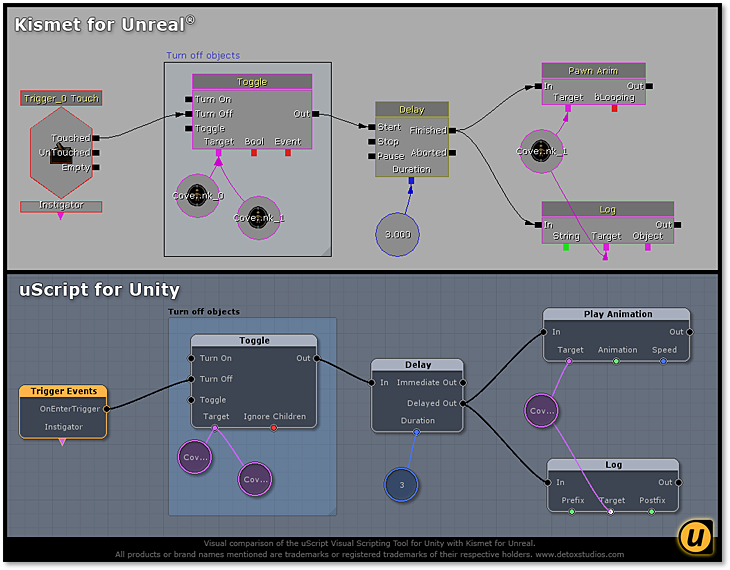
uScript’s main goal is in being easy to use and understand at a glance so that you can focus on making great games. It has been designed from the ground up to feel very similar to Kismet for Unreal (UDK), but goes far beyond what Kismet can do. For more information on uScript, please watch our introduction video on YouTube and visit our website.
Feature Overview
The uScript Visual Scripting Tool allows non-technical developers to dive right into scripting complicated setups without needing to write a single line of code. uScript can be used for anything from rapid prototyping gameplay ideas to final complicated setups ready to ship in your final product.

Here is a list of highlights for just some of the many features and benefits uScript provides:

  • Simple to Setup – Just install the uScript Unity Package into your project, launch the uScript editor, and start creating!
  • Be Creative – Focus on being creative. Empower yourself or entire teams of designers and artists to experiment and directly bring their visions to life!
  • User Friendly – Easy to read visual scripting makes reading your visual script logic simple for everyone. Plenty of help through documentation, video tutorials, examples, full undo support, node search and filtering, support forums and more to help you on your way!
  • Integrated - Integrates with your current Unity projects and C# scripts easily through reflection! Will work on all supported Unity platforms. Same great tool for both Unity Indie Unity Pro.
  • Powerful – Harness the full power of Unity and C# programming without ever having to look at, or understand, a single line of programming code!
  • Extensible – Create your own nodes to expand uScript in anyway you can imagine!
  • Community – Take part in a community of uScript users and share the benefits of sharing uScript files, download new nodes (or share your own), change the look through custom skins, extended documentation, tutorials, and more!
  • Secret Stuff – This is just a glimpse at some of the things the uScript Visual Scripting Tool can do. Many more features will be revealed soon…

Please watch this forum thread for updated information and also feel free to ask any questions you may have about uScript. You can also follow us on Twitter or join our Facebook page to stay up to date on uScript news as it unfolds.

– Your friends at Detox Studios

Follow these links for updated information posted in this forum thread:

04-07-2011 - We asked the community here what your wish list would be for uScript support of other Unity tools and scripts.

04-08-2011 - We answered some initial uScript questions.

04-10-2011 - We put up part 1 of a new uScript video showing it in action.

04-12-2011 - Added videos to screencast for thos who do not have YouTube access: uScript Screencast Link

04-13-2011 - Added a post in answer to a question that shows a glimpse of using SubSequences (nested uScripts) and also working with playMaker.

04-14-2011 - More community questions answered.

04-17-2011 - We just released part 2 of the uScript Fast Gameplay Setup video!

04-18-2011 - We just announced a new uScript feature - C# output!

04-19-2011 - We just posted an image to show how uScript can visualize a Unity script in your scene so you can use it in uScript.

04-24-2011 - We just put up the first video in a new uScript series called Feature Quick Look. This video shows a sneak peak at creating a custom node visually from within uScript. Go check it out!

04-28-2011 - Detox Studios is looking for a few good beta testers to help us finish up the closed beta phase on uScript. Click here to learn more!

05-07-2011 - We just put up the second video in the Feature Quick Look series for uScript! This one shows how Named Variables work.

06-18-2011 - The free open beta for uScript will start on July 1st!

06-28-2011 - We have opened the uScript Community Website forums (uScript.net)! Click here to learn more.

07-01-2011 - As promised, we have release the free open beta for uScript! Click here to learn more.

07-09-2011 - uScript Beta 4 has been released. Click here to learn more.

07-17-2011 - Detox Studios announces uScript pricing.

07-18-2011 - uScript Beta 6 has been released. Click here to learn more.

08-19-2011 - uScript Beta 10 has been released. Click here for details on the build and where to download it.

01-11-2012 - uScript Retail Beta 12 has been released. Now with visual debugging! Click here for details on the build and where to download it.

Sweet sweet :slight_smile:
Looking forward where its going.

Interesting time and I guess there will be fierce competition with this, Antares Universe and PlayMaker in the ring

awesome!

Unfortunatley (For Me) I just purchased Antares Universe, but I’m not against picking this up if it lives up the expectations.

Sweet.
I’m very satisfied by Antares and PlayMaker… But I’ll keep my eyes on this.
UDK lovers will like this for sure.

Sorry… Double post.

Thanks for the good wishes guys!

Dreamora: Right you are! We feel uScript will stand on its own. We made it very user friendly for non-technical people to use and understand and also took a fundamentally different approach under the hood as well (more on that later!). Besides, competition is always good for the the end user!

wadoman: Be sure to keep an eye out for the open beta so you can give uScript a try and tell us what you think.

WolfoX: As far as the UDK users go, that was definitely one of our goals. I used Kismet on a couple of games and it was a great iterative tool for the game designers to use. We have definitely taken that approach and ran with it!

Will this support iOS and Android?

Wow, you really did effectively built Kismet!

Any idea on when you’ll be done? Beta? Pricing? Performance impact? IOS issues?

Subscribed…this is so awesome…

It will. uScript will support all Unity supported platforms and will require no more overhead or performance loss than if you had just written C# code yourself to make your product. We’ll be expanding on this aspect and why it makes us different a bit later.

Thanks.

We will be making future announcements regarding those details. I will say we will be priced competitively. Please see my above reply to artzfx regarding performance.

I got a couple PMs asking about a video, so I thought I would put the video link from above here (sorry for you guys that missed it buried in the text!)

Note: This is the same video as in the original announcement post.

Very Nice!

Looks like the kind of thing that Vizio/Universe was supposed to be, before it got so complicated it forgot it place in the world and became too difficult and confusing for the very people who would have used it in the first place.

Looks like this one could be the one that compliments playMaker nicely too.

WOW ! Very interesting…
I like the way you drag and drop an item on the uScript panel to work with…

Hope you give hte link to the beta version here too…

6R

Right, as this is in development, I’ve going throw an idea out into the world. It would be awesome for the end-user to have uScripts “sync” with Actions in the Playmaker Actions directory. This would really tightly integrate the two products (a little bit how products from other companies can load each other’s things).

Having this would not be my reason for buying this (as I’d want it for the Visual Editing more than anything) but NOT having this would be my reason for ignoring it (i.e. Playmaker comes first for our team, we are willing to sacrifice visual coding for the sake of it).

Well done! I agree with Frank Oz, it seems like you kept it “simple” so even artist can pick it up and create stuff within a couple of minutes, while Universe and Playmaker require a learning curve that is just a bit higher. This could make all the difference.

I worked with Kismet for over a year, I know it inside out, and realised that in some ( definitely not all!) the visual display of the mechanics provides a better and faster workflow and typing it out in script.

I personally am capable of working with Playmaker and Universe, but if the price will be about the same, and the results that can be gained are the same… Than I will take uScript into consideration.

When looking at the UDK, even though everything can be done within Unreal script. Smaller things get setup in Kismet all the time in my experience, a visual scripting tool for the smaller gameplay pieces or even animations is just very valuable. And if I am able to get that tool back into unity the same way UDK had to offer it, I will be happy :smile:

I will be following this :slight_smile: Good luck with the development!

Thanks for the kind words guys. I’ve been a big fan of empowering designers and artists to be able to directly execute their vision with tools like uScript ever since I used my first visual scripting tool as a game designer years ago back on System Shock 2.

As I’ve mentioned before, ease of use was a key goal with uScript’s architecture-- but definitely not at the expense of power and flexibility. It has been a massive effort on our part to walk that line.

I think the “Our Philosophy” section on our website’s about page sums it up best!

(btw, this is my personal forum account since I mentioned my own history and not really speaking as Detox. Hello!)

If you make it work well with playMaker and not try to replace it, you’ll make a lot of people very happy, and get quite a few extra sales I imagine, since playMaker is pretty popular around here as an FSM alone. So a nice general visual scripting system like yours which could compliment what playMaker already offers, would certainly find a place in my collection for sure!

this is what i have been looking for. i’m a new user and i’m looking forward to it. g’d job! :wink:

I don’t understand why someone would want a product like this one or Antares Universe not to integrate what Playmaker is doing ?
Ok if you already own Playmaker, but if a buy a product i want it to offer me the most features as possible so if you can do it go ahead.