Hi, and Happy New Year to you all!
Well I had a nice break over the holiday season, and during that time I finally managed to create my graphical toolbar for Unity.
It is something I have had on my to do list ever since I started creating my RapidUnity tools, and with all my tools, it is something I wanted to help speed up my workflow in Unity.
How many times have you gone to add a cube to a scene, selected the GameObject menu, selected Create Other, and then the sub-menu that appears, suddenly disappears again because you slipped slightly with the mouse and moved off the menu.
Well those days are over!
Now you can have a graphical toolbar, allowing you to carry out the most frequent of actions within the Unity Editor.

Now add primitive GameObjects, or Empty GameObjects at the click of a button, add a Rigidbody, or collider, may be a hinge joint.
Drop in a light, or camera, add a particle system, or wind zone, they are all available on the RapidUnity Graphical Toolbar.
The graphical images themselves should help you know what each button does, however if you simply hover the mouse over a button a tooltip is displayed telling you what the button does! Cool eh!
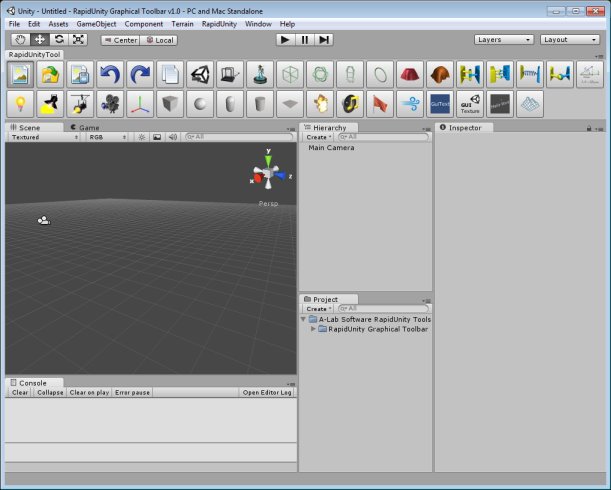
Also included are modified layouts based on the Unity defaults, except now with the RapidUnity Graphical Toolbar running along the top of the interface.
For more information on this new addition to my RapidUnity toolset, and my other tools, checkout http://www.rapidunity.com
Also, look out for my Motorcycle Add-on to my RapidUnity Vehicle Editor coming soon, take a look at forum thread for more info… http://forum.unity3d.com/threads/52646-AVAILABLE-NOW!!-RapidUnity-Vehicle-Editor-Resource-Pack-v1.5/page4
Try the two-wheel mockup webplayer here Unity Web Player | WebPlayer

 ).What are your plans for this if any,i would like to be able change the size of the buttons.(great service by the way)


