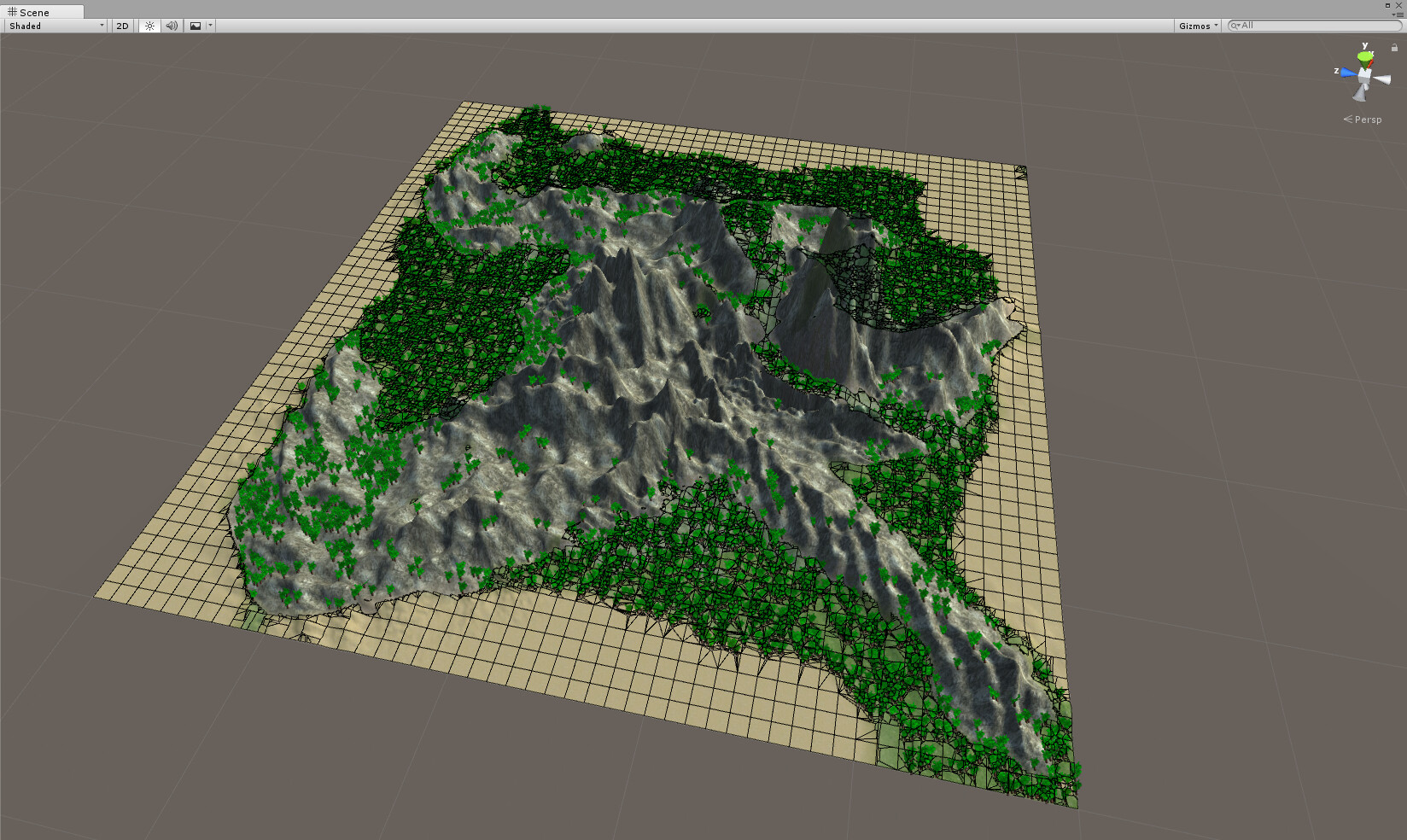
Hello! For some time im working on my own implementation of navigation mesh.
I started it cause no other navmesh do what i want. And kinda cause i want to know how it work and how to write code. Now i have somewhat working prototype and wanna to share it, get some info, advices, etc.
So. My goal was to make global chunk grid like Unity does but retain ability to disconnect chunks and redo it if needed. All chunks must be computed in threads as much as it can so “redo” operation can be done while playing. Also i wanted to have different areas and some sort of jump connections.
And it kinda doesn’t matter how much memory used while computing each chunk cause it imited by amount of processed chunks at same time. So i make temporary information storing kinda bad but rich as possible and it’s became easy to add features.
Different passability. Right now areas are optionaly divided to “walking” and “crouching” but it’s not hard to add somthing like сlimbing or crawling or whatever.
Different areas. It speaks for itself. Areas have different cost and it’s cool stuff. I have global dictionary whith areas and gameobjects can generate own areas so potentialy have reference to navmesh through GO component to pass info back and forth. Also i add ability to associate areas dictionary to splat map on terrain so it can be just painted this way and it knida works very good.
Multiple layers of navmesh. Navmesh can have multiple “floors” stack on top of each others.
Jumping spots. Right now just up and down and it kinda suck but it works. I added concept of different type of “area”. where one voxel can “capture” voxels around it and this type of areas can be passed to outline edges of navmesh if it have “captured” voxels in proximity. So i have lots of “jumping spots” and work around that. Right now jumping spots try to generate landing spots near them. Later on will expand this.
Grid. It’s kinda userful to have set of reachable points in proximity so these points can be tested to line of sight or distance to enemy or whatever.
Covers. If just cover needed navmesh can generate cover planes in proximity to obstacles. It’s actualy just reused Marching Squares and Ramer Douglas Peucker algorithm with different information. Right now there is low and high covers.
Redo chunks. chunks can be disconnected and generated new one so navmesh can be partialy updated.
Mupliple agents types support. Agent properties is key to graph dictionary inside chunks. So there can be multiple navmeshes for different agents. Also navmesh are can have different resolution.
NavMesh Raycast**.** You can check visibility on navmesh for changing Area or just hole in graph.
Local Avoidance. Agents move around and avoid each others. Cool stuff.
Questions:
Also is there some good way to get z-buffer as float array from camera? Right now i can only rasterize triangles of mesh wich plased on collider space. Much like Rain does. But it will be cool if i can use z-buffer from camera to do rasterization part.
Finaly i can start working again. Last past days i spend on optimisation and bugfixing. Not much optimisation though in term of perfomance gain.
In prototype every voxel was object, now it’s just lots of 2d arrays with some data so a lot less GC hiccups. Redone lots of code, also change how height stored. Prevoiusly it was int * voxel size, now it is just float. Expecting to release navmesh before end of this month.
Planing to spend time to up readability of code.
sorry i a bit underestamate time to finish navmesh. I did not have time to finish it and finaly when i have it i caught a cold. But i done lots of work to make it more robust. Right now working on serialization.
Thank you. Yes it is. Actualy it is combination of root motion and some rails. Where red-blue-green lines there is stop sequence and it done by rails cause root motion are not good for precise movement and i want to tell where exactly i need to stop. Rest of movement actually fairly simple. I made array of values wich changes over time with linear speed and this values are responsible for XZ movement speed, rotation on movement, rotation animation while standing and aiming IK speed (yes i limit that). Actialy biggest challange was to sync AI ticks and animation timing so AI know when it can move or when it pick up somthing and movement are blocked or when some animation already active and it cant do other animation. I probably create thread to show this a bit later.
yup. pretty much it was main goal from the start.
in main thread are:
chunk creation. it needed to tell where to find colliders, but it can be skipped if you tell it by creating chunks from start.
creation of “template” to create navmesh. info gathering stuff. colliders, position, rotation, key components, tags, etc. fairly quick. a bit slower for terrain but i have idea how to improve this.
connection of finished graph to whole navmesh and some last operations like jump spots checking.
Finaly. Today i submitter to asset store currents state of navmesh. “Expecting to release navmesh before end of this month.” was WAY too optimistic. When i start implement sort of serialization i find out lots of odd things. In the end i scrap whole set of classes that store connection data and spend lots of time fixing it. Then when i start testing on large terrain using different resolution settings i find out another set of bugs. This time in triangulator class. Then i also scrap it. Redone lots of things. Think it was worth it.
Also add another method to gather voxel height on terrain and fix lots of things related to terrain. Now things really can be threded.
Also find out Unity have a strange method to deal with terrain from physics perspective. Before this i collect colliders using Physics.SphereCast and store collieds to hashset so only one collider allowed from all casts. Now unity have BoxCast. I thought “Yay! they finaly add this!” and use it and it was fine. Until i check it in playmode. Find out in editor mode it return only one collider as expected. But in playmode it also return Terrain collider for every tree it hit.
I made small update. now PathFinder is 0.33 version. I have very small feedback so i dont really know what people want. Currently work on some optimisation.
Navmesh Raycasting
There is now simple navmesh Raycasting. You can call it using PathFinder.Raycast() function. It’s a static function and there is no stuff in thread.
It return RaycastHitNavMesh struct where contain point, and some flags about “if we fing navmesh below at all” and if it reach max iterations while searching. Intend to use it to test navmesh “if there is space to dodge” but will probably have lots of cool uses. A bit ugly inside.
Agent now have threadsafe recieve info delegates:
It now have “AgentDelegateMode” and it can be threadsafe or not threadsafe. All current functions related to this now have this parameter.
Default are AgentDelegateMode.NotThreadSafe. So nothing will change if you dont want.
Threadsafe called in Update so it’s can be a bit delayed (you can somewhat fix delay by changins scrip execution order)
BattleGridPoint now contains field “passability” where it can be Crouchable or Walkable.
In case you want to take passability into account.
Debugger are now Debuger_K
cause anyway all people write their own debuger and this word is too common. Namespaces dont help much to fix that.
You can now disable NavMesh generation (lol)
If you just need covers or battle grid then here you go. Save up some processor time cause lots of code skipped in that case.
“Debug Paths” checkbox in Debuger menu to enable or disable debuging of paths.
Cause there was not option to stop debuging it. And we end up with lots of stuff being debuged even if you dont see it
PathFinderAgent.SetGoalGetBattleGrid now have (params Vector3[ ] positions) to request grid from multiple points at same time
Will request it’s own position if you left it empty
*Bunch of internal changes. More important ones:
Point on graph search now alot faster.
New class dedicated to combine cells into graph. Cause lots of stuff in graph have no use after it was generated. This stuff moved into this class.
There is now no “Edge” is cells. It was replaced by struct witch represent two points.
There is no “Nodes” in cells and graphs.
Internaly jump points up and down stored in one class.
Whats Fixed:
Battle grid now connect more properly on border if there multiple levels
NodeCoverPoint.normalV3 now Vector3 (was Vector2)
Covers wount generate on top of objects if there another cover nearby
NodeCoverPoint now reference Cover it belongs as intended and dont throw exeptions
Serialized data will no longer loaded twice
Whats Broken:
You definatly can’t load old serialized data with new version. So clean it and redo navmesh.
Brobably broke lot’s of stuff cause internal changes was a bit big. And probably broke some parts of serialization.
hi nice work,
maybe jump through platform and multi level pathfinding ( i mean like generating patfinding in a building with more than one floor) will be great.
I’ll try it later
(my english is bad also :p)
EDIT: Just forgot some idea, crowd control (like alternate route when someone blocking my main route) usable for ai in a crowd area
I have no clue what you mean! One solid object cannot go through another!
It’s already are. I’ts split all into multiple 2d voxel maps but they still connected to each others so it’s work just fine.
I planing to do this also but this will be tough. Think there is 2 ways to do this. Like A* does (or i think it does) split all into grid and check path also on grid. Or hard way: implement dynamic obstacles, make triangulation really fast, then just carve area around agent so only this agent can use this area and no one else. First one i dont really like but easy to implement and second will be painful.
Currently i spend some time with shaders and somewhat understand it now. Planing to reimplement rasterization on Compute Shaders to accelerate it a bit. Then probably try to reimplement triangulation on Compute Shaders and then will try to implement dynamic obstacles and suggested idea. Or as usual implement both easy and hard way and see which better.
Scene from showcase are already in project and you can see how it’s implemented. I will put some code from it to default agent and add function like “get some points, find best point and get path there” to simplify it even further. With some cases like sampling points are only near covers or sample just cover nodes.
If “Unity AI strafing shooting and move to cover” there is nothing particulay intresting cause there is mostly same implementation of finding cover point.
Also couple people ask me to show implementation of strafing and i actualy did https://www.patreon.com/posts/example-of-8813692
Yes, its “Unity AI strafing shooting and move to cover” video. In the next update, could you make a example scene that have a agent like agent in this video ?
Spend some time with compute shaders and shaders overall. Get some cool experience.
Now debug are based on ComputeBuffer and fast. Rewrite rasterization on compute shaders and now it also can be somewhat fast but there is some place to improve. (how people even do it? there is like none debug tools and documentation is some kind of sacred knowledge) It now do this for lots of pixels and lots of triangles at same time. In like 0.5ms.
A bit burned out. Weather suck, feel sick. Found some strange bugs that i cant reproduce.
Actualy it’s just two things i given glued together. But okay i spend some time to make example as seaprate project and will put link in this thread.
Oh. Okay. Probably it cant properly find nearest point to navmesh in some cases when multiple levels. I spend time to test it more and will fix it.
Now i also add Compute Shader version of terrain rasterization and also done some optimisations in that part.
Probably should now consider to retrive data from GPU in better way cause now bottleneck is moving data from GPU.
Now when i start using GPU more and start also profile it. I start getting something i did not expect.
Any idea why it is?
Oh silly me. I totaly forgot to test areas by distance at all and just grab first find. Cause i test it on 2D only. That embarrassing.
You can fix this if you go to PathFinder/Generation/Graph/Graph.cs find function GetClosestCell(Vector3 pos, out Cell cell, out bool outsideCell, out Vector3 closestPoint) and change it to that:
Code
        public void GetClosestCell(Vector3 pos, out Cell cell, out bool outsideCell, out Vector3 closestPoint) {
            cell = null;
            closestPoint = Vector3.zero;
            outsideCell = true;

            //if true then no result
            if (empty || _map == null)
                return;

            float s = PathFinder.gridSize / PathFinder.cellGridSize;
            List<Cell> mapChunk = _map
                [Mathf.Clamp((int)((pos.x - chunk.realX) / s), 0, PathFinder.cellGridSize - 1)]
                [Mathf.Clamp((int)((pos.z - chunk.realZ) / s), 0, PathFinder.cellGridSize - 1)];

            float sqrDist = float.MaxValue;

            //search cell in chunk are inside chunk
            if (mapChunk.Count > 0) {
                for (int i = 0; i < mapChunk.Count; i++) {
                    Vector3 curClosest;
                    if (mapChunk[i].GetPointInsideCell(pos, out curClosest)) {
                        float curSqrDist = SomeMath.SqrDistance(pos, curClosest);
                        if (curSqrDist < sqrDist) {
                            sqrDist = curSqrDist;
                            cell = mapChunk[i];
                            outsideCell = false;
                            closestPoint = curClosest;
                        }
                    }
                }
            }

            //if there was result then here it is
            if(cell != null)
                return;

            //if there is no result then search it by checking all contours that represent hole in graph
            foreach (var pair in _contourLib) {
                Vector3 curNearest = SomeMath.NearestPointOnSegment(pair.Key.a, pair.Key.b, pos);
                float curSqrDist = SomeMath.SqrDistance(curNearest, pos);

                if(curSqrDist < sqrDist) {
                    sqrDist = curSqrDist;
                    cell = pair.Value;
                    closestPoint = curNearest;
                }
            }
        }
ComputeShader rasterization
You can now get voxels using ComputeShaders. This GPU magic are fast and have some pros and cons.
Pros:
It’s fast.
Cons:
It’s can hit perfomance if you do it in big chunks.
Options to control it are in Menu. Just below threads options. It’s separated for terrain and for other colliders. Also in that menu presented old options. “Precise” renamed to “UnityWay” and “Fast” renamed to “CPU”. Also there is tooltips for this options.
Minor optimisations here and there. Terrain CPU rasterization is now much faster.
Overal around 20% speed increase in navmesh generation
Rewrited big chunk of Debuger.
Now it uses shaders and StructuredBuffer to debug point, lines and meshes. It’s much-much faster.
Pros:
Speed.
Now you can see debuged stuff in scene.
Cons:
No more color picker.
Cant be updated to often.
You see debug in scene and game window and can’t separate it. (but still can turn it off)
Require DX10 (i think)
Also since when new data debuged it need to recreate StructuredBuffers. There is now button to “Update” debuged things manualy and checkbox to auto update when new data coming in. If you debug voxels you might want to turn off auto update cause it’s moving ALL voxels to GPU every time it get voxels.
There is now checkboxes to enable and disable some info groups like “Cells” or “Voxels”
Agent Properties now have button to set target chunk resolution to make sure it at least have sellected amount of voxels per agent radius. Recomend 2-3.
Debuging path are now also debug end point and cell
To make sure nearest point on navmesh are what you expect it to be.
Whats Fixed:
Finding nearest point to mesh now return correct position on multiple layers of navmesh
Saving data no longer cause exeption if there was no pathfinder helper yet in scene
Loading non existed data no longer cause exeption
You no longer need to rebuild project after you start using pathfinder in new scene
VolumeContainer will no longer get error related to growt of obstacles when crouch enabled
Whats Broken:
Probably triangulation was a bit broken. So can be new awesome errors in navmesh generation
Nope. Well at least with current state of this project.
If talk about navigation overall then yes it’s possible to do 3D navigation and it’s have lots of approaches. For 3d space fighter i recomend just avoid things at some safe distance. Recomend to read about Reciprocal Velocity Obstacles (RVO). It can be applied to 3D.
hi I have started using your pathfinding solution today so I downloaded it and went to the test scene you included and when the play mode is first the agent doesn’t move 2nd I get this error: there was 100 iterations and still no graph. are you trying to find path in middle of nowhere? if u r so smart than increase up number


 Is fine too.