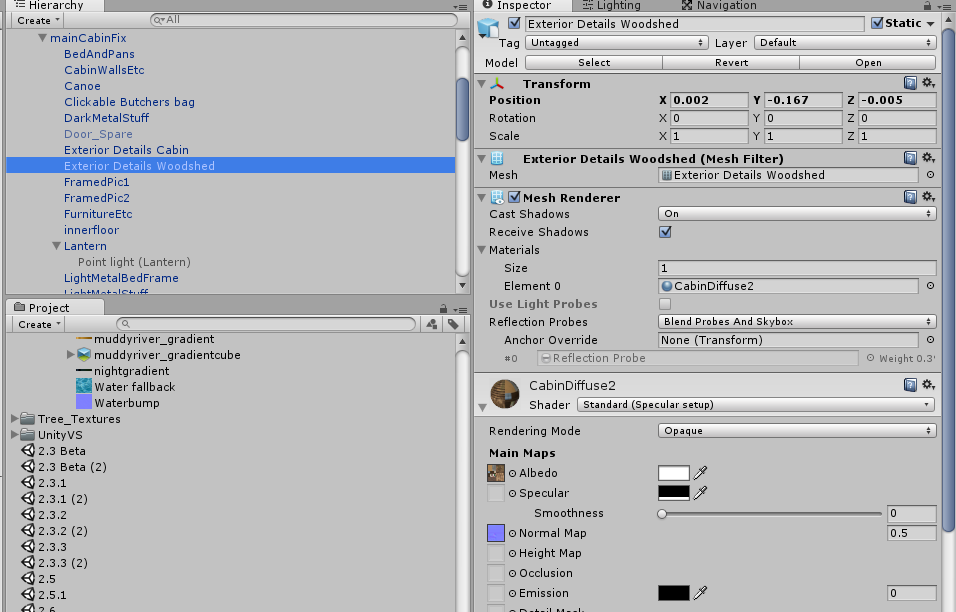
Hi, I’m trying to figure out why one renderer is effected by light probes (though I can’t actually edit that) and the mesh setup the same right next to it is unaffected by light probes…(Also uneditible)
See mesh renderer, greyed out use light probes.
Any suggestions? Is there a logical explanation for one to be one way and the other to be different?
Honestly I can’t tell what does what in Unity lighting due to most of it being broken in-engine.
Changing lighting didn’t seem to effect it because I have baked then turned off realtime lighting in preference for Mixed.
Trial and error has taught me you have to bake with lights set to realtime, and then turn them off (Otherwise you have baked and realtime lighting). Sound right to you?
I read widely that Mixed Mode is presently broken but Unity’s such a mess I can’t really tell whats expected behaviour and whats broken these days. I remastered via unityPackage into a fresh project and the lighting was completely different (and awful).
I was just curious as to why there was a difference, and having them greyed out because of baking makes sense.
It enables me to bake in lighting, and then switch them off because the lightings baked.
Precomputed realtime GI never works, It hangs after a day or two, and I guess the “Baked GI” happens when I have the lights set to realtime then bake that shit?
I can’t really tell if I have GI. My job has gone from “Make this scene look marvellous” to “Try and get the scene not-looking-like-rubbish”.
My dynamic objects use light-probes which as far as I can tell are another sort of light.
Um I don’t know. If I use Baked or Mixed, I don’t get any shadows after baking.
I can bake in realtime, switch them off and the shadows remain so I guess they are lightmaps.
GI is something that might be nice- maybe I’m getting it in realtime, but it just seems like a catch-phrase to sell Unity when in practice its a mental thing to try and get working. I honestly don’t know if its working or not. My primary objective is to get something-anything out of Unity lighting.
Actually in my test scene I can’t get lightmaps under any combination of settings.
EDIT But now my directional light only works if set to mixed. If I disable the light component the lights/shadows go away. So every step of the way is dodgy behaviour.
yea I have allowed 13 gb, my large scene takes up 8.24 GB, I still have 7GB disc space. A small test scene shouldn’t take a lot of space…
Upon loading your scene I see shadows, light set to bake, and no lightmaps in lighting panel (to be expected I suppose because the cache is local)
I hit bake and it did work, with your light in baked mode, but the shadows were about half as dark as yours. (I’m on PC)
So different behaviour to my project.(I go zero lightmaps under this configuration)
If I build with light set to realtime, I get 0 lightmaps, which is also the opposite to what I get with my project.
If I build with light set to mixed, I also get shadows, which again is the opposite to what happens in my project.
So the only thing that I see is consistent, is inconsistency.
That’s of no consequence. The setting remains what it was before you set the object to static and baked the scene. But since it’s greyed out, it means nothing.