I wrote a simple tool to grab the references to two rooms that are offset from the gameObjects transform and using an Physics.OverlapBox which can be executed in the editor by clicking the “Detect” button:

This “works” at first glance:
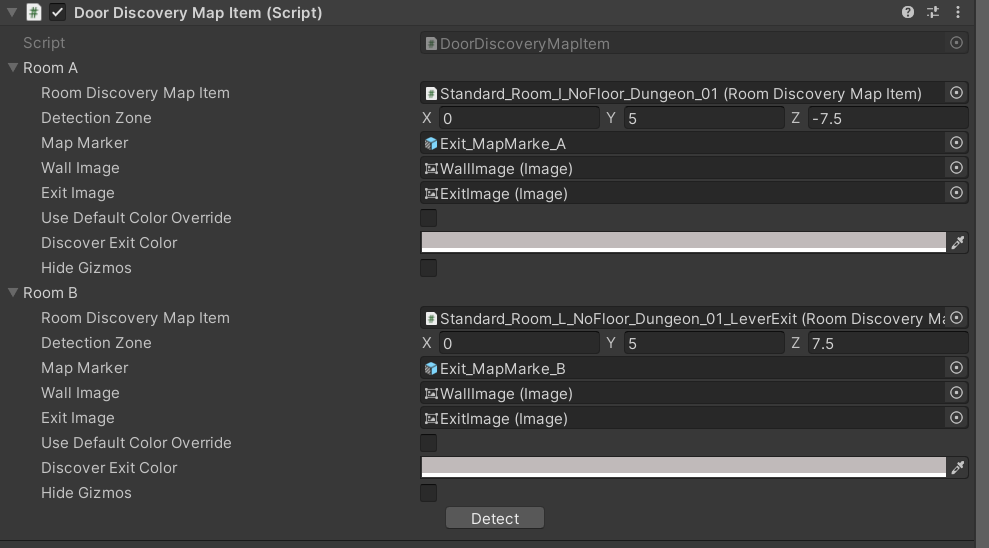
But when the scene is unloaded in the editor, the generated references are lost. However if i manually drag the references into their respective fields, the references will hold:

Now i notice that since this component is on a prefab, that the dragged references are bold since they are not part of the prefab but rather part of the prefab instance in the scene. The generated ones(That get lost when unloading the scene) are not bold but also not part of the prefab but the prefab instance.
Here is a stripped down version of the code:
    public class DoorDiscoveryMapItem : MonoBehaviour
    {
        [SerializeField] private RoomHelper m_roomA;
        [SerializeField] private RoomHelper m_roomB;
        [SerializeField, MQNTools.Editor.InspectorButton(nameof(DetectRooms))]
        private bool m_detect;

        // .. Stripped down

        private void DetectRooms()
        {
            m_roomA?.DetectRoom(transform);
            m_roomB?.DetectRoom(transform);
        }


        [System.Serializable]
        public class RoomHelper
        {
            [field: SerializeField]
            public RoomDiscoveryMapItem RoomDiscoveryMapItem { get; private set; }
            // .. Stripped down

            public void DetectRoom(Transform _transform)
            {
                Vector3 position = _transform.position + DetectionZone;
                Collider[] colliders = Physics.OverlapBox(position, s_overlapeBoxSize * 0.5f);
                if (colliders != null)
                {
                    if (colliders[0].TryGetComponent<RoomDiscoveryMapItem>(out var roomDiscoveryMapItem))
                    {
                       RoomDiscoveryMapItem = roomDiscoveryMapItem;
                    }
                }
            }
        }
    }
NOTE: The MQNTools.Editor.InspectorButton is a custom attribute which simply displays a button and calls the method defined.
Does anyone know how I can get the generated references to “stick”? I have several doors and it would be a pain to comb through the geometry and manually assign these references.
Thanks in advance.
