Mesh Batching, Draw Call Issues

I’m having some Batching issues.

I have multiple FBX with 2 meshes. I place some of these FBX close to each other to look like an Island. I need to spawn a bunch of these Islands.

When I spawn these Islands with only 1 FBX. It Batches perfectly fine. I can spawn a bunch of them without increasing the Draw Calls.
Test 1: 20 Islands, Island Consists of FBX_A


Tris: 1.4K - Verts: 2.5K - Batches: 1 - Meshes: 40

This works for each of the FBX. Another example:
Test 2: 20 Islands, Island Consists of FBX_B


Tris: 1.4K - Verts: 2.4K - Batches: 1 - Meshes: 40

Now if I spawn Islands with more then 1 FBX. Batching doesn’t work anymore, or atleast acts weird.
Test 3: 20 Islands, Island Consists of FBX_A and FBX_B


Tris: 1.9K - Verts: 3.4K - Batches: 37 - Meshes: 80

If I go over the Vertex Attribute limit, should it not just create a few extra batches, and not 36?

The Code that creates these objects:

GameObject chunk = (GameObject)GameObject.Instantiate(GetGameObject(name));
        chunk.name = chunk.name.Replace("(Clone)", string.Empty);

        MeshRenderer[] meshRenders = chunk.GetComponentsInChildren<MeshRenderer>();
        foreach (MeshRenderer mesh in meshRenders)
        {
            mesh.shadowCastingMode = ShadowCastingMode.Off;
            mesh.receiveShadows = false;
            mesh.useLightProbes = false;
            mesh.reflectionProbeUsage = ReflectionProbeUsage.Off;
        }

        ChunkInfo info = chunk.AddComponent<ChunkInfo>();
        info.Id = chunk.name;

        objectList[name].Enqueue(info);
  • I don’t change the materials
  • The Scaling is all (1,1,1)
  • All of the FBX are under the same Parent.

I am truly puzzeled why the batching is acting so weird.
Any help and/or insight to why this is happening would be great.

EDIT: Added Scene information (Tris, Verts, Batches, Meshes)
EDIT 2: Changed some terms to be more clear.
EDIT 3: Something else I noticed which might be connected.

As example, I have a Hexagon in the middle with Material 1.
Around this Hexagon I have another 3 with Material 2.
These are batched normally.
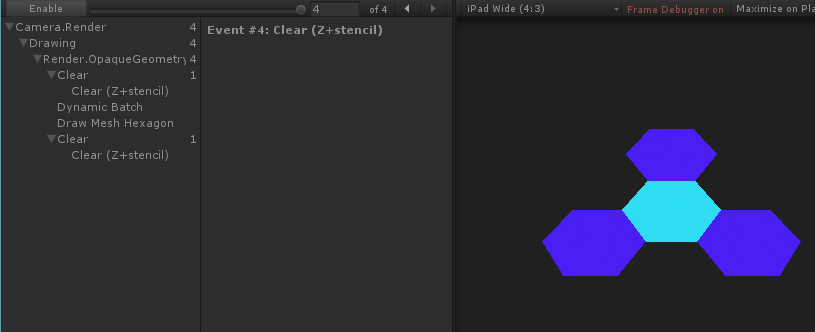
Now if I add another 3 Hexagons with Material 3. The Batching acts weird.
Not only does it not properly Batch the new Hexagons. Unity also no longer correctly batched Material 2


I think this is the same issue as with the Chunks. But I still have no idea why that happens.

You’re probably going over the vertex attribute limit of 900 per batch.

“Batching dynamic objects has certain overhead per vertex, so batching is applied only to meshes containing less than 900 vertex attributes in total.”

Thanks for the reply Flailer.

But I don’t think it’s the vertex limit.

Scene 1:

  • 1.4K Tris; 2.5K Verts; 1 Batch; 40 Meshes
    Scene 2:
  • 1.4K Tris; 2.4K Verts; 1 Batch 40 Meshes
    Scene 3:
  • 1.9K Tris; 3.4K Verts; 37 Batches; 80 Meshes

Scene 3 is basically Scene 1 and 2 combined in meshes and GameObjects.
This odd batching behaviour also happens if I only spawn 2 of those Bigger Objects.

Sorry to be a pain, but could you clarify what you mean by “Bigger Objects” - what are they? What shader/material do they have assigned? The problem with batching is its definitely not just vertex count… its vertex attributes, something in those objects is forcing the engine to flip out and break up the batches… Literally mentally diff the scenes, what is the difference between Scene (1,2) and 3, any difference could do it, but if you provide more info, or even a package I could have a look for you.

My apologies for being so vague.

Bigger Objects are a combination of different FBX. I spawn multiple of these small Chunks(FBX) to make it look like a bigger Chunk.

Scene 1 is 20 of a small Chunk. Scene 2 is 20 of a different small Chunk. Scene 3 is 20 Bigger Chunks comprised of the Small Chunks from Scene 1 and 2. So Scene 3 is literally a combination of Scene 1 and 2. All images were made in the same Unity Scene, but spawning different chunks. I just named them Scenes for convenience.

The Shader I use is pretty simple:

Properties {
        _MainTex ("Base (RGB)", 2D) = "white" {}
    }
   
    SubShader {
        Tags
        {
            "Queue" = "Background"
            "RenderType" = "Opaque"
        }
       
        LOD 100
       
        Pass {
       
            ZWrite On
       
            ColorMaterial AmbientAndDiffuse
            SetTexture [_MainTex] {
                Combine texture * primary
            }
        }
    }

Texture is 16x16 with the following settings:

Ok just taking a look here, I can see that from your first images the third appears to be using a different shader for one of your draw events… That and its Transparent, which have notoriously difficult times being batched. So if that’s applied to anything rather than having the StolenCouch/Vert Colour Diffuse one.

The Third Image has some UI Selected which you can’t see. That has some transparency, which uses 3 Calls. The transparency is not on any of the Chunks

Something else I noticed, which may be important.

As example, I have a Hexagon in the middle with Material 1.
Around this Hexagon I have another 3 with Material 2.
These are batched normally.

Now if I add another 3 Hexagons with Material 3. The Batching acts weird.
Not only does it not properly Batch the new Hexagons. Unity also no longer correctly batched Material 2

I think this is the same issue as with the Chunks. But I still have no idea why that happens.

Updated OP with clearer terms and the Hexagon issue

Bump!
I have similar issue and i still don’t understand why unity act like this. Maybe it’s related to the internal draw order?
And it’s not related to the shader. This behavior can be reproduced with simple mobile diffuse or standard shader.

P.S. Unity 5.3.2p4

Hi, Kamakachi. The batching does a rough front to back sort on non iOS platforms. I’ve put a short version of the article below.

Symptoms

  • I have a group of Mesh Renderers that are marked as static, all sharing the same material.
  • I also have a dynamic / non-static Mesh Renderer in the scene that is splitting the group of static Mesh Renderers into separate draw calls.

Cause

  • Unity does a rough front-to-back sorting for opaque objects, to increase GPU efficiency. So indeed this can result in more batches (more CPU work) but on many GPUs it’s less work for the GPU, since depth buffer rejection works better that way.

Resolution

If you know you more bottlenecked by the CPU, then turning this behaviour off might be useful, e.g. “Camera.main.opaqueSortMode = UnityEngine.Rendering.OpaqueSortMode.NoDistanceSort;”

Note that we only do that on GPUs where it matters, e.g. this is off by default on iOS GPUs since they don’t really care which way opaque geometry is rendered.

Hi Pete,

Thanks for the useful info.
I did a test by setting Camera.main.opaqueSortMode = UnityEngine.Rendering.OpaqueSortMode.NoDistanceSort;
as you suggested but there is no difference, it still batch in chunks.

Thanks

Hi Liviuss.

Can you PM me a mini project to try please?

Hi Pete,

I found that my lightprobes break batching.
Btw, issues with batching and lightprobes are going to be improved or we should take it as is, because at the moment, if i want to get rid of “live lights” on my mobile project i really don’t know what is better, drawcalls increase with vertex lit objects VS pixel lights but drawcalls reduced in a half :slight_smile: Sorry for offtop.