What does it do?
Running the wizard will combine all the meshes on the chosen Game Object and its children that share the same material. If there is more than a single material in all sub-objects, sub-objects of result will be created so that each corresponds to a single material. A prefab will be created from the combined Game Object in the root of the Assets folder, with all the newly created merged meshes. The original will be set inactive in the scene and the combined Game Object will be put in its position.
How does it work?
Put the provided script in any Editor folder. In the Menu Bar a new entry will appear (“E.S. Tools/Mesh Combine Wizard”). Picking this option will show the wizard dialog. The parent of objects to be combined should be assigned to a filed called combine Parent, which may be auto-assigned based on existing editor selection.
Benefits?
Lowers the amount of draw calls, usually dramatically.
Does not need to draw all objects in the same batch regardless of whether they are on screen or not, as opposed to static batching.
Does not compromise workflow - no need to merge modular pieces outside Unity in a 3D tool. Quick iteration time when changing the combined design.
Works with combined objects that have more than 64k verts.
Does not compromise the original object’s pivot point.
Known limitations:
Does not support objects with multiple materials on submeshes. Such meshes should be split in an external 3D tool, so that there is only a single material per mesh.
Does not migrate components from the original other than MeshFilter and MeshRenderer.
The default setting is using 32 bit indexes. From Unity - Scripting API: Rendering.IndexFormat.UInt32 (Note that GPU support for 32 bit indices is not guaranteed on all platforms; for example Android devices with Mali-400 GPU do not support them. When using 32 bit indices on such a platform, a warning message will be logged and mesh will not render.) If the combined mesh has less than 65535 vertices, it is safe to uncheck the 32-bit option in the window (otherwise meshes will be garbled).
If you’re finding this tool helpful, buy all my games and tell all your friends
Thanks for this. I modified lines 55 and 57 to include the mesh instance ID. This solves the mesh data overwrite problem when combining multiple object groups which all share the same material:
No problem.
Yes, the overwrite can happen if the asset with that name already exists in root Assets folder. I remember purposefully leaving it like that since I never leave meshes in the project root folder. I’ve updated the script with a similar solution.
Hi there. I’ve used your tool in my project and it has been really useful but now aparently is provoking some kind of trouble that prevents compiling. I was hoping if you could suggest somesolution for me. I’m using unity 2017.3.0f3
Thanks in advance.
PS: The log error says:
Assets/MeshCombineWizard.cs(2,7): error CS0246: The type or namespace name `UnityEditor’ could not be found. Are you missing an assembly reference?
Assets/MeshCombineWizard.cs(5,34): error CS0246: The type or namespace name `ScriptableWizard’ could not be found. Are you missing an assembly reference?
Build completed with a result of ‘Failed’
UnityEngine.GUIUtility:ProcessEvent(Int32, IntPtr)
UnityEditor.BuildPlayerWindow+BuildMethodException: 3 errors
at UnityEditor.BuildPlayerWindow+DefaultBuildMethods.BuildPlayer (BuildPlayerOptions options) [0x0020e] in C:\buildslave\unity\build\Editor\Mono\BuildPlayerWindowBuildMethods.cs:181
at UnityEditor.BuildPlayerWindow.CallBuildMethods (Boolean askForBuildLocation, BuildOptions defaultBuildOptions) [0x00065] in C:\buildslave\unity\build\Editor\Mono\BuildPlayerWindowBuildMethods.cs:88
UnityEngine.GUIUtility:ProcessEvent(Int32, IntPtr)
Hi @peardez , it seems you haven’t placed the script in a folder called Editor. Either that or you’re using the new feature called Assembly Definitions Unity - Manual: Assembly definitions and something is wrong with the setup on your end.
I have added the instructions at the top to clarify.
Just wanted to point out you’d get this error for any sort of editor script that is not in an Editor folder, because Unity will try to include all non-editor scripts in the build, and UnityEditor assemblies cannot be included in the build.
Thanks for reporting!
If you’re finding this article helpful, consider my asset Dialogical on for your game dialogues.
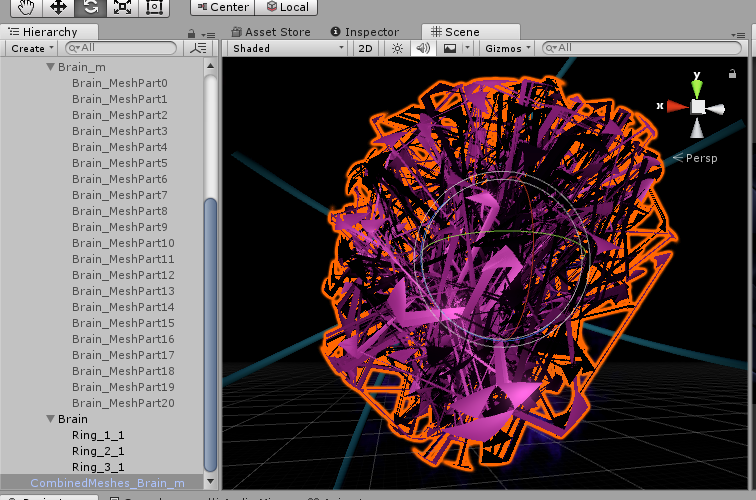
but can you please tell what really happens when I select allot of objects?
The tool creates mesh in a manner that it’s connecting like thorough a line.
Hi zero_null,
Not quite sure I understand the question, but it seems you’re getting some kind of artifact. The combining part is handled by the call to Unity - Scripting API: Mesh.CombineMeshes so this part is handled by the engine. I suggest other techniques for lowering draw calls, as this can be something connected to the specific model (I see you have other non-problematic merges).
I don’t think I did anything wrong. However, I am using Unity 2017.2. In Blender this is all one Mesh, but Unity sees it as many which is why this script could be really useful.
Seems like the same problem from above. Didn’t run into it in earlier versions of Unity. It is probable that there is some kind of graphics-related reason I don’t know about makes Unity see it as different objects, so this way of combining is inappropriate. I guess you could try to merge submeshes in Blender.
This works great. If you have some issue where the meshes are getting mangled or making weird connections, split it up. I have things like I made a combined mesh for some intricate columns. Then I put all my columns in and combine them. So do it in steps and eventually have one mesh.