# Multiple Displays
**URL:** https://discussions.unity.com/t/multiple-displays/659705
**Category:** Camera
**Created:** [March 28, 2017, 9:56am UTC](https://discussions.unity.com/t/multiple-displays/659705 "2017-03-28T09:56:01Z")
**Posts on this page:** 14
**Page:** 1
### Author:  [@nainpk09](https://discussions.unity.com/u/nainpk09)
#### Post date: [March 28, 2017, 9:56am UTC](https://discussions.unity.com/t/multiple-displays/659705/1 "2017-03-28T09:56:01Z")
Hi i am using unity 5.4.1f1 personal addition and working on windows standalone build i want to use multiple displays in my game i have 2 cameras and set the target display of one camera to Display 1 and target display of second camera to Display 2. Also i have activated the display but Display.displays.Length is always one on editor as well as on build. So it dose not display any thing on second display. What should i do to display on second screen.
---
### Author:  [@Dreamwriter](https://discussions.unity.com/u/Dreamwriter)
#### Post date: [March 28, 2017, 7:40pm UTC](https://discussions.unity.com/t/multiple-displays/659705/2 "2017-03-28T19:40:44Z")
If Display.displays.Length is just 1, then you can’t use other screens. Something in Windows is telling Unity that you only have one monitor. It sounds like you are doing everything else correctly - first check the number of displays, if it’s \> 1 then activate the ones you want ( Display.displays[1].Activate(); )
---
### Author:  [@karl\_jones](https://discussions.unity.com/u/karl_jones)
#### Post date: [March 29, 2017, 3:21pm UTC](https://discussions.unity.com/t/multiple-displays/659705/3 "2017-03-29T15:21:47Z")
Display.Length will always be 1 in the Editor. We dont have an implementation of display detection in editor as it works different. We are using Editor windows, not actual displays.
You can still use multiple display in the editor you just dont need to activate the displays like you do in a release.
What platform are you build to?
---
### Author:  [@Jean-Fabre](https://discussions.unity.com/u/Jean-Fabre)
#### Post date: [November 20, 2017, 5:20pm UTC](https://discussions.unity.com/t/multiple-displays/659705/4 "2017-11-20T17:20:24Z")
Hi,
Currently trying to make sense out of this Multi Display feature, it doesn’t work for me, first screen is pushed to fullscreen but the second screen isn’t filled up with the camera supposed to target the second screen. Is there a working sample project somewhere to rule out any misunderstanding or hardware incompatibility?
I can sort of see at the launch that the second screen is rendered below the first screen on the same Application window, ( it’s red when it doesn’t work right?).
and I can’t make sense of the -multidisplay argument, what would be the right commandline on osX? none of the usual works it seems.
Thanks 🙂
Jean
---
### Author:  [@nuxvomo](https://discussions.unity.com/u/nuxvomo)
#### Post date: [March 24, 2019, 9:37pm UTC](https://discussions.unity.com/t/multiple-displays/659705/5 "2019-03-24T21:37:49Z")
> [@Jean-Fabre](#):
>
> Hi,
>
> Currently trying to make sense out of this Multi Display feature, it doesn’t work for me, first screen is pushed to fullscreen but the second screen isn’t filled up with the camera supposed to target the second screen. Is there a working sample project somewhere to rule out any misunderstanding or hardware incompatibility?
>
> I can sort of see at the launch that the second screen is rendered below the first screen on the same Application window, ( it’s red when it doesn’t work right?).
>
> and I can’t make sense of the -multidisplay argument, what would be the right commandline on osX? none of the usual works it seems.
>
> Thanks 🙂
>
> Jean
Hi Jean,
Is there a PlayMaker function I can add to the Main Camera to activate Multi-Display?
Having issues getting this to work.
Kind of proud I’ve only used PlayMaker so far and no C# and would like to keep it that way 🙂
Your assistance is always appreciated!
Thanks!
---
### Author:  [@Jean-Fabre](https://discussions.unity.com/u/Jean-Fabre)
#### Post date: [March 25, 2019, 6:36am UTC](https://discussions.unity.com/t/multiple-displays/659705/6 "2019-03-25T06:36:22Z")
Hi,
I was not able to make this work back then.
All it should take is to set the target display of your camera. is it working for you if you just make that setup during editing? If it works for you and you need to switch display at runtime, I can make a custom action to let you change the display property of cameras, but first you need to make sure the feature is working as is.
anyway, I don’t think this multi display feature is mature nor reliable unfortunatly… It was a big issue for me at the time and I had to resort to multiple apps being ran at the same and connected via local network ( I had 6 screens to manage), but I am not sure your case would be ok with this technic.
> **[Possible to change display at runtime?](https://discussions.unity.com/questions/1131106/possible-to-change-display-and-update-resolutions.html)**
>
> Hey, So I’ve been implementing my own custom graphics options that can be altered at runtime. While most of these options are easily changed, one I can’t figure out how to do is change the display (for fullscreen purposes). Basically I need to do...
I’d love a clean resolution and explanation on how multi displays work and it’s scope of control ( when full screen, how to deal with it at runtime, etc etc), so hopefully someone can share his experience on this.
Bye,
Jean
---
### Author:  [@chrisk](https://discussions.unity.com/u/chrisk)
#### Post date: [March 25, 2019, 7:35am UTC](https://discussions.unity.com/t/multiple-displays/659705/7 "2019-03-25T07:35:32Z")
I also have to say, Unity Editor is so dumb and it doesn’t work well with multi-monitor. It’s been ages that it works like that. When I edit on the secondary monitor and new popup window goes to the left upper corner of the primary monitor and I miss noticing the popups and trying to bring the popups again and again.
Are all Unity employees mandated to work on a single monitor? Otherwise, they should’ve noticed it years ago.
Perhaps, they are all using MacBooks and it has never been an issue for them.
There are so many simple little things like that makes me painful all the time.
Saying will not help as they don’t listen. Even if they listen, it will take months, if not years.
It has to be mentioned in the keynotes a couple of times before it gets real.
Please do a (good) job!
Sigh…
---
### Author:  [@Jean-Fabre](https://discussions.unity.com/u/Jean-Fabre)
#### Post date: [March 25, 2019, 7:41am UTC](https://discussions.unity.com/t/multiple-displays/659705/8 "2019-03-25T07:41:38Z")
Hi,
Well, I raised a ticket with them and they could not reproduce, and unfortunatly, I think it’s enough for them to dismiss it, in all fairness. so the more bug report we make to them on that topic, the better as it will increase the chance for them to reproduce it and increase their level of awareness that this feature is buggy.
I am on a macbook and I have this issue, so I think it’s more complex than it looks.
I don’t think they behave like this in purpose, they have to prioritize somehow and of course it will impact negatively a fringe of the devs that wanted a resolution on these cases they dismissed. it’s a tricky situation, and I would not be so harsh with the Unity QA team.
also, I think you are confusing the feature, we are talking about a runtime feature where you set a camera to render to a target display ( 8 max) : [Unity - Manual: Multi-display](https://docs.unity3d.com/Manual/MultiDisplay.html) and what you are refering too seems to be the Unity editor layout feature :[Unity - Manual: Customizing your workspace](https://docs.unity3d.com/Manual/CustomizingYourWorkspace.html)
Bye,
Jean
---
### Author:  [@nuxvomo](https://discussions.unity.com/u/nuxvomo)
#### Post date: [April 13, 2019, 5:16pm UTC](https://discussions.unity.com/t/multiple-displays/659705/9 "2019-04-13T17:16:03Z")
> [@Jean-Fabre](#):
>
> Hi,
>
> Well, I raised a ticket with them and they could not reproduce, and unfortunatly, I think it’s enough for them to dismiss it, in all fairness. so the more bug report we make to them on that topic, the better as it will increase the chance for them to reproduce it and increase their level of awareness that this feature is buggy.
>
> I am on a macbook and I have this issue, so I think it’s more complex than it looks.
>
> I don’t think they behave like this in purpose, they have to prioritize somehow and of course it will impact negatively a fringe of the devs that wanted a resolution on these cases they dismissed. it’s a tricky situation, and I would not be so harsh with the Unity QA team.
>
> also, I think you are confusing the feature, we are talking about a runtime feature where you set a camera to render to a target display ( 8 max) : [https://docs.unity3d.com/Manual/MultiDisplay.html](https://docs.unity3d.com/Manual/MultiDisplay.html) and what you are refering too seems to be the Unity editor layout feature :[https://docs.unity3d.com/Manual/CustomizingYourWorkspace.html](https://docs.unity3d.com/Manual/CustomizingYourWorkspace.html)
>
> Bye,
>
> Jean
Hi Jean,
I made it work for my situation by adding the following script to the Main Camera. I haven’t dove in to making custom PlayMaker actions yet though. Would love to translate this eventually.
Also, I’m just making mine for a demo but seems like it would be difficult to put in to production when displays are so varied in resolution and size. Would need to be able to scale based on the set up but I didn’t get that deep. Just built it for the displays I’m using 👀
```csharp
using System.Collections;
using System.Collections.Generic;
using UnityEngine;
public class MultiDisplayActivate : MonoBehaviour
{
void Start ()
{
if (Display.displays.Length > 1)
Display.displays[1].Activate(Display.displays[1].systemWidth,
Display.displays[1].systemHeight, 60);
}
}
```
If you could create a PlayMaker action like this or better it would be a huge help to me and probably the community 🙂
Thanks again,
Jim
---
### Author:  [@JG-Denver](https://discussions.unity.com/u/JG-Denver)
#### Post date: [June 19, 2019, 5:39pm UTC](https://discussions.unity.com/t/multiple-displays/659705/10 "2019-06-19T17:39:02Z")
Hi Jean,
It actually looks like you are possibly experiencing the same issue as others of us, where multi-display is not scaling correctly on displays of different resolutions and this can affect UI hits as well.
There are two issues in Issue Tracker for this, so you may want to vote for them:
> **[Unity IssueTracker - Loading second display on 2 different monitor setups...](https://issuetracker.unity3d.com/issues/loading-second-display-on-2-different-monitor-setups-shrinks-the-higher-resolution-display-to-lower-resolution-displays-size)**
>
> Steps to reproduce: 1. Download latest attached project("ScreenTestScenery.zip") 2. Make sure you have 2 monitors with different nat...
> **[Unity IssueTracker - Button's hitbox is offset when building standalone...](https://issuetracker.unity3d.com/issues/buttons-hitbox-is-offset-when-building-standalone-project-for-two-screens)**
>
> Reproduction steps: 1. Open the attached build of the project named "Build\_1141732\_New" 2. Select a non-native screen resolution 3. ...
Here is another forum post on the same matter:
> [@UI and multiple displays](https://discussions.unity.com/t/616411/42):
>
> We're having the same issues here and are desperately longing for a fix.
---
### Author:  [@rustinlee](https://discussions.unity.com/u/rustinlee)
#### Post date: [November 1, 2020, 8:26pm UTC](https://discussions.unity.com/t/multiple-displays/659705/11 "2020-11-01T20:26:36Z")
> [@karl\_jones](#):
>
> Display.Length will always be 1 in the Editor. We dont have an implementation of display detection in editor as it works different. We are using Editor windows, not actual displays.?
It would be nice if the documentation made note of this.
---
### Author:  [@khuarizmi98](https://discussions.unity.com/u/khuarizmi98)
#### Post date: [November 10, 2022, 3:04am UTC](https://discussions.unity.com/t/multiple-displays/659705/12 "2022-11-10T03:04:06Z")
> [@karl\_jones](#):
>
> Display.Length will always be 1 in the Editor. We dont have an implementation of display detection in editor as it works different. We are using Editor windows, not actual displays.
> You can still use multiple display in the editor you just dont need to activate the displays like you do in a release.
> What platform are you build to?
Hi karl, I’m using 8 display screen in my development. I have problem which is my game screen blank (like loading something) and after 10 min the game start to appear the game scene. I tried out not using multimonitor script (1 screen like default) and game not delay like 8 display. is it some kind of bug?
---
### Author:  [@karl\_jones](https://discussions.unity.com/u/karl_jones)
#### Post date: [November 10, 2022, 3:27am UTC](https://discussions.unity.com/t/multiple-displays/659705/13 "2022-11-10T03:27:53Z")
> [@khuarizmi98](#):
>
> Hi karl, I’m using 8 display screen in my development. I have problem which is my game screen blank (like loading something) and after 10 min the game start to appear the game scene. I tried out not using multimonitor script (1 screen like default) and game not delay like 8 display. is it some kind of bug?
Try using the profiler to see what the delay is.
---
### Author:  [@Varaughe](https://discussions.unity.com/u/Varaughe)
#### Post date: [March 21, 2025, 10:30am UTC](https://discussions.unity.com/t/multiple-displays/659705/14 "2025-03-21T10:30:38Z")
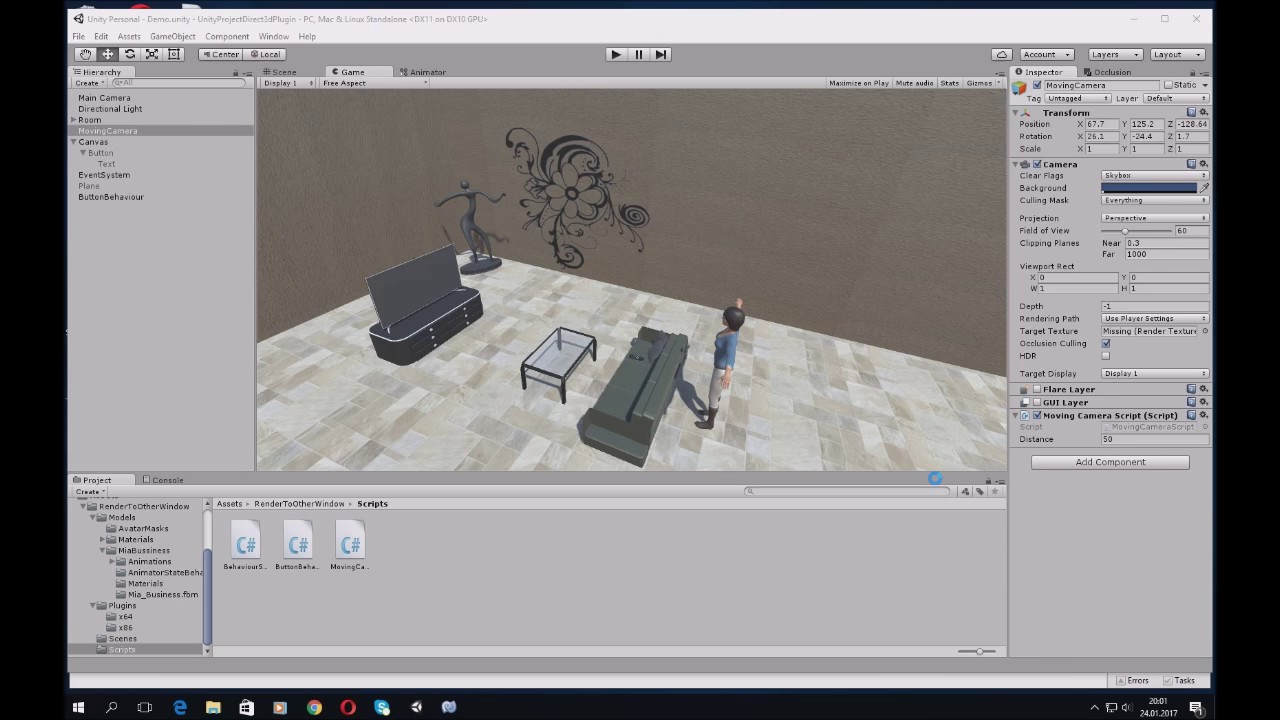
If anyone wants something more flexible, like opening another window, with preferred size and position, should check this out:
[ ](https://www.youtube.com/watch?v=9VSn-UBrHe0)
A new window pops up into which a scene is rendered.
It works on both Windows and MacOS.