I’m currently working on a third-person shooter (TPS) controller in Unity using Cinemachine, animation rigging and a character controller. The third-person perspective is working well, but I’m encountering difficulties setting up a first-person perspective (FPS) camera.
I have searched on YouTube for tutorials, but most of them focus on FPS controllers with a simple capsule, without animation rigging or weapon attached to hands.
My goal is to seamlessly switch between TPP and FPP perspectives in my game. I’ve successfully implemented the third-person perspective, but I’m struggling with configuring the FPS camera and ensuring that the weapons are correctly attached to the hands.
I’ve made a build of the game that you can check out here. It mostly shows off the third-person stuff, and I’m keen to get your feedback.
Controls:
- W/S/A/D: Move
- F: Pick up weapon
- X: Holster weapon
- Spacebar: Jump
- Mouse scroll: Change weapon
- Left Mouse Button: Shoot
- Right Mouse Button: Aim
Aiming script:
using UnityEngine;
using UnityEngine.Animations;

public class CharacterAiming : MonoBehaviour
{
    public float turnSpeed = 15f;
    Camera mainCamera;
    public Cinemachine.AxisState xAxis;
    public Cinemachine.AxisState yAxis;
    public Transform cameraLookAt;
    public Animator animator;
    WeaponPickupAndDrop weaponPickup;
    // Start is called before the first frame update
    void Start()
    {
        Cursor.visible = false;
        Cursor.lockState = CursorLockMode.Locked;
        mainCamera = Camera.main;
        animator = GetComponent<Animator>();
        weaponPickup = GetComponent<WeaponPickupAndDrop>();
    }

    void Update()
    {
        bool isAiming = Input.GetMouseButton(1);
        animator.SetBool("isAiming", isAiming);

        GameObject activeWeapon = weaponPickup.GetActiveWeapon();

        if(activeWeapon)
        {
            Recoil weapon = activeWeapon.GetComponent<Recoil>();
            weapon.recoilModifier = isAiming ? 0.3f : 1.0f;
        }
    }

    // Update is called once per frame
    void FixedUpdate()
    {
        xAxis.Update(Time.fixedDeltaTime);
        yAxis.Update(Time.fixedDeltaTime);

        cameraLookAt.eulerAngles = new Vector3(yAxis.Value, xAxis.Value, 0f);

        float yawCamera = mainCamera.transform.rotation.eulerAngles.y;
        transform.rotation = Quaternion.Slerp(transform.rotation, Quaternion.Euler(0f, yawCamera, 0f), turnSpeed * Time.fixedDeltaTime);
    }
}
You can check out the Riglayers hierarchy here and Cinemachine Virtual Camera here.
First question: why aren’t you using CM3? It has a really nice sample scene showing TPS cameras with more precise aiming than you have (in your game, when you switch to aim mode it doesn’t hold the same point under the reticle).
Thank you for the response, I’m currently on Cinemachine version 2.8.7, as the upgrade option to version 3 is not showing in Unity 2021.3.14f LTS.
The reticle issue is fixed, I was changing the shoulder offset while aiming, and aiming is now working fine.
Here is the latest build.
If everything’s good with aiming, I’m now looking for guidance on setting up an FPS camera to smoothly switch between first-person and third-person perspectives.
From a CM point of view, it’s just a matter of duplicating the existing vcam and adjusting the settings to place the camera at the right spot. When you activate the new vcam, CM will blend to it.
Thanks for the tip, I’m currently away from my PC but will give it a try once I’m back.
I also want to ask if the aiming is working fine.
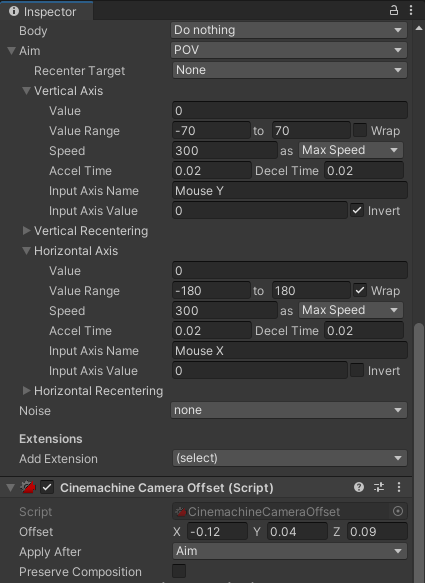
I duplicated the vcam and adjusted its position. However, when I move the mouse up and down, the weapon slightly goes out of the camera view, how to make the camera always look at the weapon ?. Currently, the follow of the Cinemachine vcam is set to a “CameraLookAt” empty object positioned at the head.
here’s how it looks, the lag in the video is due to screen recording.

If you want something to remain steady in the frame, you need to position it every frame after the camera has been positioned, or you will be using a stale camera position/rotation from the previous frame. Is that what’s happening? Your description is not clear.
I’ve positioned the camera similar to an FPS game, but when I look up or down, the camera clips into the weapon model. I want the camera to always look at the weapon model.
This is how it looks.
ok, I see it. Can you expand the “Body” section of the vcam inspector so I can look at the ThirdPersonFollow settings?
Here is the expanded settings for the “Body” section.
I think the issue you are having is that the camera is not moving in the same way as the weapon. I don’t know how the weapon moves in relation to the object the camera is attached to. Possibly you can choose a rig configuration (shoulder offset, vertical arm length, camera distance) that preserves the camera relationship with the weapon. Alternatively, you can attach the POV cam to a different object - one that moves and rotates along with the weapon.
The object that moves with the weapon is the ‘WeaponHolder.’ I attached the vcam with aiming set to POV, but now the camera goes crazy. So, I disabled the ‘CharacterAiming’ script. This stabilized the camera,However, this creates a new issue – the character no longer rotates with the camera because rotation was originally handled through the ‘CharacterAiming’ script. Additionally, in TPP mode, I cannot move the mouse because this is how it was being managed.
using UnityEngine;
using UnityEngine.Animations;

public class CharacterAiming : MonoBehaviour
{
    public float turnSpeed = 15f;
    Camera mainCamera;
    public Cinemachine.AxisState xAxis;
    public Cinemachine.AxisState yAxis;
    public Transform cameraLookAt;
    public Animator animator;
    WeaponPickupAndDrop weaponPickup;
    // Start is called before the first frame update
    void Start()
    {
        Cursor.visible = false;
        Cursor.lockState = CursorLockMode.Locked;
        mainCamera = Camera.main;
        animator = GetComponent<Animator>();
        weaponPickup = GetComponent<WeaponPickupAndDrop>();
    }

    void Update()
    {
        bool isAiming = Input.GetMouseButton(1);
        animator.SetBool("isAiming", isAiming);

        GameObject activeWeapon = weaponPickup.GetActiveWeapon();

        if(activeWeapon)
        {
            Recoil weapon = activeWeapon.GetComponent<Recoil>();
            weapon.recoilModifier = isAiming ? 0.3f : 1.0f;
        }
    }

    // Update is called once per frame
    void FixedUpdate()
    {
        xAxis.Update(Time.fixedDeltaTime);
        yAxis.Update(Time.fixedDeltaTime);

        cameraLookAt.eulerAngles = new Vector3(yAxis.Value, xAxis.Value, 0f);

        float yawCamera = mainCamera.transform.rotation.eulerAngles.y;
        transform.rotation = Quaternion.Slerp(transform.rotation, Quaternion.Euler(0f, yawCamera, 0f), turnSpeed * Time.fixedDeltaTime);
    }
}
It might be difficult to describe the problem, so I’ve created this video.
This is all getting really hard for me to follow. I’m feeling like you need to step back and consider the desired flow of control. With CM ThirdPersonFollow, the paradigm is that your code should never move or aim the camera. You write a controller that moves and rotates an object in the scene (e.g. the player, or some child object of the player). That object will determine where the player is facing or aiming. That object’s position and rotation then feeds a camera, which positions and rotates itself in fixed relation to that object. Maybe you already know this, it’s hard for me to tell.
This is a good tutorial:
Rather than describing your setup and sending me videos, it might be simpler to share a small test project.
Here is the project for you to take a look at.
There are a few problems in your scene:
- Stuff is happening in FixedUpdate (CharacterAiming, other?) Why? Change it to Update or LateUpdate.
- Set the brain update mode to SmartUpdate/LateUpdate
- Cameras should not be parented to character. Move Cameras object out
- Disable the JitterFix script. It’s messing things up, and seems to be some kind of hack
- Now that the jitter is gone, figure out why the character speed is wrong.
Initially, I had all the actions in the Update function, and it caused jitter. I watched this YouTube video (I have included the time stamp) that explained the jitter problem and provided a solution – jitter fix script, which I implemented.
Even though I followed the steps you mentioned, the jitter is back. I’m wondering if it’s necessary to move everything to Update, considering the script fixed the jitter before.
- I moved everthing in the CharacterAiming to Update.
- Moved the Look and Move functions to Update.
- Set the CM brain update method to Smart Update.
- Set the CM brain blend update method to fixedUpdate.
- Don’t just disable the jitter fix script, but completely remove it (solved the slow speed issue).
Now the weapon is stable but character jitters.
If you do everything properly in Update or LateUpdate, and use Time.deltaTime (not Time.fixedDeltaTime), and set your animator to animate normally (not Animate Physics) and set the brain’s update modes to LateUdate, there will be no jitter. Jitter is happening because you’re doing some stuff on the physics clock and some stuff on the render clock. What is the reason to do anything on the physics clock?