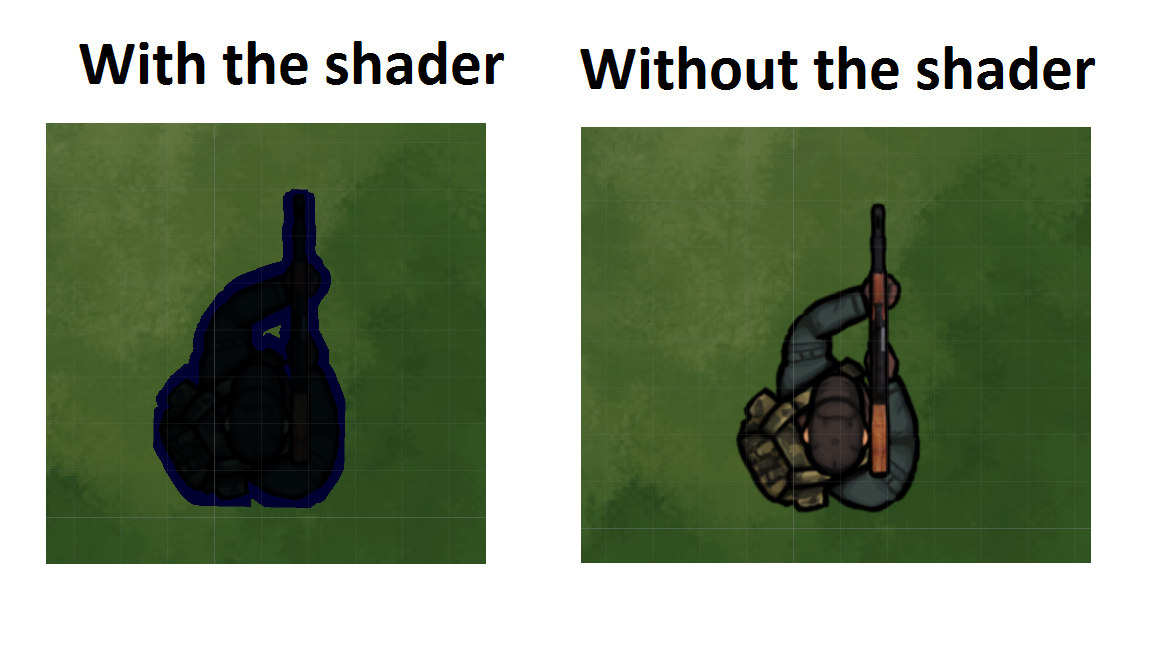
I found the shader below and works great for outlining characters. The problem is that the character looks really dark. Also if someone could sort of explain why and how it can be fixed. I would love to learn more about shaders. Thank you
Shader "Custom/Outline_2DSprite"
  {
       Properties
       {
           _MainTex ("Base (RGB)", 2D) = "white" {}
           _OutLineSpreadX ("Outline Spread", Range(0,0.03)) = 0.007
           _OutLineSpreadY ("Outline Spread", Range(0,0.03)) = 0.007
           _Color("Outline Color", Color) = (1.0,1.0,1.0,1.0)

       }

       SubShader

       {
           Tags {"Queue"="Transparent" "IgnoreProjector"="True" "RenderType"="Transparent"}
           ZWrite Off Blend SrcAlpha OneMinusSrcAlpha Cull Off
           Lighting Off
           LOD 110

           CGPROGRAM
           #pragma surface surf Lambert alpha

           struct Input
           {
               float2 uv_MainTex;
               fixed4 color : COLOR;
           };

           sampler2D _MainTex;
           float _OutLineSpreadX;
           float _OutLineSpreadY;
           float4 _Color;

           void surf(Input IN, inout SurfaceOutput o)
           {
               fixed4 TempColor = tex2D(_MainTex, IN.uv_MainTex+float2(_OutLineSpreadX,0.0)) + tex2D(_MainTex, IN.uv_MainTex-float2(_OutLineSpreadX,0.0));
               TempColor = TempColor + tex2D(_MainTex, IN.uv_MainTex+float2(0.0,_OutLineSpreadY)) + tex2D(_MainTex, IN.uv_MainTex-float2(0.0,_OutLineSpreadY));
               if(TempColor.a > 0.1){
                   TempColor.a = 1;
               }
               fixed4 AlphaColor = (.5,.5,.5,TempColor.a);
               fixed4 mainColor = AlphaColor * _Color.rgba;
               fixed4 addcolor = tex2D(_MainTex, IN.uv_MainTex) * IN.color;

               if(addcolor.a > 0.95){
                   mainColor = addcolor;
               }

               o.Albedo = mainColor.rgb;
               o.Alpha = mainColor.a;

           }
           ENDCG
       }

       SubShader
       {
          Tags {"Queue"="Transparent" "IgnoreProjector"="True" "RenderType"="Transparent"}
           ZWrite Off Blend One OneMinusSrcAlpha Cull Off Fog { Mode Off }
           LOD 100
           Pass {
               Tags {"LightMode" = "Vertex"}
               ColorMaterial AmbientAndDiffuse
               Lighting off
               SetTexture [_MainTex]
               {
                   Combine texture * primary double, texture * primary
               }
           }
       }
       Fallback "Diffuse", 1
   }