# Parallel LookAt
**URL:** https://discussions.unity.com/t/parallel-lookat/647909
**Category:** Scripting
**Tags:** Scripting
**Created:** [December 4, 2016, 4:48pm UTC](https://discussions.unity.com/t/parallel-lookat/647909 "2016-12-04T16:48:26Z")
**Posts on this page:** 5
**Page:** 1
### Author:  [@UnityLighting](https://discussions.unity.com/u/UnityLighting)
#### Post date: [December 4, 2016, 4:48pm UTC](https://discussions.unity.com/t/parallel-lookat/647909/1 "2016-12-04T16:48:26Z")
Hi
I’m not experienced in Math programming in unity and have a problem in Unity LookAt function.
I’m used simple LookAt function to face lens flare textures to camera. But in AAA game you can see lens flares are face to camera in parallel.
How can i do that in unity?
Thank you.
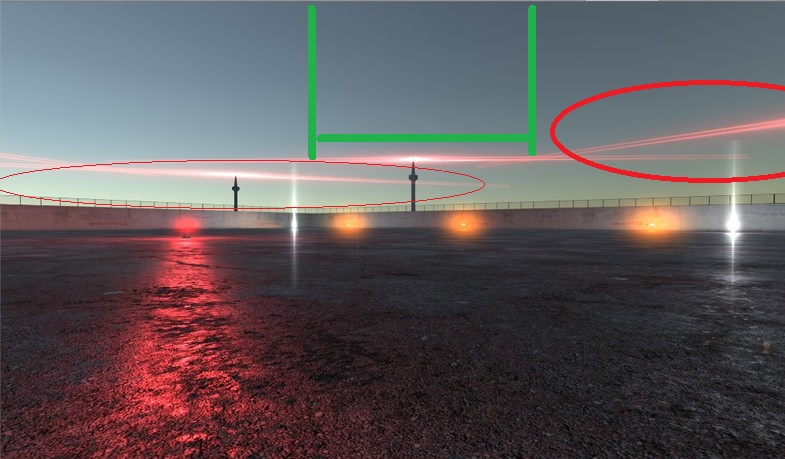
[ ](https://www.youtube.com/watch?v=qSWDjkRLCDY)
---
### Author:  [@makeshiftwings](https://discussions.unity.com/u/makeshiftwings)
#### Post date: [December 4, 2016, 9:44pm UTC](https://discussions.unity.com/t/parallel-lookat/647909/2 "2016-12-04T21:44:22Z")
You need to use the version of LookAt that also specifies the up vector, like this:
transform.LookAt(camera.transform.position, Vector3.up);
---
### Author:  [@UnityLighting](https://discussions.unity.com/u/UnityLighting)
#### Post date: [December 5, 2016, 7:04am UTC](https://discussions.unity.com/t/parallel-lookat/647909/3 "2016-12-05T07:04:13Z")
> [@makeshiftwings](#):
>
> You need to use the version of LookAt that also specifies the up vector, like this:
>
> transform.LookAt(camera.transform.position, Vector3.up);
Thank you. But nothing changed.
---
### Author:  [@ThermalFusion](https://discussions.unity.com/u/ThermalFusion)
#### Post date: [December 5, 2016, 7:15am UTC](https://discussions.unity.com/t/parallel-lookat/647909/4 "2016-12-05T07:15:54Z")
Just set the rotation of flare to the rotation of camera.
If needed rotate 180 degrees around local Y
---
### Author:  [@UnityLighting](https://discussions.unity.com/u/UnityLighting)
#### Post date: [December 5, 2016, 8:23am UTC](https://discussions.unity.com/t/parallel-lookat/647909/5 "2016-12-05T08:23:53Z")
> [@ThermalFusion](#):
>
> Just set the rotation of flare to the rotation of camera.
> If needed rotate 180 degrees around local Y
[https://www.youtube.com/watch?v=M3\_9Pn5t0OY](https://www.youtube.com/watch?v=M3_9Pn5t0OY)