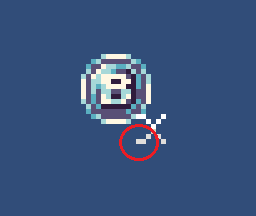
Image and Text alignment is off by a half pixel with pixel perfect canvas enabled.
This gif demonstrates the text snapping incorrectly. Notice how the top left pixel of the text does not line up with the bottom right pixel of the icon:
This is obviously an issue when rendering the game. Look at how the sprite is stretched:
I tried it and my text snaps correctly. I’ve set the font rendering to “Hinted Raster” and activated the “Pixel Perfect” in Canvas. Can it be the font? (Try another one). Or may be the Canvas Scaler? I’m using the default CanvasScaler with “Constant Pixel Size”, Scale Factor 1, Pixels Per Unit 100.