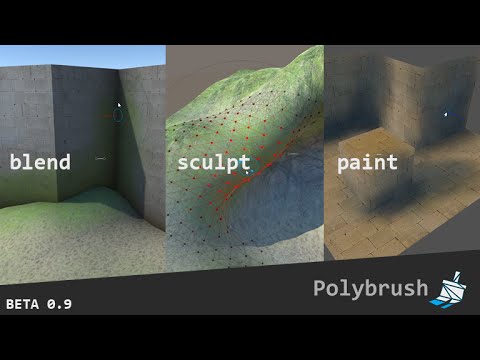
Hi all! “Polybrush” is a tool that lets you sculpt organic meshes, blend up to 12 textures, paint vertex colors, and more on the way. Similar to Unity’s terrain tools, but with the freedom to work on any mesh at all (including ProBuilder meshes, more on that later), and some extra features as well.
Caves, tunnels, and other complex, otherwise-impossible terrain details
Adding special concave areas to your terrain
Custom rock/cliff walls, islands, etc
visually merging terrain with structures (ie, pushing sand/dirt up toward foundation/etc)
Use Texture Blending for:
Painting terrain textures onto meshes
Paint on grunge, moss, dirt, rust, etc (my favorite!)
Use Vertex Painting for:
Adding color to geometry
Hand-painting lighting (great for mobile games, or unique look)
Painting simple grunge, dirt, and detail onto models
Polybrush is still in a very early stage, but we’ve had a lot of interest, so it’s being released as an “Early Beta” version, on the Unity Asset Store. Beta purchases will be $65 instead of $95, and you get to help decide how we build Polybrush toward it’s final version.
We’ll be adding more info as the tool develops, looking forward to questions/comments/feature requests/etc!
We haven’t done any runtime work yet, but that could be in the future, sure
We just pushed to the Asset Store, should be available there ASAP! Sorry for the wait. Otherwise, purchasing via webstore just means you download from our webpage, anytime you need.
It looks promising, i have few questions :
-What materials are supported ? Normal maps , detail maps ?
-This is trilinear UV shader ?
-Does it react to lights and can it uses Unity lightmap baking ?
-Does it contains collision ? Can it generate a lower detail mesh for collision handling ?
-What are the mesh polygons limit ? It is possible to make mesh as large as a 128 or 256 terrain mesh ?
It is possible to sculpt a low poly version and save it as collision , than have a sudivision brush to detail some parts ?
Do you plan some auto painting texture feature based on mesh angle (grass on floor and rocks elsewhere) to speed up the painting before detaillling manually ?
Polybrush sculpts geometry on any imported mesh, and any material at all can be on that mesh. No limits However- if you intend to paint vertex colors, you’ll need to use some sort of vertex-color-enabled material. Similarly, for painting textures, you’ll need to use a material that supports this feature. We’ve included example materials for each, and detailed documentation regarding the example texture-blending material.
You could use a triliinear UV shader, sure! Our example does not. Again, any material at all, will work just fine
I think there’s a bit of confusion- no worries, I should have made it more clear! Polybrush doesn’t create a fancy mesh/shader/etc. It just edits existing meshes. So, you can use any mesh, any material, and it’ll be just fine. So, to answer, yes, it’ll react to light/etc just the same as any other mesh in Unity- that part is completely up to you, we just enable sculpting and painting
Yep, it’s just a mesh, so collision is no different
You could do this, sure
We’ve talked about this, yep, and it may happen- but can’t say for sure.
Thanks zenGarden, sorry if I didn’t make things clear enough (I’ll edit the description). I think the most important answer is, Polybrush does not “create” (or require) any special meshes, textures, shaders, etc. All Polybrush does, is enable you to sculpt and paint on existing meshes, Unity I hope that helps to clear it up!
How do you keep good UV when you extrude some faces without such shader ?or when you grow volume.
In the video we see texture deformation when you grow some mesh volume.
Sure, we’re open to a discount for Bundle users, just email us directly for info.
As for a sale, we don’t intend to put the tools on further sales- it devalues the product and makes full-price purchase customers unhappy. However, Polybrush is currently $30 off while in Beta, which should last for a couple more weeks, depending on development.
I am also having this issue. I don’t have terrain in my scene though. Mine seems to freeze when I change from focus on the scene view to the Hierarchy. No error codes appear it just freezes requiring Ctrl+alt+del.
Also windows doesn’t recognise unity as not responding. Its mem usage and cpu ect all seem normal its just frozen and cannot click on anything within Unity.
@Brity and @Collrain - thanks for the detailed bug reports! Will take a look ASAP.
If you have time to also post this to our official support forum at “www.procore3d.com/forum”, that really helps ensure we can fully track the issue. Either way, we’ll get right on this and have an update quickly, thanks again for the info!
Thanks for the reports, I just committed the fix for both of these crashes. Asset Store update submitted (0.9.4b0) and should be live any time now. Also included in this update are two new shaders for legacy lighting mode.
That’s what I thought before I purchased. I waited several days thinking but do I really need this, I have two other tools that do a similar thing. But the other tools have terrible customer service and bad workflow.
I know ProCore customer service is amongst the best of them and they handle criticism so well. That’s why I have all their tools and even double purchased. (purchased a few here and there then purchased the bundle)
Also this is a very well thought out tool. I love the way I can adjust the brush size and falloff very speedy workflow.
I’m also happy with the price. Its a complicated tool condensed into an easy to use package. One thing I’m impressed with is the speed at which it handles a large vert count object. I created a massive plane and subdivided it loads to see how PolyBrush handled, it seemed fine, smooth and responsive. Any extra features would be a bonus but it already contains all of the functionality I personally wanted.
Thanks for the quick fix Karl_. I’ll try it out again once I’m home from work.
@Collrain and @Brity , thanks very much! It’s really good to hear that! I know Karl has worked like mad to make this an especially solid “beta” launch.
PS- may I shamelessly ask if you could post reviews on the Asset Store? Those really help new products!
@yahodahan
Can the tool delete faces and weld vertex ? This is essential to build caves or holes on some mesh imported for example.
It is included a triplanar shader in the actual version ? It is usable to avoid texture obvious deformations when we sculpt a mesh ?
 Sorry for the wait. Otherwise, purchasing via webstore just means you download from our webpage, anytime you need.

 Those really help new products!