# Post Processing in VR?
**URL:** https://discussions.unity.com/t/post-processing-in-vr/689002
**Category:** Post-Processing
**Tags:** Post-Processing, Scripting
**Created:** [January 19, 2018, 11:54pm UTC](https://discussions.unity.com/t/post-processing-in-vr/689002 "2018-01-19T23:54:27Z")
**Posts on this page:** 20
**Page:** 1
### Author:  [@abojiuc](https://discussions.unity.com/u/abojiuc)
#### Post date: [January 19, 2018, 11:54pm UTC](https://discussions.unity.com/t/post-processing-in-vr/689002/1 "2018-01-19T23:54:27Z")
How can I use post processing in VR? The graphics look really dull without it.
---
### Author:  [@lordofduct](https://discussions.unity.com/u/lordofduct)
#### Post date: [January 20, 2018, 12:02am UTC](https://discussions.unity.com/t/post-processing-in-vr/689002/2 "2018-01-20T00:02:44Z")
Can you be more specific?
Have you tried just using post processing regardless of VR?
> **[Unity - Manual: Post-processing and full-screen effects](https://docs.unity3d.com/Manual/PostProcessingOverview.html)**
Is there something about post processing that isn’t working in VR?
---
### Author:  [@abojiuc](https://discussions.unity.com/u/abojiuc)
#### Post date: [January 20, 2018, 12:22am UTC](https://discussions.unity.com/t/post-processing-in-vr/689002/3 "2018-01-20T00:22:29Z")
I have and it worked, but there’s no tutorial on how to set it up in VR
---
### Author:  [@lordofduct](https://discussions.unity.com/u/lordofduct)
#### Post date: [January 20, 2018, 12:24am UTC](https://discussions.unity.com/t/post-processing-in-vr/689002/4 "2018-01-20T00:24:39Z")
I’m still not understanding how VR has to do with this.
If you set it up, and it works… why does it need to have a VR oriented tutorial?
---
### Author:  [@abojiuc](https://discussions.unity.com/u/abojiuc)
#### Post date: [January 20, 2018, 12:29am UTC](https://discussions.unity.com/t/post-processing-in-vr/689002/5 "2018-01-20T00:29:10Z")
> [@lordofduct](#):
>
> I’m still not understanding how VR has to do with this.
>
> If you set it up, and it works… why does it need to have a VR oriented tutorial?
It works if you have a non vr project, then you just have one camera to deal with. VR cameras also have a forward rendering path which is different from the tutorial settings I’ve seen so far.
---
### Author:  [@lordofduct](https://discussions.unity.com/u/lordofduct)
#### Post date: [January 20, 2018, 12:35am UTC](https://discussions.unity.com/t/post-processing-in-vr/689002/6 "2018-01-20T00:35:20Z")
OK…
This is what I’m asking, what is happening that is not working in VR?
My point is, describe your problem. Give us details. Give us a way to recreate what is going on.
Why should we put in effort to solve your problem if you won’t put in the effort to even describe it to us?
---
### Author:  [@abojiuc](https://discussions.unity.com/u/abojiuc)
#### Post date: [January 20, 2018, 12:47am UTC](https://discussions.unity.com/t/post-processing-in-vr/689002/7 "2018-01-20T00:47:09Z")
You need a deffered rendering path for post processing and VR uses a forward rendering path, and there’s no tutorials anywhere for this.
---
### Author:  [@Ryiah](https://discussions.unity.com/u/Ryiah)
#### Post date: [January 20, 2018, 2:25am UTC](https://discussions.unity.com/t/post-processing-in-vr/689002/8 "2018-01-20T02:25:08Z")
> [@abojiuc](#):
>
> You need a deffered rendering path for post processing
Unity’s Post Processing Stack is capable of being used with forward rendering. You just won’t have every single effect available to you (like the manual entry and the script itself says you won’t have Screen Space Reflections).
[https://www.assetstore.unity3d.com/en/#!/content/83912](https://www.assetstore.unity3d.com/en/#!/content/83912)
[https://docs.unity3d.com/Manual/PostProcessing-Stack-SetUp.html](https://docs.unity3d.com/Manual/PostProcessing-Stack-SetUp.html)
---
### Author:  [@abojiuc](https://discussions.unity.com/u/abojiuc)
#### Post date: [January 20, 2018, 3:52am UTC](https://discussions.unity.com/t/post-processing-in-vr/689002/9 "2018-01-20T03:52:44Z")
thank you, I don’t think I can preview the effects since I have to set it for each eye camera, so how do I find the scene view camera so I can test things out?
---
### Author:  [@abojiuc](https://discussions.unity.com/u/abojiuc)
#### Post date: [January 20, 2018, 3:56am UTC](https://discussions.unity.com/t/post-processing-in-vr/689002/10 "2018-01-20T03:56:45Z")
never mind got it to work, you can just click on the camera
---
### Author:  [@AdamBL](https://discussions.unity.com/u/AdamBL)
#### Post date: [May 31, 2018, 3:54pm UTC](https://discussions.unity.com/t/post-processing-in-vr/689002/11 "2018-05-31T15:54:45Z")
Sorry to dig up an old thread, but do you need to apply the effect to each camera (left eye, right eye, center) or will just applying it to the center do? Or do you need to apply it to the rig itself somehow?
---
### Author:  [@abojiuc](https://discussions.unity.com/u/abojiuc)
#### Post date: [June 4, 2018, 10:02pm UTC](https://discussions.unity.com/t/post-processing-in-vr/689002/12 "2018-06-04T22:02:18Z")
> [@AdamBL](#):
>
> Sorry to dig up an old thread, but do you need to apply the effect to each camera (left eye, right eye, center) or will just applying it to the center do? Or do you need to apply it to the rig itself somehow?
I did get it to work I believe by just applying it to the center. I don’t think you need a post processing component for each eye.
---
### Author:  [@psych77](https://discussions.unity.com/u/psych77)
#### Post date: [June 21, 2018, 6:13pm UTC](https://discussions.unity.com/t/post-processing-in-vr/689002/13 "2018-06-21T18:13:45Z")
This is not working at all for me on Oculus rift. Tried everything. Used to work before i installed 2018.1 and lightweigt pipeline.
---
### Author:  [@abojiuc](https://discussions.unity.com/u/abojiuc)
#### Post date: [July 3, 2018, 9:12pm UTC](https://discussions.unity.com/t/post-processing-in-vr/689002/14 "2018-07-03T21:12:58Z")
I’m using Unity 2017.3.0f3
Putting the Post Processing Behavior script (with the post processing profile chosen for it in the script’s profile variable) in CenterEyeAnchor makes it work.
---
### Author:  [@Krushlit](https://discussions.unity.com/u/Krushlit)
#### Post date: [August 8, 2018, 10:23pm UTC](https://discussions.unity.com/t/post-processing-in-vr/689002/15 "2018-08-08T22:23:15Z")
> [@abojiuc](#):
>
> I’m using Unity 2017.3.0f3
> Putting the Post Processing Behavior script (with the post processing profile chosen for it in the script’s profile variable) in CenterEyeAnchor makes it work.
I did the same and Left and Right Cameras show black screen.
---
### Author:  [@Leland\_Unity](https://discussions.unity.com/u/Leland_Unity)
#### Post date: [November 5, 2018, 7:12am UTC](https://discussions.unity.com/t/post-processing-in-vr/689002/16 "2018-11-05T07:12:44Z")
> [@Krushlit](#):
>
> I did the same and Left and Right Cameras show black screen.
Have you solved your problem? I also encountered such a problem
---
### Author:  [@CNR-EpiTel](https://discussions.unity.com/u/CNR-EpiTel)
#### Post date: [March 12, 2019, 12:18pm UTC](https://discussions.unity.com/t/post-processing-in-vr/689002/17 "2019-03-12T12:18:56Z")
I’m reluctant to add postprocessing in VR because of that.
---
### Author:  [@unity\_gQOrGCjvZVHgaw](https://discussions.unity.com/u/unity_gQOrGCjvZVHgaw)
#### Post date: [May 6, 2019, 7:16am UTC](https://discussions.unity.com/t/post-processing-in-vr/689002/18 "2019-05-06T07:16:50Z")
If you don’t have a VR headset connected Unity will use the fallback camera. This means you will have to add all components to that camera as well if you want to see any differences during testing. Once connected to a headset, unity will use the standard camera.
---
### Author:  [@SharonEL](https://discussions.unity.com/u/SharonEL)
#### Post date: [May 24, 2019, 12:53pm UTC](https://discussions.unity.com/t/post-processing-in-vr/689002/19 "2019-05-24T12:53:42Z")
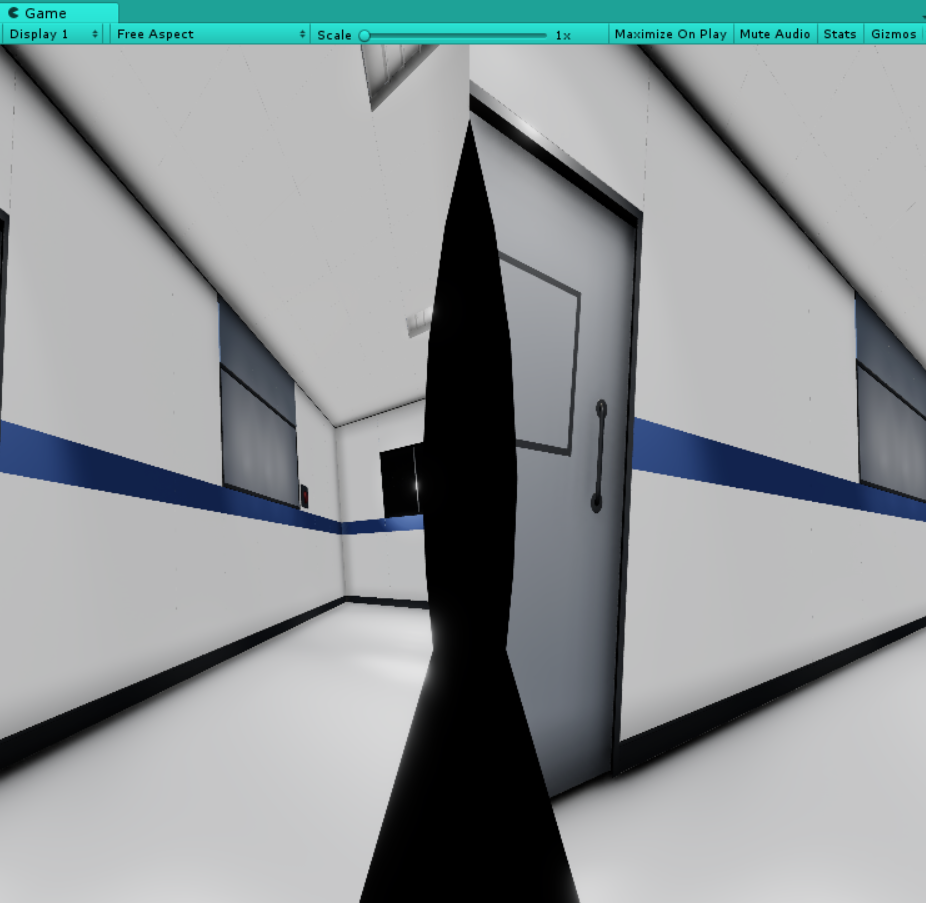
I have following issue: I want to create a VR Game with Post Processing, but when I start testing at first it shows me a black screen, then I relode it again, second time: Splittet eye view. Left and right. I don’t know how to fix it. And yes, I read the whole thread. My Post.Proc. Script is on my VR Camera, only AO, Bloom, Color Grading on.
Could someone help me? Is there a newer version where the problem is fixed? Thanks!
---
### Author:  [@TeamDefiant](https://discussions.unity.com/u/TeamDefiant)
#### Post date: [September 5, 2019, 10:07am UTC](https://discussions.unity.com/t/post-processing-in-vr/689002/20 "2019-09-05T10:07:57Z")
I’m also trying to get post processing to work with the LWRP in VR.
It works in desktop mode as I expect, but when I build it onto a VR device, (Oculus Quest in my case) I don’t get any PP effects at all.
Unity 2019.2.2f1
LWRP: 6.9.1
PP: 2.1.7
PP Effects: Bloom, Vignette, Chromatic Aberration, and Grain.
[Next page](https://discussions.unity.com/t/post-processing-in-vr/689002.md?page=2)