Hello, everyone. I’m trying to make a shader to use when characters are behind walls, to draw a transparent silhouette (blending a solid color with the wall).
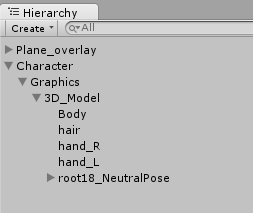
The problem that I have is that my characters are modelled with more than 1 mesh, so even if I make the shader to avoid rendering, and thus blending, hidden parts, when it renders another mesh from the same character, the blending inevitably occurs, as you can see in the picture attached. The hierarchy of my model also looks like in the other picture.

Now, to the core of the problem. I thought I could write the stencil buffer, and then the other meshes of the same character would ignore the parts already drawn, but that doesn’t work if there are other characters overlapping that character, they would not render the silhouette, resulting in fake visual depth order, like this:
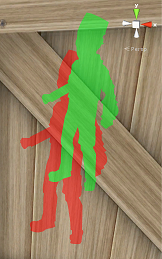
This is the shader to get this result:
SubShader {
            Tags { "Queue" = "Transparent+100" "IgnoreProjector"="True" "RenderType"="Transparent" }
            LOD 100
            ColorMask RGB
            Lighting Off

            Pass {
               //the first time the silhouette is rendered, writes 10 to the stencil. Other passes won't render, because stencil doesn't pass (Comp NotEqual)
                Stencil {
                    Ref 10
                    Comp NotEqual
                    Pass Replace
                }

                ZTest Greater  //to draw only behind walls
                ZWrite Off
                Blend SrcAlpha OneMinusSrcAlpha

                CGPROGRAM
                #pragma vertex vert
                #pragma fragment frag
                #include "UnityCG.cginc"

                uniform float4 _ColorOverlay;

                struct vertexOutput { float4 pos: POSITION; };

                vertexOutput vert ( appdata_base v ) {
                    vertexOutput output;
                    output.pos = mul(UNITY_MATRIX_MVP, v.vertex);
                    return output;
                }
                float4 frag ( vertexOutput input ) : COLOR {
                    float4 lColor     = _ColorOverlay;
                    lColor.a = 0.5;
                    return lColor;
                }
                ENDCG
            }
}
Then what I tried was to “reset” the stencil buffer after rendering the mesh, with an extra pass like this:
Pass {
                ZTest Always
                Colormask 0
                ZWrite Off

                Stencil {
                    Ref 10
                    Comp Equal
                    Pass Zero
                }
            }
…but then, what I got is the first result I told. That would be with the 2 characters:

So… what can I do to get the characters with all its meshes in a flat color, and in the correct depth order?
Any help would be appreciated, shader gurus! Thanks for your time!