Following some threads around, I’m trying to get a random Idle animation with blend tree and some custom script, but it’s not working…
Basically I’ve a standard Idle animation and I’d like that once in a while, randomly, a new Idle animation is played (called Idle_Random).
I’ve set a Blend Tree with the two idles and a float parameter “IdleRandom”. If this float parameter is equal to 0, the character is in standard Idle, if the float is equal to 1, the character plays the occasional Idle anim.
I’ve set an event at the end of the standard Idle animation, that calls the “RandomIdle”. But unfortunately is not working. When the random range is triggered, my character freezes and is not playing anything.
Here the script attached to my character.
using System.Collections;
using System.Collections.Generic;
using UnityEngine;
public class RandomizeIdleType : MonoBehaviour
{
    Animator animator;
    void Start()
    {
        animator = GetComponent<Animator>();
    }
    void RandomIdle()
    {
        if (Random.Range(1, 5) == 1)
        {
            animator.SetFloat("IdleRandom", 1);
        }
    }
}
And attached a screenshot of the Blend Tree parameters.
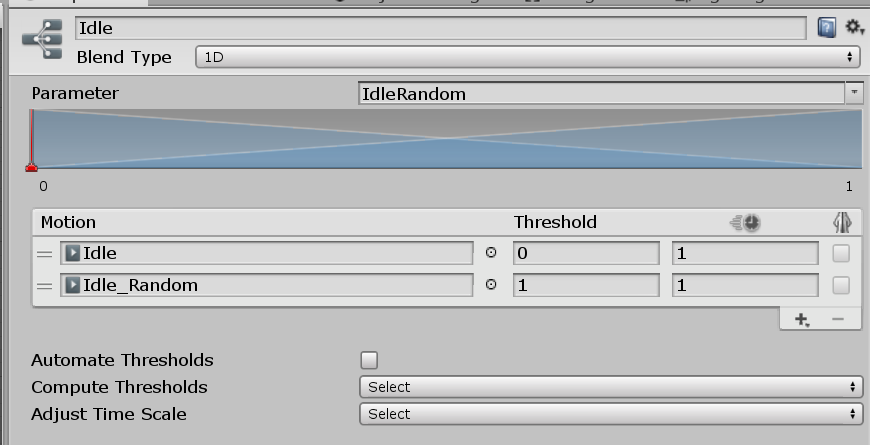
The method called from the last frame of my standard Idle anim.

And my animator screen with all the branches.

Why is not working?
It’s because of the nested Blend Trees?
Something wrong with the script?
Please let me know!
Thanks!