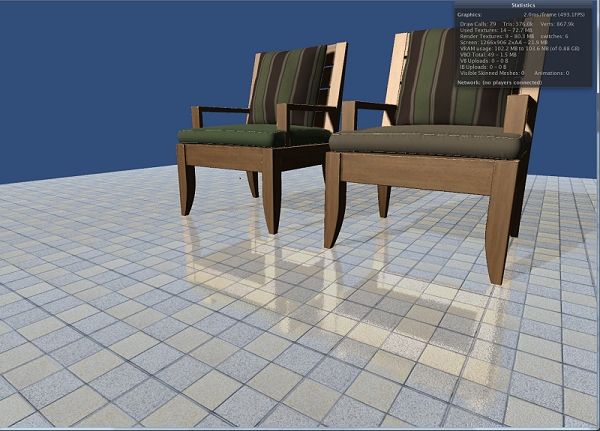
Reflective Fade

Hi, i’m trying to get reflections like in the image below. I rendered the picture using Brazil2 from Splutterfish. Now i have seen the unity3d reflective shaders but they are all 100% reflective and don’t give a procedural fade. How should i go about getting this effect without writing my own shader since i’m horrible if not unable to do so.

Mod: oversized images removed

I don’t see any fade in these pictures. There is a shadow which looks like aggressive ambient occlusion, and a white mask for the logo in the second picture, but otherwise the reflections are of equal strength regardless of distance from the reflective surface, or angle of reflection.

That said, if you want the fresnel effect (Apple-style faded reflections), you probably want to modulate reflection strength according to the facing angle. Check out the rim light component in this shader for an example of a facing angle.

Apolagies for the poor picture choice, but the freshnel effect is what i am after. Sadly my shader programming experience is nil.

What’s a “basic” way of tackling this? been reading a few posts and some people get along way with just copy pasting bits from other shaders.

Hi Daniel,

I’d like to fade out the reflection according to the distance from the reflecting surface, so could you please put me onto the right track? Is there an example of something similar to start out with?

Thanks a lot
Greg

someone?

Have u try just cloning everything and flipping it then applying some kind of alpha shadier to where u can have fade flip/clone mesh.

Thanks showoff. I’ll try to experiment with something like that, although I would like to use the MirrorReflection script with the additive reflection shader.
But to be able to do gradual fade and not fade the whole reflection I guess I’d need to rewrite the fixed pipeline reflection shader to CG, because I am not sure whether I could achieve a gradual fade with the fixed pipeline one.

So I’ll keep experimenting, but if someone have an idea I’d be glad to hear it.

Thanks
Greg

The fade based on vertical position is a trick that was used in early games to simulate the fresnel effect. You can do a much better approximation of that effect by calculating a fresnel term and multiplying your reflection strength by that.

Hi all,

Could you please check out the result?
I started out with the water shader and modified it for reflective surfaces.
You can adjust the reflection strength and add blur.

So please take a look at it and tell me if it looks right or not. And maybe if you have an idea on how to improve it that would be great.

Thanks a lot
Greg

EDIT.: link deleted

Well I don’t know if anyone tried this or not, but what I am trying is to add bumpmapping to the reflective surface and to the reflected image.

My first question is, can the main texture bumpmapping be added to the same pass where the reflection is calculated or it must be in a separate pass?

EDIT: I’ve just realized that I lost the shadows. Is it possible to get them back on the reflective surface?

At the moment I can perturb the reflection image with the bumpmap (here the tiling of the bumpmap should be the same as the tiling of the texture) but I cannot apply the bumpmap on the base texture.
here is the shader code:

Shader "FX/SurfaceReflection"
{ 
	Properties
	{
		_Color ("Reflection strength", color) = (1,1,1,1)
		_MainTex ("Main texture", 2D) = "" {}
		_BumpMap ("Bumpmap (RGB) ", 2D) = "bump" {}
		_Fresnel ("Fresnel (A) ", 2D) = "gray" {}
		_ReflectionTex ("Internal Reflection", 2D) = "" {}
	}

	// -----------------------------------------------------------
	// Fragment program cards


	Subshader
	{ 
		Pass
		{
			CGPROGRAM
			#pragma vertex vert
			#pragma fragment frag
			#pragma multi_compile_builtin
			#pragma fragmentoption ARB_precision_hint_fastest 
			#pragma fragmentoption ARB_fog_exp2

			#include "UnityCG.cginc"
			#include "AutoLight.cginc"


			float4 _MainTex_ST, _BumpMap_ST;

			struct v2f {
				V2F_POS_FOG;
				LIGHTING_COORDS
				float3 ref;
				float3 viewDir;
				float3 lightDirT;
				float2 uv;
				float2 uv2;
				float4 color: COLOR;
			};

			v2f vert(appdata_tan v)
			{
				v2f o;
				PositionFog( v.vertex, o.pos, o.fog );
				
				o.uv = TRANSFORM_TEX(v.texcoord, _MainTex);
				o.uv2 = TRANSFORM_TEX(v.texcoord, _BumpMap);
				
				// object space view direction (will normalize per pixel)
				o.viewDir.xzy = ObjSpaceViewDir(v.vertex);
				
				TANGENT_SPACE_ROTATION;
				o.lightDirT = mul( rotation, ObjSpaceLightDir( v.vertex ) );
				
				// calculate the reflection vector
				float3x4 mat = float3x4 (
					0.5, 0, 0, 0.5,
					0, 0.5 * _ProjectionParams.x, 0, 0.5,
					0, 0, 0, 1
				);	
				o.ref = mul (mat, o.pos);
				
				TRANSFER_VERTEX_TO_FRAGMENT(o);
				return o;
			}
			
			sampler2D _MainTex;
			sampler2D _BumpMap;
			sampler2D _Fresnel;
			sampler2D _ReflectionTex;
			float4 _Color;

			half4 frag( v2f i ) : COLOR
			{
				i.viewDir = normalize(i.viewDir);

				float3 normal = tex2D(_BumpMap, i.uv2).xyz * 2 - 1;
				
				// fresnel factor
				half fresnelFac = dot( i.viewDir, normal );
				
				// perturb reflection/refraction UVs by bumpmap, and lookup colors
				
				float3 uv1 = i.ref; uv1.xy += normal;
				half4 refl = tex2Dproj( _ReflectionTex, uv1 );
				refl *= _Color;
				// final color is between refracted and reflected based on fresnel	
				half4 color;
				float4 base = tex2D(_MainTex, i.uv);
				
				half4 surface = tex2D( _Fresnel, float2(fresnelFac,fresnelFac) );
				color.rgb = lerp( surface.rgb, refl.rgb, surface.a );
				color.a = refl.a * surface.a;
				
				DiffuseLight(i.lightDirT, normal, base, LIGHT_ATTENUATION(i) );
				
				return color + base;
			}
			ENDCG
		}
	}

would be nice if someone could point out where to add the main texture bumpmapping

Thanks
Greg

297158--10567--$refl_bump_103_104.png

Hi,

so I could add shadows by adding a second diffuse material to the surface so that it receives shadows and I could blend it - with more or less success - to the material that reflects.
I also could add the diffuse bumpmap shader in the second pass so it adds a bumpmap to the reflecting material.

Where I am really stuck at the moment is how to make the reflected image a bit stronger. The reflection strength color is already maxed out. probably the blending is not the best or there is some other thing to add in the shader code.

Shader "FX/SurfaceReflection"
{ 
	Properties
	{
		_Color ("Reflection strength", color) = (1,1,1,1)
		_MainTex ("Main texture" , 2D) = "" {}
		_BumpMap ("Bumpmap (RGB) ", 2D) = "bump" {}
		_Fresnel ("Fresnel (A) ", 2D) = "gray" {}
		_ReflectionTex ("Internal Reflection", 2D) = "grey" { TexGen ObjectLinear }
	}

	// -----------------------------------------------------------
	// Fragment program cards


	Subshader
	{ 
		
		Pass
		{	
			Blend DstColor SrcColor
			CGPROGRAM
			#pragma vertex vert
			#pragma fragment frag
			#pragma fragmentoption ARB_precision_hint_fastest 
			#pragma fragmentoption ARB_fog_exp2

			#include "UnityCG.cginc"

			float4 _MainTex_ST, _BumpMap_ST;

			struct v2f {
				V2F_POS_FOG;
				float3 ref;
				float3 viewDir;
				float2 uv;
				float2 uv2;
				float4 color: COLOR;
			};

			v2f vert(appdata_tan v)
			{
				v2f o;
				PositionFog( v.vertex, o.pos, o.fog );
				
				o.uv = TRANSFORM_TEX(v.texcoord, _MainTex);
				o.uv2 = TRANSFORM_TEX(v.texcoord, _BumpMap);
				
				// object space view direction (will normalize per pixel)
				o.viewDir.xzy = ObjSpaceViewDir(v.vertex);
				
				// calculate the reflection vector
				float3x4 mat = float3x4 (
					0.5, 0, 0, 0.5,
					0, 0.5 * _ProjectionParams.x, 0, 0.5,
					0, 0, 0, 1
				);	
				o.ref = mul (mat, o.pos);
				
				return o;
			}
			
			sampler2D _MainTex;
			sampler2D _BumpMap;
			sampler2D _Fresnel;
			sampler2D _ReflectionTex;
			float4 _Color;

			half4 frag( v2f i ) : COLOR
			{
				i.viewDir = normalize(i.viewDir);

				float3 normal = tex2D(_BumpMap, i.uv2).xyz * 2 - 1;
				
				// fresnel factor
				half fresnelFac = dot( i.viewDir, normal );
				
				// perturb reflection/refraction UVs by bumpmap, and lookup colors
				
				float3 uv1 = i.ref; uv1.xy += normal;
				half4 refl = tex2Dproj( _ReflectionTex, uv1 );
				refl *= _Color;
				
				// final color is between refracted and reflected based on fresnel	
				half4 color;
				float4 base = tex2D(_MainTex, i.uv);
				
				half4 surface = tex2D( _Fresnel, float2(fresnelFac,fresnelFac) );
				color.rgb = lerp( surface.rgb, refl.rgb, surface.a );
				color.a = refl.a * surface.a;
				
				return color + base;
			}
			ENDCG
		}
		pass
		{
			Blend SrcColor OneMinusSrcColor
			CGPROGRAM
			#pragma vertex vert
			#pragma fragment frag
			#pragma multi_compile_builtin
			#pragma fragmentoption ARB_fog_exp2
			#pragma fragmentoption ARB_precision_hint_fastest
			#include "UnityCG.cginc"
			#include "AutoLight.cginc"

			struct v2f { 
				V2F_POS_FOG;
				LIGHTING_COORDS
				float2	uv;
				float2	uv2;
				float3	lightDirT;
			};

			uniform float4 _MainTex_ST, _BumpMap_ST;

			v2f vert (appdata_tan v)
			{
				v2f o;
				PositionFog( v.vertex, o.pos, o.fog );
				o.uv = TRANSFORM_TEX(v.texcoord,_MainTex);
				o.uv2 = TRANSFORM_TEX(v.texcoord,_BumpMap);
				
				TANGENT_SPACE_ROTATION;
				o.lightDirT = mul( rotation, ObjSpaceLightDir( v.vertex ) );	
				
				TRANSFER_VERTEX_TO_FRAGMENT(o);
				return o;
			}

			uniform sampler2D _BumpMap;
			uniform sampler2D _MainTex;

			float4 frag (v2f i) : COLOR
			{
				float4 texcol = tex2D(_MainTex,i.uv);
				
				// get normal from the normal map
				float3 normal = tex2D(_BumpMap, i.uv2).xyz * 2 - 1;
				
				return DiffuseLight( i.lightDirT, normal, texcol, LIGHT_ATTENUATION(i) );
			}
			ENDCG  
		}
	}
}

Thanks a lot for helping out with this
Greg

297317--10568--$refl_bumped_894_208.png

Thanks for the mods for having taken care of the image problem in the first post. (I’ve also resized my images by the way)

I am not sure if it is clear what I am asking so here is a summary.

As far as I understand, there are no shadows on reflective/transparent surfaces, so one need to blend the reflective surface with a non-reflective one to get shadows.

Q.1.: Is this correct?

Q.2.: If yes, am I doing the blending right?

This multiple blending makes the reflected image really dim.

Q.3.: Is it possible to make the reflected image stronger?

Q.4.: If yes, what parameter should be changed for this?

Thanks
Greg

erhm… is it something that noone knows or I am not providing enough info on what I would like to achieve?

bump

Hi,

So here is where I am at.
I could get the reflection showing stronger, but the shadow got fainter.

So I have a material with the tile texture using a diffuse shader and a second material with the same tile texture using the SurfaceReflection shader.

I am using this in the SubShader to achieve this:

Tags {"Queue" = "Transparent" }
Blend DstColor OneMinusDstColor

Would anyone know how could I get both effect (shadow + reflection) blend together without loosing either one’s intensity?

Thanks
Greg

300855--10676--$faded_refl_169.png

Hi Greg,

Im trying to do something very similar with a reflective floor with shadows, what you’ve done looks great, is there any chance of you uploading a sample project for me to take a look at id be happy to repost and modification i make and pictures of the results.

Thanks,
Tony.