[Released] GO Map 3.0 - Location based games made easy

Well, this time it took quite a while but…

GO Map 3.0 is finally here!

GO Map 3.0 takes the map experience to a whole new level, including most of the features already presented in the GO Terrain asset, and many new ones.

GO Map was the first dynamic procedural map being released on the Unity Asset Store about a year and a half ago, and it has been constantly updated since then. With countless new features, a new website, new tutorials and many demo scenes GO Map 3.0 is for sure the most complete package you can find to develop your location based app in Unity 3D.

Still skeptical? Trust the reviews! =)

And get GO Map 3.0 now!

- Marauder’s map - Included in GO Map 3.0

GO Map is a dynamic map SDK for making location based games with unity 3D. Every setting and graphic control is directly customizable from the inspector and no coding is required. The package contains several demo scenes covering many of the GO Map possible styles: classic flat map, real buildings, terrain, satellite, hybrid maps, points of interest, etc.

You aren’t going to find an easier map asset for Unity 3D!

- Maps with elevation - Included in GO Map 3.0
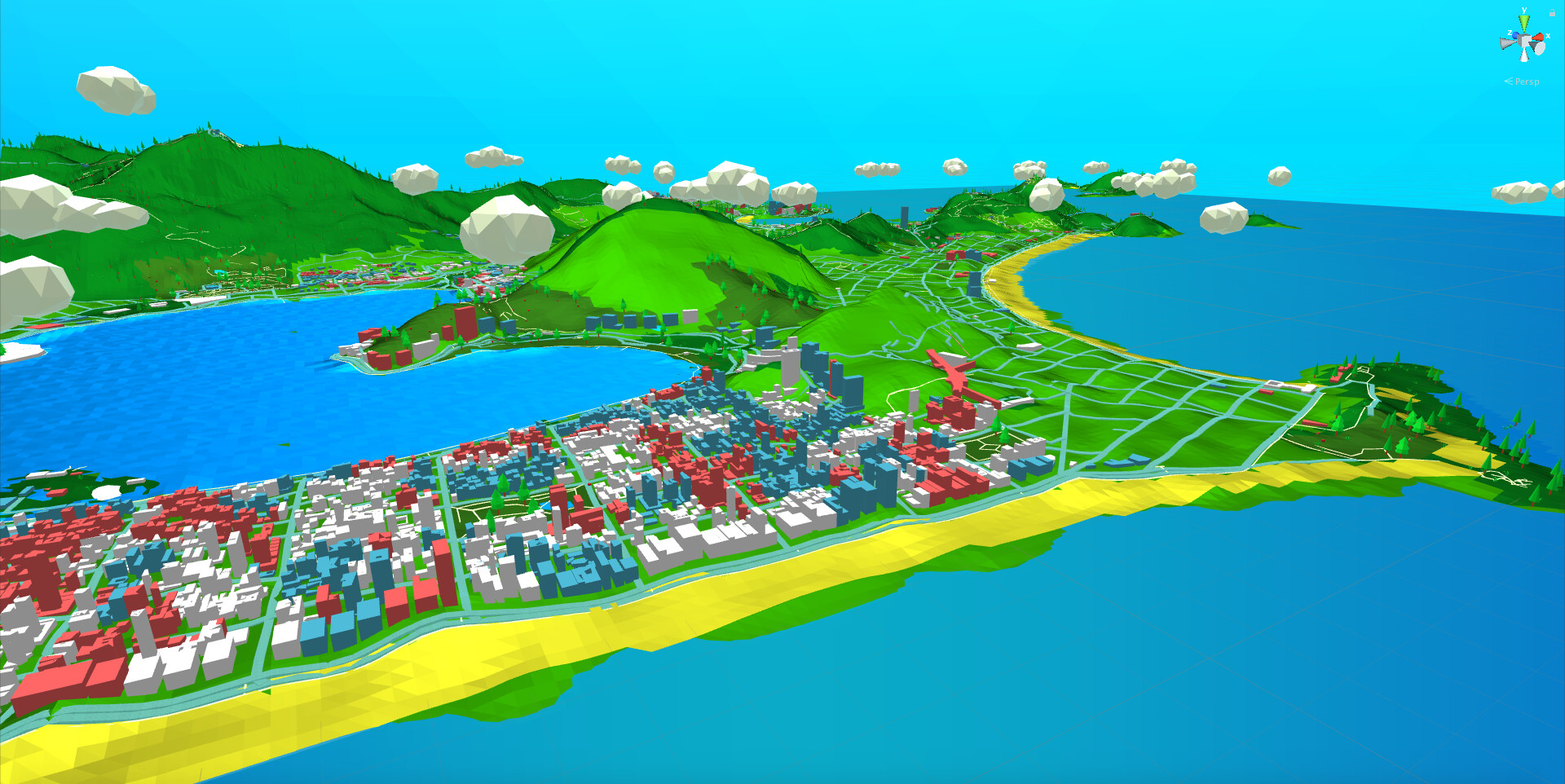
GO Terrain is now included in GO Map asset
Starting with GO Map 3.0 you can enjoy maps with elevation directly, without purchasing GO Terrain. Basically every GO Terrain feature is now included in GO Map with a lot of new upgrades.
GO Terrain asset will be deprecated soon, but don’t worry: Users that have only purchased GO Terrain will get an upgrade offer between the two assets.

This is a list of the included GO Terrain features

  • Maps with elevation (Mapbox and Mapzen)
  • Satellite images (Mapbox)
  • Hybrid maps
  • Low poly models pack
  • Low poly materials and shaders
  • Satellite 4x, for high resolution landscapes.

- Super HD satellite landscapes - Included in GO Map 3.0

New features and styles
GO Map 3.0 allows you to customize the map like you have never done before but keeping the same ease of use that it always had.

Among the new features are:

  • New street names and labels
  • New Google Places POI component
  • Revisited environment system
  • Global scale

For a complete list of new features please visit the documentation page.

- Google Places POI - Included in GO Map 3.0

Significant performance upgrade
The map should be just the background of your game, the land on which to put your game mechanics, so the less resources it takes the better. GO Map 3.0 takes a significant leap in performance compared to the previous versions, and this is due to:

  • Multi threading: everything that could be moved off the main thread it’s gone.
  • Code optimization: mesh generation, protobuffer decode and other scripts were reviewed for faster performances.
  • Combining meshes: this feature is enabled only if selected in the GO Map panel and prevent from spawning too many game objects. Combining every layer’s building into a single mesh reduces the instantiate time and the global load time significantly.
Feedbacks and questions are always appreciated!
Bye
Alan

6 Likes

hi how to add game object to specific location when the tile map is loaded? and when the tile map is removed the object will be removed too, i tried to follow the 3rd tutorial but it is too hard for me Tutorial 03 – How to add objects to the map - GO Map - Unity 3D Asset, can you make this section of tutorial with video please

Hi,

The third tutorial has code bits and images that make it quite easy to follow, there’s even a demo scene of the whole thing inside the GoMap unity package.

Adding game objects take just a line of code and it’s well explained in the docs and many tutorials.
If you want to add objects when a specific tile load you have to register to the event OnTileLoad, that is called when each one of the tiles is loaded.
To make the created objects disappear when the tile is destroyed just make them children of the tile and unity will take care of destroying.

Bye
Alan

Does this plugin count API requests as of MAU on mapbox or web requests? There is a huge difference in pricing depending on the approach. Tanks in advance for the feedback.

I was wondering, is there a way to keep track of build locations? Based on location or something? I thought about a game that could utilizing the information based on the building locations.
However, I’m having trouble inspecting the building objects.

Rays and Ray Hits, but it’s not detecting them. Nor can I find a prefab for the buildings on the maps. I can select them in the Scene view after starting the game.

Any help would be great. Thanks!

To raycast buildings you have to enable useColliders on the buildings layer, to get the info about the building (if there is any for the current one) you have to enable the goFeatureBehavours for the buildings layer.
Then you should be able to hit the buildings meshes and get their info.

1 Like

Thanks! That worked.
I didn’t get any information that was useful, as it would appear there’s nothing for me to identify that building by. Even their position is (0,0,0) :smile:
But it worked!

That’s okay, I have a hundred more ideas for this map asset.

All the info is stored in the GOFeature object and it is stored in the GOFeatureObjectBehaviour component, attached to every GoMap GameObject. (by checking the useGoFeatureBehaviours flag)

1 Like

Hi @AlanGrant ! I’m considering this asset for an AR experience where I need real elevation, and optionally buildings shapes. In the doc you mentioned “The world’s origin is the GPS coordinate (lat,lng) of the center of the tile in which you open GoMap”.
In the AR solution I’m using, the camera, and thus the avatar, starts at the origin. Can this two systems coexist? Would it be as simple as adding a linear offset to the map so the avatar fits the AR camera position? Thanks!

Hi @kosowski , the world origin is something you can ignore in a certain way when developing.
When you start the scene in which GOMap is in, the world origin is automatically set when the first gps position is acquired. Then you should start to enable every gomap related feature.
If your camera and the avatar position is linked with gps coordinates you shouldn’t have any issue.

Hey - recently bought this, getting a lot of mileage out of it. OnTileLoad is a useful event - I’m using it to trigger drawing in-game elements when the tiles containing them load. Of course, I want to destroy those objects when the tile unloads. I’ve edited the GoMap script in my own code to achieve this, but it would be cool to have this built-in in future iterations (or maybe I just missed the correct way to do this?) Thanks!

I’m looking to buy this but it seems like the dev @AlanGrant has gone missing again? No reply to that last post 4 months ago… I’ve also emailed with no response so far. Not looking promising however the product does still look good enough to risk getting. Please prove me wrong Alan! :wink:

Hi, have I somehow missed your post?
Also, it can happen that from time to time the contact form on the GoMap website goes offline and emails get lost, I’m sorry for that. If you don’t hear from me in days after emailing me please send another email.

Bye
Alan

Hi Alan,

Thanks for your reply. I was actually referring to the last post which was January 27th which has no reply, I was just worried that there was no support anymore. I did also email but had no response. The good news is that you are actually responding, and I did just take the risk and buy anyway so looks like we’re good! :slight_smile: I will email you again today. It is “alangrant.unity@gmail.com” yes?

Ok I just emailed you from “robgr****mail@gmail.com” thanks. :slight_smile:

@AlanGrant What do you think about creating a Discord group, could decentralized a little bit the support, It will allow community members to help each other without overwhelming you, will help to build a better community also, fix bugs or propose new ideas.

2 Likes

Hi there, I have developed a game using Mapbox 2.0 but it is not great with React Native and 3D objects placement. I have also utilised Niantic Lightship Maps SDK and the issue is that is being decomissioned. So I have no more options available, I would like to know if this would work in React Native and allow me to place 3D polygons for then through a bridge I have be able to place them in Unity. So Basically , this map would be able to work also in React Native?