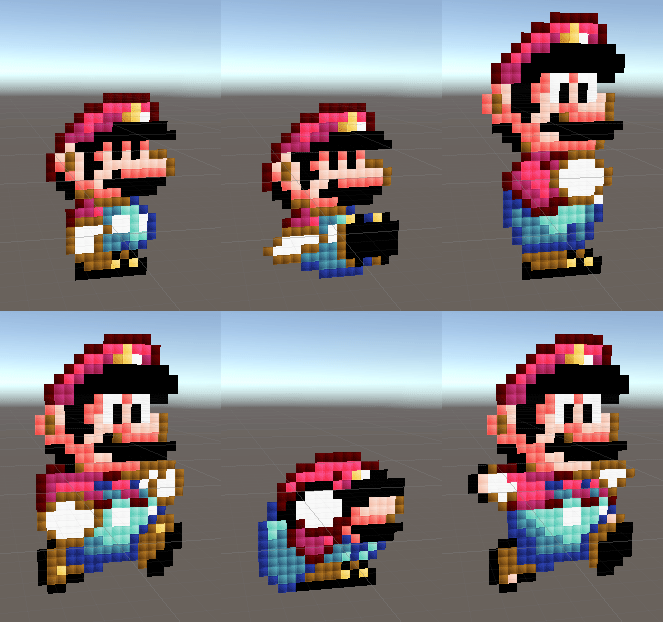
So I’ve stumbled across this article linked below and am really interested as how this can be recreated through Unity. I would like to approach it using some form of post process effect opposed to creating that effect inside Photoshop but the problem is I have zero experience scripting shaders or using shader forge.
I’ve not been able to find any good references for using Shader forge for post process effects and the limited amount of content I have found on scripting a CG shader has really helped.
Is this a smallish task? Could anyone provide some help or examples using CG language or shader forge? Or at least point me to some useful reference sources?
Thanks in advance.
PS. I’ve also posted this in answers if anyone knows a direct answer and wants some unity points .
Pretty simple modification of the Default Sprite shader, to use
(the texture coordinates multiplied by the texture size) % 1
as a lookup on a bevel map, then blend with some function (Line 62 is roughly equivalent to Photoshops ‘Overlay’)
You could theoretically do away with the bevel map and use the lookup coordinates on line 61 to calculate a color in code - would eliminate the bilinear filter bleed around the edges of the big pixels
That’s great, thanks for the reply. I will certainly need to try and learn some CG scripting then. That does not work directly as you’ve provided but it looks like everything I’d need is there and I will certainly keep at it until I can get something going. Thanks again.
Oh, that’s bizarre. I have applied it in game and it is just creating a semi transparent white plane over the entire object or scene depending on where I place it. I may just be doing something wrong, as I mentioned I have never tried to alter shaders before now.
EDIT: I just had some time to go back and look through things in more depth. I was trying to apply it as a post process effect, putting the bevel texture onto the texture slot on the shader. I have made a material with it on and put the bevel texture there and it works perfectly. I look forward to dissecting this now to try and get my head around how it’s working.
 .