Slin's World Projection Shader to Unity 3 fail

I’m trying to port Slin’s excellent shader, but am coming up short.

Here’s what I’ve got so far, which ain’t working.

Shader "WorldProjection" {
    Properties {
      _MainTex ("Texture", 2D) = "white" {}
		_TileFac("Tile factor", Float) = 5
      
    }
    SubShader {
      Tags { "RenderType" = "Opaque" }
      CGPROGRAM 
		#pragma surface surf Lambert vertex:vert
     
      struct Input {
          float2 uv_MainTex;
          float3 worldPos;
     
        sampler2D _MainTex;
          float3 customColor;
      };
		
       void vert (inout appdata_full v, out Input o) {
         float2 s = float2(_TileFac, -_TileFac);
					
					float2 tex0 = worldPos.xy/s;
					float2 tex1 = worldPos.zx/s;
					float2 tex2 = worldPos.zy/s;
					
					float4 color0_ = tex2D(_MainTex, tex0);
					float4 color1_ = tex2D(_MainTex, tex1);
					float4 color2_ = tex2D(_MainTex, tex2);
					
					v.normal = normalize(v.normal);
					float3 projnormal = saturate(pow(v.normal*1.5, 4));
					
					o.customColor = lerp(color1_, color0_, projnormal.z);
					o.customColor = lerp(color, color2_, projnormal.x);

      }
           
 
void surf (Input IN, inout SurfaceOutput o) {


           o.Albedo = (tex2D (_MainTex, IN.customColor).rgb);
         
        }
      ENDCG
    } 
    Fallback "Diffuse"
  }

Any ideas?

What is “Slin’s excellent shader”, and what your shader is trying to do here?

http://www.unifycommunity.com/wiki/index.php?title=3SideProjDiffuse

I think this is a “never mind” though, because Stramit’s shader editor just came out with an example shader that does pretty much the same thing.

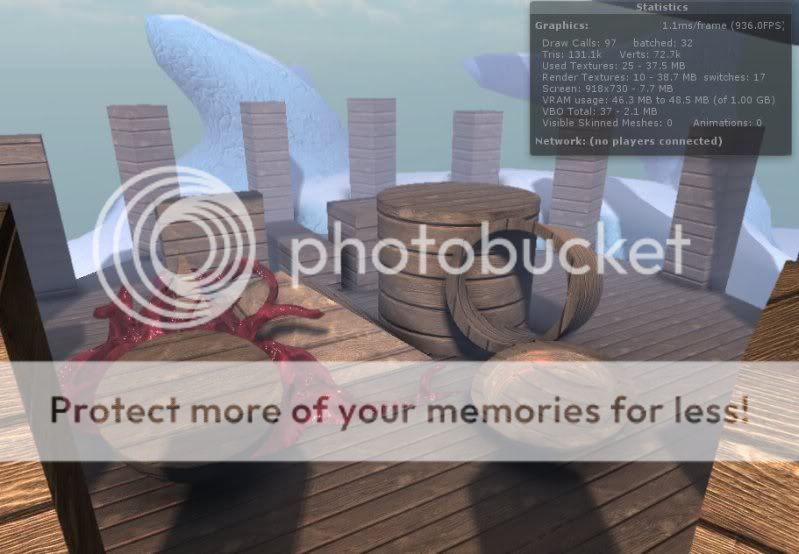
I transtated the projection and blending math to U3 the other day by injecting it into ShaderFusion’s lighting model, which enables most of the eyecandy by default.

Above: color, bumpmapping, fog, pixel lights, soft shadows, specular (rgb value), beast lightmap and post-process (SSAO and Edge Blur).

SF’s alpha cutoff works just fine (not shown above).
In theory, the gloss and emissive properties of the SF template should “just work”, too, if set up.

I have yet to figure out how to do extra projection math for the normals (which worked fine in SF by forcing the lerp value with abs() on three projections instead of using six), so they look inverted on all negative projection axis at the moment. I might just use six projections instead, which is longer code but at least it works.

Static models and terrain use the world projection shader and the rotated props use the local projection shader. I baked the lightmap then removed the static property from the props. Why? Because static or combined meshes lose their individual local space, which alters the end result (sometimes a desired effect).

Here is the world projection shader example:

Shader "ShaderFusion/TexProjWorld" {
	Properties {
_Color ("Diffuse Color", Color) = (1.0, 1.0, 1.0, 1.0)
_SpecColor ("Specular Color", Color) = (1.0, 1.0, 1.0, 1.0)
_Cutoff ("Alpha cutoff", Range(0,1)) = 0.5
_Tiling ("Tiling", Float) = 1
_MainTex ("MainTex", 2D) = "white" {}
_BumpMap ("NormalMap", 2D) = "white" {}
	}
	
	Category {
		SubShader { 
//#Blend
ZWrite On
//#CatTags
Tags { "RenderType"="Opaque" }
			//Tags { "RenderType"="Opaque" }
//#LOD
			LOD 400
//#GrabPass
		CGPROGRAM
		//#LightingModelTag
		#pragma surface surf ShaderFusion vertex:vert alphatest:_Cutoff
		 //use custom lighting functions
		 
		 //custom surface output structure
		 struct SurfaceShaderFusion {
			half3 Albedo;
			half3 Normal;
			half3 Emission;
			half Specular;
			half3 GlossColor; //Gloss is now three-channel
			half Alpha;
		 };
		 //forward lighting function
		 inline half4 LightingShaderFusion (SurfaceShaderFusion s, half3 lightDir, half3 viewDir, half atten) {
			#ifndef USING_DIRECTIONAL_LIGHT
			lightDir = normalize(lightDir);
			#endif
			viewDir = normalize(viewDir);
			half3 h = normalize (lightDir + viewDir);
			
			half diff = max (0, dot (s.Normal, lightDir));
			
			float nh = max (0, dot (s.Normal, h));
			float spec = pow (nh, s.Specular*128.0);
			
			half4 c;
			//Use gloss colour instead of gloss
			c.rgb = (s.Albedo * _LightColor0.rgb * diff + _LightColor0.rgb * s.GlossColor * spec) * (atten * 2);
			//We use gloss luminance to determine its overbright contribution
			c.a = s.Alpha + _LightColor0.a * Luminance(s.GlossColor) * spec * atten;
			return c;
		 }
		 //deferred lighting function
		 inline half4 LightingShaderFusion_PrePass (SurfaceShaderFusion s, half4 light) {
			//Use gloss colour instead of gloss
			half3 spec = light.a * s.GlossColor;
			
			half4 c;
			c.rgb = (s.Albedo * light.rgb + light.rgb * spec.rgb);
			//We use gloss luminance to determine its overbright contribution
			c.a = s.Alpha + Luminance(spec);
			return c;
		 }
 
//#TargetSM
#pragma target 3.0
#pragma multi_compile_builtin
//#UnlitCGDefs
float _Tiling;
sampler2D _MainTex;
sampler2D _BumpMap;
float4 _Color;
		
		struct Input {
			float4 vertex;
			//#UVDefs
			float3 normal;
			float3 worldPos;
			float2 uvCoords;
			float3 worldNormal;
			INTERNAL_DATA
		};
		
		void vert (inout appdata_full v, out Input o) {
			o.worldNormal = mul(_Object2World, float4(v.normal, 0.0f)).xyz;
			o.worldPos = mul(_Object2World, v.vertex);
		}
		
		void surf (Input IN, inout SurfaceShaderFusion o) {
			float4 bump = float4(1.0, 1.0, 1.0, 1.0);
			float3 emissive = 0.0;
			float3 specular = 1.0;
			float gloss = 1.0;
			float3 diffuse = 1.0;
			float alpha = 1.0;
			
			//#PreFragBody			
			float2 s = float2(_Tiling/10, _Tiling/10);
			float2 tex0 = s * IN.worldPos.xy;
			float2 tex1 = s * IN.worldPos.zx;
			float2 tex2 = s * IN.worldPos.zy;

			float4 color0_ = tex2D(_MainTex, tex0); 
			float4 color1_ = tex2D(_MainTex, tex1); 
			float4 color2_ = tex2D(_MainTex, tex2);
			float4 ncolor0_ = tex2D(_BumpMap, tex0); 
			float4 ncolor1_ = tex2D(_BumpMap, tex1); 
			float4 ncolor2_ = tex2D(_BumpMap, tex2);			
			
			float3 projnormal = saturate(pow(normalize(IN.worldNormal)*1.5, 5)); 
			
			diffuse = lerp(lerp(color1_, color0_, projnormal.z), color2_, projnormal.x); 
			bump = lerp(lerp(ncolor1_, ncolor0_, projnormal.z), ncolor2_, projnormal.x);

			o.Albedo = diffuse.rgb * _Color;
			o.Emission = emissive*_Color;
			o.GlossColor = specular*_SpecColor;//They are inverted O_o?
			o.Alpha = alpha;
			o.Specular = gloss;
			o.Normal = UnpackNormal(bump);
		}
		ENDCG
		}
	}
	FallBack "Transparent/Cutout/VertexLit"
}

To use in local space simply change the vert function with this one:

void vert (inout appdata_full v, out Input o) {
					o.localNormal = v.normal;
					o.localPos = v.vertex;
				}

Thank you!

Anybody got a copy of this that works in Unity3 on a Mac?

This shader dowsn’t work right on Macs, there’s huge parts of the geometry that just get’s rendered in plain black.

Sorry to necrobump, but this is the only option I got for what I’m doing…

I’ve tried Werewraith’s shader (Unity 3.2 here), but I get a compiler error saying it would need too many texture interpolators…

If I replace the vert function by the local one, I get a number of different errors, but I assume those are caught before the one above…

Can anyone confirm that this shader works? I don’t have shaderfusion here, but I assume it isn’t necessary… right?

As always, thanks in advance!

Cheers

EDIT:

I managed to fix the errors by commenting out the bumpmap… right now I just want this thing to work…

So, it worked, kind of… It displays very well, but it seems to be in global space, even after changing the vert function to the one below…

Here’s the code now:

// this code was wrong. check below for improved version (same code, only it works now)

I also added a new texture for the side projections, since I want this as a terrain shader…
It worked, but it’s still in world space…

Any thoughts?

Cheers again!

EDIT 2::

I got it to work on local space now!! turns out you HAVE to write to the output normal… I had commented it out because of the bump map issues…

Now I’m faced with a new problem… what to write on this normal?
I tried just writing the localaNormal vector onto it, and while it does work, it’s not fully aligned with the light’s position… meaning the light seems to shine from the sides, while it’s actually straight above the mesh…

I’ll keep trying… in the meantime, if anyone comes up with anything… please… let me know!

Cheers

EDIT 3::

Third time’s the charm as it seems ;D

I think I got it!! just giving a float3(0,0,1) to the normal output produced the expected result!!

It’s working in localspace now! no bumpmap as of yet, but working!!

Here is code:

Shader "Terrain/TexProjWorld" {

	Properties {

		_Color ("Diffuse Color", Color) = (1.0, 1.0, 1.0, 1.0)

		_SpecColor ("Specular Color", Color) = (1.0, 1.0, 1.0, 1.0)

		_Cutoff ("Alpha cutoff", Range(0,1)) = 0.5

		_Tiling ("Tiling", Float) = 1

		_MainTex ("MainTex", 2D) = "white" {}

		_SideTex ("SideTex", 2D) = "white" {}

		_BumpMap ("NormalMap", 2D) = "white" {}

	}


	Category {

		SubShader { 

			//#Blend

			ZWrite On

			//#CatTags

		Tags { "RenderType"="Opaque" }

			//Tags { "RenderType"="Opaque" }

			//#LOD

			LOD 400

			//#GrabPass

		CGPROGRAM

		//#LightingModelTag

		#pragma surface surf ShaderFusion vertex:vert alphatest:_Cutoff

		 //use custom lighting functions


		 //custom surface output structure

		 struct SurfaceShaderFusion {

			half3 Albedo;

			half3 Normal;

			half3 Emission;

			half Specular;

			half3 GlossColor; //Gloss is now three-channel

			half Alpha;

		 };

		 //forward lighting function

		 inline half4 LightingShaderFusion (SurfaceShaderFusion s, half3 lightDir, half3 viewDir, half atten) {

			#ifndef USING_DIRECTIONAL_LIGHT

			lightDir = normalize(lightDir);

			#endif

			viewDir = normalize(viewDir);

			half3 h = normalize (lightDir + viewDir);


			half diff = max (0, dot (s.Normal, lightDir));


			float nh = max (0, dot (s.Normal, h));

			float spec = pow (nh, s.Specular*128.0);


			half4 c;

			//Use gloss colour instead of gloss

			c.rgb = (s.Albedo * _LightColor0.rgb * diff + _LightColor0.rgb * s.GlossColor * spec) * (atten * 2);

			//We use gloss luminance to determine its overbright contribution

			c.a = s.Alpha + _LightColor0.a * Luminance(s.GlossColor) * spec * atten;

			return c;

		 }

		 //deferred lighting function

		 inline half4 LightingShaderFusion_PrePass (SurfaceShaderFusion s, half4 light) {

			//Use gloss colour instead of gloss

			half3 spec = light.a * s.GlossColor;


			half4 c;

			c.rgb = (s.Albedo * light.rgb + light.rgb * spec.rgb);

			//We use gloss luminance to determine its overbright contribution

			c.a = s.Alpha + Luminance(spec);

			return c;

		 }


		//#TargetSM

		#pragma target 3.0

		#pragma multi_compile_builtin

		//#UnlitCGDefs


		float _Tiling;

		sampler2D _MainTex;

		sampler2D _SideTex;

		sampler2D _BumpMap;

		float4 _Color;


		struct Input {

			float4 vertex;

			//#UVDefs

			float3 normal;

			float3 localPos;

			float2 uvCoords;

			float3 localNormal; 

			INTERNAL_DATA

		};


		//void vert (inout appdata_full v, out Input o) {

		//	o.localNormal = mul(_Object2World, float4(v.normal, 0.0f)).xyz;

		//	o.localPos = mul(_Object2World, v.vertex);

		//}

		void vert (inout appdata_full v, out Input o) {

			o.localNormal = v.normal;

			o.localPos = v.vertex; 

		}


		void surf (Input IN, inout SurfaceShaderFusion o) {

			//float4 bump = float4(1.0, 1.0, 1.0, 1.0);

			float3 emissive = 0.0;

			float3 specular = 1.0;

			float gloss = 1.0;

			float3 diffuse = 1.0;

			float alpha = 1.0;


			//#PreFragBody			

			float2 s = float2(_Tiling/10, _Tiling/10);

			float2 tex0 = s * IN.localPos.xy;

			float2 tex1 = s * IN.localPos.zx;

			float2 tex2 = s * IN.localPos.zy;


			float4 color0_ = tex2D(_SideTex, tex0); 

			float4 color1_ = tex2D(_MainTex, tex1); 

			float4 color2_ = tex2D(_SideTex, tex2);

			//float4 ncolor0_ = tex2D(_BumpMap, tex0); 

			//float4 ncolor1_ = tex2D(_BumpMap, tex1); 

			//float4 ncolor2_ = tex2D(_BumpMap, tex2);			


			float3 projnormal = saturate(pow(normalize(IN.localNormal)*1.5, 5)); 


			diffuse = lerp(lerp(color1_, color0_, projnormal.z), color2_, projnormal.x); 

			//bump = lerp(lerp(ncolor1_, ncolor0_, projnormal.z), ncolor2_, projnormal.x);


			o.Albedo = diffuse.rgb * _Color;

			o.Emission = emissive * _Color;

			//o.GlossColor = specular * _SpecColor;//They are inverted O_o?

			o.Alpha = alpha;

			//o.Specular = gloss;

			o.Normal = float3(0, 0, 1);

		}

		ENDCG

		}

	}

	FallBack "Diffuse"

}

Now, onwards onto giving it a heap of textures to interpolate depending on terrain height :slight_smile:

Cheers

Hmm im bit new with shaders, but how i can use this?

Basically, just copy the code over yonder, and paste into a shader file in unity… it should do the rest.

If all goes well, it will appear in the shader list as Terrain/TexProjWorld, so you can apply it to a material.

Btw, I got the multi-texture-over-height thing working! I now have 3 different ‘top’ textures, which get applied depending on vertex height, and some adjustable tweaks.
I’m planning on adding yet some more textures… but the interpolation thing is starting to get a little big… Maybe instead of having a texture for each terrain type, having a single terrain ‘spritesheet’… Only one texture to load, and potentially a lot of terrain types :wink:

Hmm…

Cheers

Great idea on the texture height blend! Vertex height could be used alongside some perlin noise if you want some randomness as well.

Personally I tied the blends to vertex colors so VertexPainter (and the upcoming builtin Unity vertex painter) can be used to manually paint the meshes.

At four projections (left/right, front/back, top and bottom) plus four extra texture blends for vertex colors, it comes to a grand total of 8 texture blends, which are reused for normal maps. Very expensive as you can imagine. And the shader requires to assign 12 textures… Optimizing them in an atlas would be a good idea indeed.

But I am also building a voxel terrain system, where vertices may be colored procedurally (using height, etc.) through script in a one-time vertex painting operation instead of aksing the shader to interpolate all the time (it already does enough as it is!).

You can see my progress in this thread

The completed shaders will be released alongside the voxel terrain, so unless you want to reinvent the wheel or need them -right now-, I currently have the following shaders working (with normal map support):

  • Worldspace (1 diffuse, 1 normal, SM 2.0)
  • Localspace (1 diffuse, 1 normal, SM 2.0)
  • Terrain (2 diffuses, 2 normals, SM 3.0)
  • Terrain, Vertex Color Blend (6 diffuse, 6 normals, SM 3.0)
  • Terrain, Vertex Color Alpha Clamped (6 diffuse, 6 normals, SM 3.0)

Also, I know it’s a very simple change but I’m curious why you need terrain in localspace; do you plan to move/rotate the terrain chunks?

Well, yes. My terrain is so large there’s no conceivable way of drawing the whole thing at once, so I have a crazy setup going on here, that’s actually starting to work…

There is a grid of terrain tiles that follow the main camera around, so there’s always high-definition terrain around the player… these tiles conform themselves to an imaginary sphere, and then adjust their vertices to match the heightmap… Well, there’s actually two heightmaps… (did I mention how huge the terrain is? :wink: )

One heightmap is generated by libNoise, and provides a 3D heightfield which I use to displace the vertices along theire normals (in relation to the planet). This is for the detail terrain.
Then, there is a heightmap texture in which I look up the corresponding pixel for each vertex. That is a much lower resolution map (since it’s an image and all), and I use it to control terrain elevation on a continental scale, so I can have oceans, mountain ranges, and so on…

Along with the terrain grid, is a large flat tile using a water shader. This one only conforms to the planet’s curve once, and then just follows the camera position along the planet’s surface.

Behind all that is a miniature planet, made by another procedural script that generates a sphere section based on camera position and distance, so that for the camera, there’s always a full sphere visible… this miniature planet is rendered by another camera, that follows the motions of the main one, but on a 6000 : 1 scale. This avoids the z fighting issues, and having to deal with massive objects in scene, which is a bug no-no for unity. This mini-planet has a color version of the planet heightfield, so that it looks more or less blended with the terrain grid.

The miniature planet is also capable of deforming to the heightmap, so it serves well as a far-away terrain… it always keeps the mesh with the same level of detail, so there’s always a nice, round horizon. It’s placed at the scene origin, and along with it are spheres for the atmospheric scattering shaders…

All in all, quite a big headache :smile:

I’ll post screenshots when I get the thing working and a little more presentable… there’s still a lot to be done with it, for example, the terrain grid textures are just the standard unity terrain textures… they don’t match too well with the planet texture, so that’s gotta get done eventually… Also, I’m having nightmares trying to optimize the thing so it runs without stuttering… right now I’ve got pretty much the whole thing on coroutines and I’m basically scheduling everything that needs to be done on the tiles so that they appear to update instantaneously, but in fact the math was started long before… trouble is, applying the new mesh to the meshcolliders is a heavy procedure, and there’s no way to break it in parts… the next step will probably be disabling the collider for tiles far from the camera, since you’ll never actually collide with them…

As you can see, I’m going crazy over this thing… I hope it’s worth the effort :wink:

Cheers

I would love to see that in action.

I’ll showcase it once it’s presentable :slight_smile:

For now, I’ve made a major change in my approach… I was using a tile grid because I was having bad stuttering problems with updating the meshcollider’s mesh… apparently, PhysX does some optimizations to the mesh, and that takes a while… and there’s no way to coroutine it without risking having sporadic collider failures (suppose you hit the ground just when the mesh is updating)… And I wanted my scheme to be rock solid…

So, what I did today was to remove the meshcolliders altogether, since they’re just causing trouble… I’ve made a new script that will create a small meshcollider just under the object, and follow it around, masking the terrain… that effectively creates a ‘ground’ just where the object is, and makes the physics completely independent of the terrain mesh.

So that enabled me to go back to the single huge mesh idea, which works a lot better, since there are no vertices to average between levels of detail, no weird normals on the seams… much easier.

I’ve then had this single terrain tile scale itself according to target altitude, so that when you’re high up, you can see farther but with overall less detail… zooming in will reduce the terrain size, therefore increasing vertex density, and thus, more detail.

I’ve also tweaked the terrain shader again… now I’ve added a neat scheme for fading the terrain mesh out according to pixel distance… it fades out at approx. 10km out, and blends in with the background terrain. It does look like a single huge thing now :smile:

I’ve done the same with the water shader, which I must admit looks pretty horrible right now… I gotta find me a decent water shader that’ll work for spherical water (as in not requiring the water to be XZ aligned)… but at least it does fade out over distance now :wink:

The terrain updating scheme is working quite well… I’ve got a 36k poly mesh for the terrain, and it updates over 20 frames… it only replaces the mesh and moves it once the whole updation thing is completed, so it’s effectively weightless at the cost of some delay. The amount of frame skips is adjustable, so for larger meshes you can tradeoff some more response time for more steps, to keep the frame rate acceptable while it’s updating. Right now mine is going at 40-50FPS during the update, and over 1000 while it’s doing nothing… for slower computers It’ll probably need some 30 or 40 skips to keep that framerate.

So, I’m starting to finally feel happy about this contraption… I’ll put up a post about it as soon as it looks a little more decent.

Missing now are, a decent water shader and more tweaking of the atmospheric scattering thingies… those are VERY finnicky…
after that, it’ll probably be good enough for showcasing and possibly even the asset store :slight_smile:

Cheers

I hear you, take the time it needs to be polished :slight_smile:

ShaderFusion (the beta at least) came with a good water shader demo that properly covered surfaces beyond the xz plane, and faded out wherever it touched other meshes. Might be worth looking into.

That might be just what I need!

But isn’t ShaderFusion “payware”? I was hoping I wouldn’t have to buy anything for this project…

Well, if it comes to that, it’d probably cost more than 100 bucks to have someone code up a shader like that :wink:

Cheers


Fantastic!

Thanks! More here: http://forum.unity3d.com/threads/67194-WIP-Dynamic-Terrain-Shaders

Sorry to slightly necro this thread, but there were some compile issues with Werewraiths shader code above, that I thought the simple fix would be worth sharing for future reference.

Essentially the shader is fine, but it fails to compile due to the error ‘Too many texture interpolators would be used for ForwardBase pass’

This was a little odd as it didn’t seem to have too many interpolators , but then one issue with using surface shaders and even shaders in U2.6 is you never (well I find it difficult) know just how much stuff Unity then adds in to support multiple lights, lightmapping and all the rest of the goodies it provides.

So after wasting some time trying to reduce the Inputs and fix this error, I had a quick look at Harvesters version. On the face of it disabling the bumpmap code got around the issue, but doing the same with Warewraiths code still had the error! I then went through line by line looking for something I must have missed between the two, but could find nothing else removed/commented out that would reduce the interpolators.

Then it hit me, the only difference was the naming of worldPos/worldNormal to localPos/localNormal!

Now perhaps this should have been obvious from the start, but worldPos and worldNormal are already used/provided by Unity surface shaders as ‘Additional values that can be put into Input structure’. Simply renaming them to local or anything else for that matter, e.g. thisPos, thisNormal, solves the error, the shader compiles and appears to work perfectly.

What I can’t work out though is why using the native Unity values, causes too many interpolators too be used. Unless that act of using them causes Unity to add additional code to the compile? Guess thats probably it.

So any way to get Warewraiths shader working, simply rename worldPos/worldNormal to anything else in the Input structure and replace any references to ‘world…’ in the code with your new names. Problem solved. You can still use either world or local coordinates, thats not the issue, its just the naming used.

In fact as far as I tell you only need

struct Input 
{
	float3 thisPos;		
	float3 thisNormal;	
};

So now I can get back to trying to work out how to update my own triplanar shader from Unity 2.6 to 3.3 (based on the GPU gems source). I’ve spent hours trying to integrate it with surface shaders, but by the looks of it, it just can’t be done, instead every other triplanar shader example i’ve come across that works in Unity 3.3 has essentially written its own lighting and surface shader, to the point where i’m really not understanding why surface shaders are so great? Go beyond simply tweaking the lighting functions and all manor of issues and problems seem to crop up.

That is exactly why I would have prefered them not to exist… Andnow that they do, at least the documentation for none surface shaders should be improved a lot… I mean things like all the built-in uniforms…
Triplanar projection however should not be a problem with surface shaders.

Yep, i’m trying to learn to love surface shaders and I can see how they can help, but go beyond the basic stuff and I seem to spend most of my time fighting to get stuff working.

As for triplanar, yes thats not a problem with surface shaders I have the gpu gems version working in terms of mixing 3 base textures together, but the lighting is completely messed up, can’t seem to get the surface shader to use the modified normal created from the vertex normal and a normal generated from mixing 3 bumpmaps. I suspect using the above shaders as a basis, including my own lighting function will be the solution.

Though one aspect that is bugging me, is that it appears I can’t get rid of tangent code from within a surface shader, yet as far as I’m aware its irrelevant for triplanar?

It just feels there is too much going on behind the scenes in surface shaders that is not adequately documented or sometimes exposed.

Anyway for completeness here is the full shader

Shader "ShaderFusion/TexProjWorld" 
{
	Properties 
	{
		_Color ("Diffuse Color", Color) = (1.0, 1.0, 1.0, 1.0)
		_SpecColor ("Specular Color", Color) = (1.0, 1.0, 1.0, 1.0)
		_Cutoff ("Alpha cutoff", Range(0,1)) = 0.5
		_Tiling ("Tiling", Float) = 1
		_MainTex ("MainTex", 2D) = "white" {}
		_BumpMap ("NormalMap", 2D) = "white" {}
	}
		
	Category 
	{
		SubShader 
		{ 
			ZWrite On			
			Tags { "RenderType"="Opaque" }
			LOD 400

			CGPROGRAM
				#pragma target 3.0
				#pragma multi_compile_builtin	
				// #pragma debug
				
				//use custom lighting functions	
				#pragma surface surf ShaderFusion vertex:vertWorld  alphatest:_Cutoff
				
				 //custom surface output structure
				 struct SurfaceShaderFusion 
				 {
					half3 Albedo;
					half3 Normal;
					half3 Emission;
					half Specular;
					half3 GlossColor; //Gloss is now three-channel
					half Alpha;
				 };
				 
				 //forward lighting function
				 inline half4 LightingShaderFusion (SurfaceShaderFusion s, half3 lightDir, half3 viewDir, half atten) 
				 {			 
					#ifndef USING_DIRECTIONAL_LIGHT
						lightDir = normalize(lightDir);
					#endif
					
					viewDir = normalize(viewDir);
					half3 h = normalize (lightDir + viewDir);			
					half diff = max (0, dot (s.Normal, lightDir));			
					float nh = max (0, dot (s.Normal, h));
					float spec = pow (nh, s.Specular*128.0);
					
					half4 c;
					//Use gloss colour instead of gloss
					c.rgb = (s.Albedo * _LightColor0.rgb * diff + _LightColor0.rgb * s.GlossColor * spec) * (atten * 2);
					
					//We use gloss luminance to determine its overbright contribution
					c.a = s.Alpha + _LightColor0.a * Luminance(s.GlossColor) * spec * atten;
					return c;
				 }
				 
				 //deferred lighting function
				 inline half4 LightingShaderFusion_PrePass (SurfaceShaderFusion s, half4 light) 
				 {
					//Use gloss colour instead of gloss
					half3 spec = light.a * s.GlossColor;
					
					half4 c;
					c.rgb = (s.Albedo * light.rgb + light.rgb * spec.rgb);
					
					//We use gloss luminance to determine its overbright contribution
					c.a = s.Alpha + Luminance(spec);
					return c;
				 }
				
				float 		_Tiling;
				sampler2D 	_MainTex;
				sampler2D 	_BumpMap;
				float4 		_Color;
							
				// INSANE UNITY 3.3 COMPILE NOTE
				// If you use 'worldPos' or 'worldNormal' in INPUT struct it will ERROR with
				// 'Too many texture interpolators would be used for ForwardBase pass'
				// Replace them with thisPos and thisNormal which aren't surface shader defintions and all is fine.
				
				struct Input 
				{
					float3 thisPos;		
					float3 thisNormal;	
				};	
				
				
				// Vertex program is determined in pragma above
				
				void vertWorld (inout appdata_full v, out Input o)
				{
					o.thisNormal = mul(_Object2World, float4(v.normal, 0.0f)).xyz;
					o.thisPos = mul(_Object2World, v.vertex);
				}

				void vertLocal (inout appdata_full v, out Input o) 
				{
					o.thisNormal = v.normal;
					o.thisPos = v.vertex; 
				}		

				
				void surf (Input IN, inout SurfaceShaderFusion o) 
				{
					float4 bump 	= float4(1.0, 1.0, 1.0, 1.0);
					float3 emissive = 0.0;
					float3 specular = 1.0;
					float gloss 	= 1.0;
					float3 diffuse 	= 1.0;
					float alpha 	= 1.0;
							
					float2 s = float2(_Tiling/10, _Tiling/10);
					float2 tex0 = s * IN.thisPos.xy;
					float2 tex1 = s * IN.thisPos.zx;
					float2 tex2 = s * IN.thisPos.zy;

					float4 color0_ 	= tex2D(_MainTex, tex0); 
					float4 color1_ 	= tex2D(_MainTex, tex1); 
					float4 color2_ 	= tex2D(_MainTex, tex2);
					float4 ncolor0_ = tex2D(_BumpMap, tex0); 
					float4 ncolor1_ = tex2D(_BumpMap, tex1); 
					float4 ncolor2_ = tex2D(_BumpMap, tex2);			
					
					float3 projnormal = saturate(pow(normalize(IN.thisNormal)*1.5, 5)); 
					
					diffuse = lerp(lerp(color1_, color0_, projnormal.z), color2_, projnormal.x); 
					bump 	= lerp(lerp(ncolor1_, ncolor0_, projnormal.z), ncolor2_, projnormal.x);

					o.Albedo 		= diffuse.rgb * _Color;
					o.Emission 		= emissive * _Color;
					o.GlossColor 	= specular * _SpecColor; //They are inverted O_o?
					o.Alpha 		= alpha;
					o.Specular 		= gloss;
					o.Normal 		=  UnpackNormal(bump);
				}
			ENDCG
		}
	}
	FallBack "Diffuse"
//	FallBack "Transparent/Cutout/VertexLit"
}