Hello all,
I’ve been fighting a GUI problem that I’m hoping you can help shed some light on what’s going on. I’m working on a project that uses several scenes to manage game state. Not sure if this is the right approach for this but seemed the most reasonable. Start Game, Game Options, Play Game, etc. The problem I’m running into is that when do a build of the current game when I navigate from my start game state to the next game state (New Game) all the GUI elements (buttons,etc.) are retained from the previous state. My expectation is that the new GUI elements are show and none of the elements from the previous state should be shown. I know I’m missing something probably very simple but I cannot see it. I’ve searched the forums and documentation and am having no luck. Thanks in advance for the help.
To reproduce the problem:
Copy the code listed below into a file:.cs.
Create an empty GameObject in your scene hierarchy.
Attach .cs to the empty object.
Note that this behavior is demonstrated doing a “Build Run” for a Windows standalone. The problem does not appear when playing inside the editor.
using UnityEngine;

public class start_game_state : MonoBehaviour
{
    int m_current_state = 0;
    public bool check_for_patch()
    {
        return false;
    }

    void OnGUI()
    {
        switch( m_current_state )
        {
            case 0:
                    start_game_gui();
                    break;
            case 1:
                    new_game_gui();
                    break;
        }
    }

    void start_game_gui()
    {
        Rect group_rect = new Rect(Screen.width / 2.5F, Screen.height / 2, 320, 320);
        GUI.BeginGroup(group_rect);

        Rect button_rect = new Rect(0, 0, group_rect.width, 40);
        if (check_for_patch())
        {
            if (GUI.Button(button_rect, "Update"))
            {
                //Application.LoadLevel("update_game");
            }
            button_rect.y += 90;
        }

        if (GUI.Button(button_rect, "New Game"))
        {
            //Application.LoadLevel("new_game");
            m_current_state = 1;
        }

        button_rect.y += 45;
        if (GUI.Button(button_rect, "Load Game"))
        {
            //Application.LoadLevel("continue_game");
            m_current_state = 1;
        }

        button_rect.y += 45;
        if (GUI.Button(button_rect, "Options"))
        {
            //Application.LoadLevel("game_options");
            m_current_state = 1;
        }

        button_rect.y += 45;
        if (GUI.Button(button_rect, "Credits"))
        {
            //Application.LoadLevel("credits");
            m_current_state = 1;
        }

        button_rect.y += 45;
        if (GUI.Button(button_rect, "Exit Game"))
        {
            //Application.LoadLevel("end_game");
            Application.Quit();
        }

        GUI.EndGroup();
    }

    void new_game_gui()
    {
        Rect group_rect = new Rect(Screen.width / 2.5F, Screen.height / 2, 320, 240);
        GUI.BeginGroup(group_rect);

        Rect button_rect = new Rect(0, 0, group_rect.width, 40);
        if (GUI.Button(button_rect, "Play Game"))
        {
            m_current_state = 0;
            //Application.LoadLevel("play_game");
        }

        button_rect.y += 45;
        if (GUI.Button(button_rect, "Back"))
        {
            m_current_state = 0;
            //Application.LoadLevel("start_game");
        }

        GUI.EndGroup();
    }
}
Welcome to the forums! 
Your GUI branching behavior seems predicated on the value assigned to m_current_state, are you sure that it has the value you expect in both scenes? Specifically, are you sure that when you build your scene it is assigned a value of zero and of one in the two scenes as expected. Your instructions to reproduce the problem don’t explicitly describe making two scenes, nor do they describe ensuring that the variable’s value is set properly in both scenes so my gut reaction is to ask if you’ve done that so far. Have you? 
Hey Higgy, Thanks for the reply. Yup, I verified that m_current_state is being set correctly and both the start_game_gui() and new_game_gui() are drawing their respective buttons correctly based upon that value and the switch. The problem occurs that, when run outside of the editor when the “New Game” button is pressed and the new_game_gui() is called the newer buttons are drawn over the older start_game_gui() buttons without these older buttons being cleared from the screen as I would have anticipated. When run within the editor the buttons clear from the previous menu as I would expect.
You are correct in that this example I do not explicitly call out creating two scenes within the project. This is a simplest example I came up with that demonstrates the behavior. FWIW I have noticed this behavior when loading into another scene on an Application.LoadLevel(“another_scene”) where another GUI is created and the older GUI is retained in the “background”. I just did not want to add complexity to this question where it may not be needed. (Especially if the solution is a simple one).
If the scenario I’m describing still doesn’t make sense I’ll be happy to post some screenshots.
Thanks for the help.
I took the script that he wrote, built it into a windows binary, and I am exhibiting the same behavior. Wonder why it is overwriting the old GUI instead of clearing it. Very strange. I don’t know what is going on. Bug in Unity? Anyone else seeing this?
Windows 7 64bit
Quad Core2 Duo 2.83GHz
8 GB RAM
Nvidia GeForce GTX 275
Bumped for even simpler code that exhibits the behavior. Still works as expected within the editor but does not as a Windows standalone binary.
using UnityEngine;

public class demo : MonoBehaviour
{
    public int m_current_state = 0;

    void OnGUI()
    {
        switch( m_current_state )
        {
            case 0:
                    display_menu_A();
                    break;
            case 1:
                    display_menu_C();
                    break;
        }
    }

    void display_menu_A()
    {
        if (GUI.Button(new Rect(0, 0, 200, 40), "A"))
        {
			m_current_state = 1; // switch and display menu_C
        }

        if (GUI.Button(new Rect(0, 45, 200, 40), "B"))
        {
            m_current_state = 1;
        }
    }

    void display_menu_C()
    {
        if (GUI.Button(new Rect(250, 0, 200, 40),"C"))
        {
            m_current_state = 0; // switch and display menu_A
        }

        if (GUI.Button(new Rect(250, 45, 200, 40), "D"))
        {
            m_current_state = 0;
        }
    }
}
Hmmm… can’t reproduce this for a Mac or web player build. Are you running the editor on a Windows machine?
Yup:
Windows 7 64-bit
Core2 Duo E6850 3.0
4GB RAM
Nvidia 8800 GTX
could you please test something: ensure that you put the buttons at different enough positions in the two layouts and test again.
because at worst you could run into a mouse key repeat that directly clicks the alternatives layout button and fires it back. as it would be visible only for a single frame if at all, I highly doubt you would realize that it switched.
Definitely posting them in different locations on screen. I’ve attached a few screenshots from a standalone Windows binary build. “menu_a” is just the menu on start-up. “menu_c_incorrect” is what is displayed after invoking display_menu_C() via a button press in display_menu_A(). However, the Rect’s/Buttons from display_menu_A() are still visible. They are not focusable in this context. “menu_c_correct” was a manually altered image of what I think the menu should look like instead of “_incorrect”.
Thanks for the help!


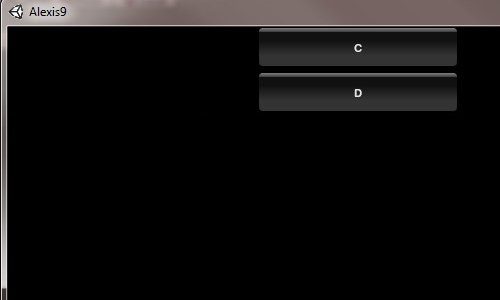
Solved. My error was in the fact that the only object I had in the scene was a GameObject with only the above script attached. Once I added a camera object the removals of the “older” buttons occur as I expect them to. Like I said initially, a very simple (and noobish) mistake.
hehe
Yeah that can bite one very badly … without a camera, the backdrop naturally never is flushed and as such the other UI elements seem to remain there, though if you want to use them, they shouldn’t react because they are physically no longer present.
I’m glad to read that all is well and you’ve sorted this out. While the reason sounds sensible enough it just wasn’t on my checklist of problem spots to ask about. It is now.
I’m very grateful this was posted and answered - I was doing the exact same thing, getting the exact same behavior, and losing the same amount of sanity and hair. I love Unity, but man, the philosophy of “why fix our bugs when we can let the community share their workarounds?” is tiring some days.
Thanks for posting your solution - you saved me a lot of pain today!
hi… i have been using unity for a while… and i am facing the same problem mentioned above… thing is i have a camera in the scene but eventhough when new scene loads the old scene gui remains in the background… i need to clear that off… it would be grateful if any of u provide a solution for that…