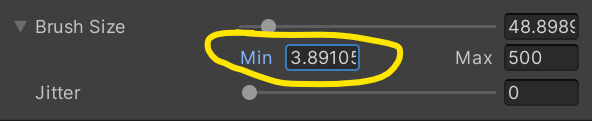
As the title describes I’m using the latest terrain tools package, and the brush size (when attempting to paint textures) is locked. I can’t manually enter any values into the min, max, or current size. Anything I enter is reset. Anyone have any ideas?
The problem is apparently unrelated to Terrain Toolbox or the 2017 Toolkit; uninstalling them made no difference.
Instead, I was able to fix / work-around the problem by opening the “Range” option (by clicking the drop-down arrow), then entering a smaller number for the lower limit. The “Range” had set itself to 500 for both the top and bottom numbers. I couldn’t change the top number, but entering a small number for the bottom part of the range caused the “Size” slider/control to function again. I hope this works for you as well.
(Previous/Original Post) . . .
It’s been a couple of months, and I don’t see a solution yet. I’m in the same fix, though mine is locked at 500. I just upgraded to Unity 2019.4.21 I have both the Terrain Toolbox (package) installed as well as the Heparo 2017 Terrain Toolkit asset. Gonna try deleting those, one at a time; I’ll post an update if that fixes the problem. Meanwhile, please post if you’ve come across a solution, Nathanieljla – thanks!
I have the same issue in Unity 2021.1.20f1
Forgot to mention (tested a bit):
the brush size is huge, even left at size 2. The size seems to be of correct size. Reinstalled everything (including Unity), deleted everything in %appdata% (local, locallow, roaming) regarding Unity and Unity Hub, and made new project. Default size seems to be 2 (not 1.94931)
reinstalled “com.unity.terrain-tools” then the problems appeared. Brush size could only be set to “1.94931” (instead of 2) and the Brush was huge
THE PROBLEM IS THE JITTER! Even with a value of 0.3 it creates a huge brush, like it would be of size 100. Putting the jitter to 0, made possible for the brush to retain it’s set size.
Hi All,
Thank you for bringing this issue up to our attention. Luckily, this issue has previously been reported and a fix has landed to address it. The fix landed in Terrain Tools 4.0.0-pre.1 and is in the verified version of 4.0.0. Please keep in mind this means you’ll need to update your editor to the latest 21.2 beta.
If updating isn’t an option there is still a workaround…
Click “Examples/EditorPrefs/Clear all Editor Preferences” to run the previously pasted script
-To Reset a Specific Parameter-
Instead of calling EditorPrefs.DeleteAll(); in the example script above you’ll call EditorPrefs.DeleteKey("[ToolName].[ParameterName]").
This is an example for resetting the Paint Texture Tool’s Brush Size as well Min/Max parameters
EditorPrefs.DeleteKey("PaintTexture.TerrainBrushSizeMin");
EditorPrefs.DeleteKey("PaintTexture.TerrainBrushSizeMax");```

-Setting a Parameter From Code-
You can also set the parameter in a similar way using
```EditorPrefs.SetFloat("PaintTexture.TerrainBrushSize", 100);
EditorPrefs.SetFloat("PaintTexture.TerrainBrushSizeMin", 1);
EditorPrefs.SetFloat("PaintTexture.TerrainBrushSizeMax", 200);```
I have no idea why it got set like that - for me it put the min brush size to 500 and the max brush size to 500. Maybe I was using the mousewheel to zoom or something while it was selected?
Anyway, to fix it expand the brush size section and type in the min brush size to 1 or something and then hit enter.