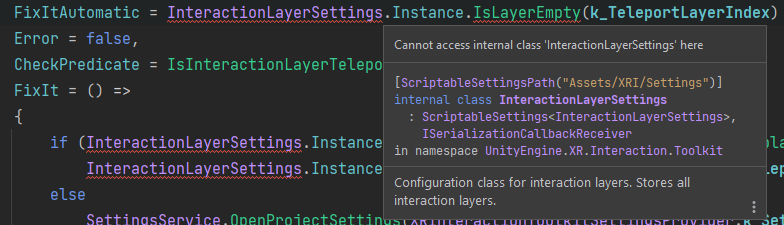
Hi there,
I’ve created a package with a basic XR project setup for my company using the XR Interaction Toolkit. The Package includes some prefabs and some basic XR Interactors etc. in our company style.
Since we have set up InteractionLayers in that project, I wanted to create some sort of automatic project validation or set up to ensure, that the InteractionLayers are set up properly after our Package has been imported.
I found the StarterAssetsSampleProjectValidation.cs class from the StarterAssets samples very helpful as a starting point. Basically, I’m creating a copy with our specific layer settings.
Unfortunately, The InteractionLayerSettings class from the XRIT is not public. So I can’t reference it in my validation script.
It seemed that Unity had the same issue, so they’ve added a [assembly: InternalsVisibleTo(“Unity.XR.Interaction.Toolkit.Samples.StarterAssets.Editor”)] attribute to the XRIT AssemlyInfo.
I’ve managed to hack it by creating an assembly reference with the same name as the StarterAssets.Editor Assembly. But this is obviously very hacky and conflicts, if someone also tries to use the StarterAssets from the XRIT.
Since I can’t (/don’t want to) change anything on the XRIT, this is probably more a XRIT bug or change request.
Does anyone have any idea, how I could approach this issue instead?
Some of the usages of InteractionLayerSettings.Instance within StarterAssetsSampleProjectValidation can actually be replaced with public methods.
Replace InteractionLayerSettings.Instance.GetLayerNameAt with InteractionLayerMask.LayerToName.
Replace InteractionLayerSettings.Instance.IsLayerEmpty with string.IsNullOrEmpty(InteractionLayerMask.LayerToName(int)).
As for the call to InteractionLayerSettings.Instance.SetLayerNameAt(k_TeleportLayerIndex, k_TeleportLayerName) to actually modify the settings, you can achieve the same result with the following code:
// Equivalent to InteractionLayerSettings.Instance.SetLayerNameAt(k_TeleportLayerIndex, k_TeleportLayerName);

var settingsObject = Resources.Load("InteractionLayerSettings");
if (settingsObject != null)
{
    var serializedObject = new SerializedObject(settingsObject);
    serializedObject.UpdateIfRequiredOrScript();
    var layerNames = serializedObject.FindProperty("m_LayerNames");
    layerNames.GetArrayElementAtIndex(k_TeleportLayerIndex).stringValue = k_TeleportLayerName;
    serializedObject.ApplyModifiedProperties();
}
Alternatively you can call SettingsService.OpenProjectSettings("Project/XR Plug-in Management/XR Interaction Toolkit") to only open the Project Settings window and instruct the user to edit the layer name manually.
This method of setting the layer name is admittedly somewhat fragile because it won’t work if we change the name of the field, but that’s unlikely. I’ve created an issue in our backlog to expose additional methods to allow the layer settings to be set by users in a public way so you can do so through an explicit API.