I’m working on a small prototype of a rewrite of an old game of mine, this time in Unity 5.2.0f3 Personal.
What I’m trying to do is make generic, data-driven units; when you click a spawn button, the game creates a cookie cutter unit, loads its stats, then instantiates a mesh, which has its parent set to the instance of the generic game object.
The code in question looks like this:
Driving Data - MapDetails.txt (JSON):
{
    "MapDetail":[
        {
            "Name":"Test Map",
            "Placements":[
                {
                    "Path":"Prefabs/GameObjects/Terrain (Grass)",
                    "Name":"Terrain",
                    "ObjectType":"GameObject",
                    "Placements":[
                        {
                            "Position":{
                                "x":0,
                                "y":0,
                                "z":0
                            },
                            "Rotation":{
                                "x":0,
                                "y":0,
                                "z":0
                            },
                            "Scale":{
                                "x":10,
                                "y":10,
                                "z":10
                            }
                        }
                    ]
                },
                {
                    "Path":"Prefabs/Units/Base Key Unit",
                    "Name":"Knight Castle",
                    "ObjectType":"Unit",
                    "Placements":[
                        {
                            "Position":{
                                "x":-7,
                                "y":0,
                                "z":0
                            },
                            "Rotation":{
                                "x":0,
                                "y":315,
                                "z":0
                            },
                            "Scale":{
                                "x":4,
                                "y":4,
                                "z":4
                            }
                        }
                    ]
                },
                {
                    "Path":"Prefabs/Units/Base Key Unit",
                    "Name":"Zombie Necropolis",
                    "ObjectType":"Unit",
                    "Placements":[
                        {
                            "Position":{
                                "x":7,
                                "y":0,
                                "z":0
                            },
                            "Rotation":{
                                "x":0,
                                "y":45,
                                "z":0
                            },
                            "Scale":{
                                "x":4,
                                "y":4,
                                "z":4
                            }
                        }
                    ]
                }
            ]
        }
    ]
}
Driving Data - Units.txt (JSON):
{
    "Units":[
        {
            "Name":"Knight Castle",
            "IsKeyUnit":true,
            "Faction":"Knights",
            "Stats":[
                {
                    "Name":"HP",
                    "Value":25,
                    "ValueCap":25,
                    "FixedModifier":0,
                    "ScalingModifier":1
                },
                {
                    "Name":"Attack",
                    "Value":1,
                    "ValueCap":4,
                    "FixedModifier":0,
                    "ScalingModifier":1
                },
                {
                    "Name":"Knockback",
                    "Value":15,
                    "ValueCap":4,
                    "FixedModifier":0,
                    "ScalingModifier":1
                },
                {
                    "Name":"MoveSpeed",
                    "Value":0,
                    "ValueCap":0,
                    "FixedModifier":0,
                    "ScalingModifier":1
                },
                {
                    "Name":"TurnSpeed",
                    "Value":0,
                    "ValueCap":0,
                    "FixedModifier":0,
                    "ScalingModifier":1
                }
            ],
            "AbilityNames":[
                "Recruit Footman"
            ]
            "MeshPath":"Visual/Meshes/kvz - castle"
        },
        {
            "Name":"Zombie Necropolis",
            "IsKeyUnit":true,
            "Faction":"Zombies",
            "Stats":[
                {
                    "Name":"HP",
                    "Value":25,
                    "ValueCap":25,
                    "FixedModifier":0,
                    "ScalingModifier":1
                },
                {
                    "Name":"Attack",
                    "Value":1,
                    "ValueCap":4,
                    "FixedModifier":0,
                    "ScalingModifier":1
                },
                {
                    "Name":"Knockback",
                    "Value":15,
                    "ValueCap":4,
                    "FixedModifier":0,
                    "ScalingModifier":1
                },
                {
                    "Name":"MoveSpeed",
                    "Value":0,
                    "ValueCap":0,
                    "FixedModifier":0,
                    "ScalingModifier":1
                },
                {
                    "Name":"TurnSpeed",
                    "Value":0,
                    "ValueCap":0,
                    "FixedModifier":0,
                    "ScalingModifier":1
                }
            ],
            "AbilityNames":[
                "Raise Ghoul"
            ]
            "MeshPath":"Visual/Meshes/kvz - grave"
        }
    ]
}
Specific code from UnitActuator.cs:
public void RealizeModel(UnitModel model)
    {
        Name = model.Name;
        IsKeyUnit = model.IsKeyUnit;
        Faction = model.Faction;
        Stats = model.Stats.DeepCopyList();

        Abilities = new List<Ability>();
        for (int i = 0; i < model.AbilityNames.Count; i++)
        {
            string currentName = model.AbilityNames[i];

            if (_abilityRepository == null)
                _abilityRepository = AbilityRepository.Instance;

            Ability actualAbility = _abilityRepository.GetAbilityByName(currentName);
            if (actualAbility == null)
            {
                DebugMessage("Could not map ability " + currentName + " because it doesn't exist in the Ability Repository.");
                continue;
            }

            Abilities.Add(actualAbility.DeepCopy());
        }

        Buffs = new List<Buff>();

        _deathObjectPath = model.DeathObjectPath;
        if(! string.IsNullOrEmpty(_deathObjectPath))
            DeathObject = (GameObject) Resources.Load(_deathObjectPath);

        // Problem is in this if block here...
        _meshPath = model.MeshPath;
        if (!string.IsNullOrEmpty(_meshPath))
        {
            // UnitMeshObject is a GameObject declared as a public variable for the behavior.
            GameObject unitMesh = Resources.Load<GameObject>(_meshPath);
            UnitMeshObject = (GameObject) Instantiate(unitMesh, Vector3.zero, Quaternion.identity);
            UnitMeshObject.name = "Mesh";
            UnitMeshObject.transform.SetParent(gameObject.transform);
        }
    }
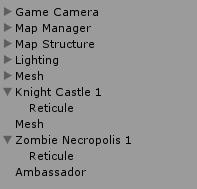
What should be happening, is that when I load my scene, two opposing ‘Key Units’ - a Knight Castle, and a Zombie Necropolis - pre-spawn on opposite ends of the map. What’s happening is that, while the game objects, their selection reticules, and colliders are spawning in the right place with the right rotation, the two meshes are spawning in the middle of the map and not being parented to their respective game objects.
Question - Why is it that the following code:
GameObject unitMesh = Resources.Load<GameObject>(_meshPath);
UnitMeshObject =  (GameObject) Instantiate(unitMesh, Vector3.zero, Quaternion.identity);
UnitMeshObject.name = "Mesh";
UnitMeshObject.transform.SetParent(gameObject.transform);
Does not cause the mesh object to become a child of the Unit?