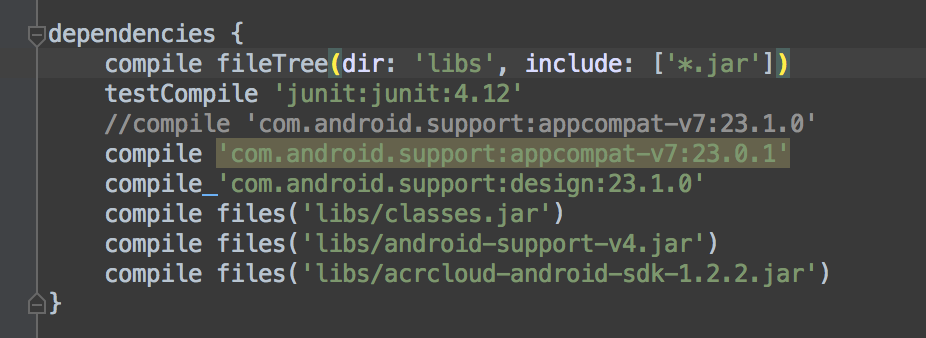
Hi I am building a Unity app which uses Android library as one of the plugin. This Android library uses AppCompat.
Reading from the Unity blog, I realized that Unity does not include the appcompat library during the building due to several reasons (mainly the APK size) but it still allow the library to be added manually. (blog here: Unity Blog)
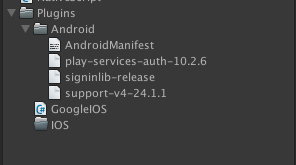
Thus I’ve added the library inside Assets/Plugins/Android/ which then my Unity app is able to build successfully and generate the APK file.
The problem comes when I tried to open the app which supposedly start an activity that was defined in the android library. This particular activity uses appcompat library. I get the following error message from logcat
I/art     (19482): Rejecting re-init on previously-failed class java.lang.Class<android.support.v7.app.AppCompatActivity>
I/art     (19482): Rejecting re-init on previously-failed class java.lang.Class<android.support.v7.app.AppCompatActivity>
W/ActivityManager(  890):   Force finishing activity amillardo.test.blasterescopic/com.test.player.MainActivity
I/art     (19482): Rejecting re-init on previously-failed class java.lang.Class<android.support.v7.app.ActionBarActivity>
I/art     (19482): Rejecting re-init on previously-failed class java.lang.Class<android.support.v7.app.ActionBarActivity>
I/art     (19482): Rejecting re-init on previously-failed class java.lang.Class<com.test.player.MainActivity>
E/AndroidRuntime(19482): FATAL EXCEPTION: main
E/AndroidRuntime(19482): Process: amillardo.test.blasterescopic, PID: 19482
E/AndroidRuntime(19482): java.lang.RuntimeException: Unable to instantiate activity ComponentInfo{amillardo.test.blasterescopic/com.test.player.MainActivity}: java.lang.ClassNotFoundException: Didn't find class "com.test.player.MainActivity" on path: DexPathList[[zip file "/data/app/amillardo.test.blasterescopic-1/base.apk"],nativeLibraryDirectories=[/data/app/amillardo.test.blasterescopic-1/lib/arm, /system/lib, /vendor/lib, system/vendor/lib, system/vendor/lib/egl, system/lib/hw]]
E/AndroidRuntime(19482):     at android.app.ActivityThread.performLaunchActivity(ActivityThread.java:2322)
E/AndroidRuntime(19482):     at android.app.ActivityThread.handleLaunchActivity(ActivityThread.java:2474)
E/AndroidRuntime(19482):     at android.app.ActivityThread.access$800(ActivityThread.java:144)
E/AndroidRuntime(19482):     at android.app.ActivityThread$H.handleMessage(ActivityThread.java:1359)
E/AndroidRuntime(19482):     at android.os.Handler.dispatchMessage(Handler.java:102)
E/AndroidRuntime(19482):     at android.os.Looper.loop(Looper.java:155)
E/AndroidRuntime(19482):     at android.app.ActivityThread.main(ActivityThread.java:5696)
E/AndroidRuntime(19482):     at java.lang.reflect.Method.invoke(Native Method)
E/AndroidRuntime(19482):     at java.lang.reflect.Method.invoke(Method.java:372)
E/AndroidRuntime(19482):     at com.android.internal.os.ZygoteInit$MethodAndArgsCaller.run(ZygoteInit.java:1028)
E/AndroidRuntime(19482):     at com.android.internal.os.ZygoteInit.main(ZygoteInit.java:823)
E/AndroidRuntime(19482): Caused by: java.lang.ClassNotFoundException: Didn't find class "com.test.player.MainActivity" on path: DexPathList[[zip file "/data/app/amillardo.test.blasterescopic-1/base.apk"],nativeLibraryDirectories=[/data/app/amillardo.test.blasterescopic-1/lib/arm, /system/lib, /vendor/lib, system/vendor/lib, system/vendor/lib/egl, system/lib/hw]]
E/AndroidRuntime(19482):     at dalvik.system.BaseDexClassLoader.findClass(BaseDexClassLoader.java:56)
E/AndroidRuntime(19482):     at java.lang.ClassLoader.loadClass(ClassLoader.java:511)
E/AndroidRuntime(19482):     at java.lang.ClassLoader.loadClass(ClassLoader.java:469)
E/AndroidRuntime(19482):     at android.app.Instrumentation.newActivity(Instrumentation.java:1083)
E/AndroidRuntime(19482):     at android.app.ActivityThread.performLaunchActivity(ActivityThread.java:2312)
E/AndroidRuntime(19482):     ... 10 more
E/AndroidRuntime(19482):     Suppressed: java.lang.NoClassDefFoundError: com.test.player.MainActivity
E/AndroidRuntime(19482):         at dalvik.system.DexFile.defineClassNative(Native Method)
E/AndroidRuntime(19482):         at dalvik.system.DexFile.defineClass(DexFile.java:226)
E/AndroidRuntime(19482):         at dalvik.system.DexFile.loadClassBinaryName(DexFile.java:219)
E/AndroidRuntime(19482):         at dalvik.system.DexPathList.findClass(DexPathList.java:321)
E/AndroidRuntime(19482):         at dalvik.system.BaseDexClassLoader.findClass(BaseDexClassLoader.java:54)
E/AndroidRuntime(19482):         ... 14 more
E/AndroidRuntime(19482):     Suppressed: java.lang.ClassNotFoundException: com.test.player.MainActivity
E/AndroidRuntime(19482):         at java.lang.Class.classForName(Native Method)
E/AndroidRuntime(19482):         at java.lang.BootClassLoader.findClass(ClassLoader.java:781)
E/AndroidRuntime(19482):         at java.lang.BootClassLoader.loadClass(ClassLoader.java:841)
E/AndroidRuntime(19482):         at java.lang.ClassLoader.loadClass(ClassLoader.java:504)
E/AndroidRuntime(19482):         ... 13 more
E/AndroidRuntime(19482):     Caused by: java.lang.NoClassDefFoundError: Class not found using the boot class loader; no stack available
I/TrimMemoryManager( 1561): [trimMemory] 20
E/ActivityManager(  890): App crashed! Process: amillardo.test.blasterescopic
So yup I am stuck here. Anyone has any suggestion? Thanks!