I’ve been noticing now that Unity keeps re-importing assets used in other scenes when I try to create a build only for a specific scene. This seems to happen sometimes for audio files and now allways for lightmap files.
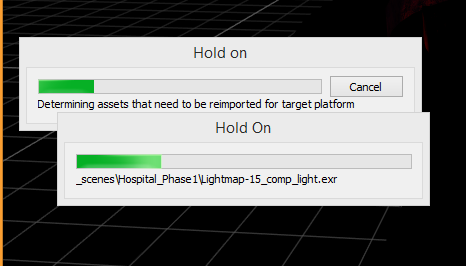
In this screenshot, the lightmap files being re-imported are not used in the scene I am building.
The files are not being added to the build .exe, but they are continually re-imported.
The target platform is always left at “PC”.
I noticed it started happening when the “Optimize Mesh data” was selected from the player settings window.
I have since un-selected that option but it still imports assets used in other scenes which are not used in the scenes which I am including in the build.
When you switch projects/build for a target, it reimports everything for that target platform, it is not scene specific.
But the issue is I am not switching projects or build. The build is always left at “PC”. Also, it is not re-importing the entire project, only new assets such as .mp3 and images files and newly created lightmap files used in other scenes. They are not used in current build I am doing, because I am not including those scenes in the build. So I don’t understand why Unity keeps importing/re-importing these files.
So PC/standalone is already your selected target when you open the build dialog? You are just opening the build panel and clicking Build?
Yeah.

Noticed it started happening when I selected Optimize Mesh Data.
I no longer select that, but it still happens.
Odd. You should file a bug report. Even if it is not a bug, hopefully the response will explain why it happens.
1 Like