Hello, i’m experiencing a very different lighning scene in WebGL builds, i’m not sure if this is how its to supposed to be.
Here is the Editor / Stand Alone build screen:
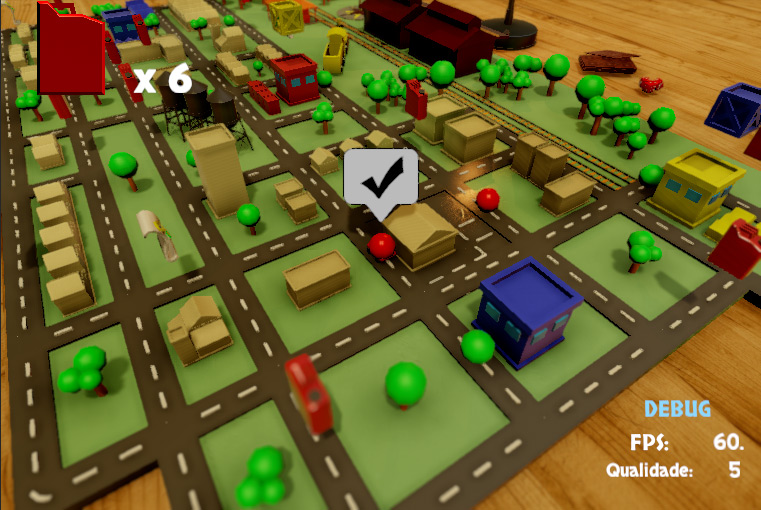
And here is the WebGL build screen:

So far, i noticed those problems:
1 - The first major discrepancy seems to be the ambient light level, (but my “Ambient Intensity” is set to 0 on Lighting tab).
2 - Most of the materials don’t use any normal-maps, but the green soil seems to have some artifacts on its normal map.
3 - I’m using two lights in the scenes (all realtime), a directional (mostly ambience) and a spot one. The spot light seems to not work on WebGL at all (you can see it shining on the street on the first image).
4 - It looks like the shadows aren’t being rendered (maybe related to the overall lighting level ?).
5 - The reflection coming from probes looks different (maybe this can be part of the problem)
My Lighting Config looks like this:

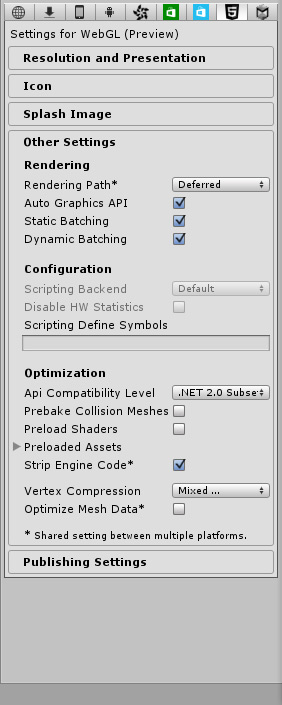
My WebGL Player Settings are those:
Any tips towards fixing those issues are greatly appreciated. Thanks in advance for the help.
