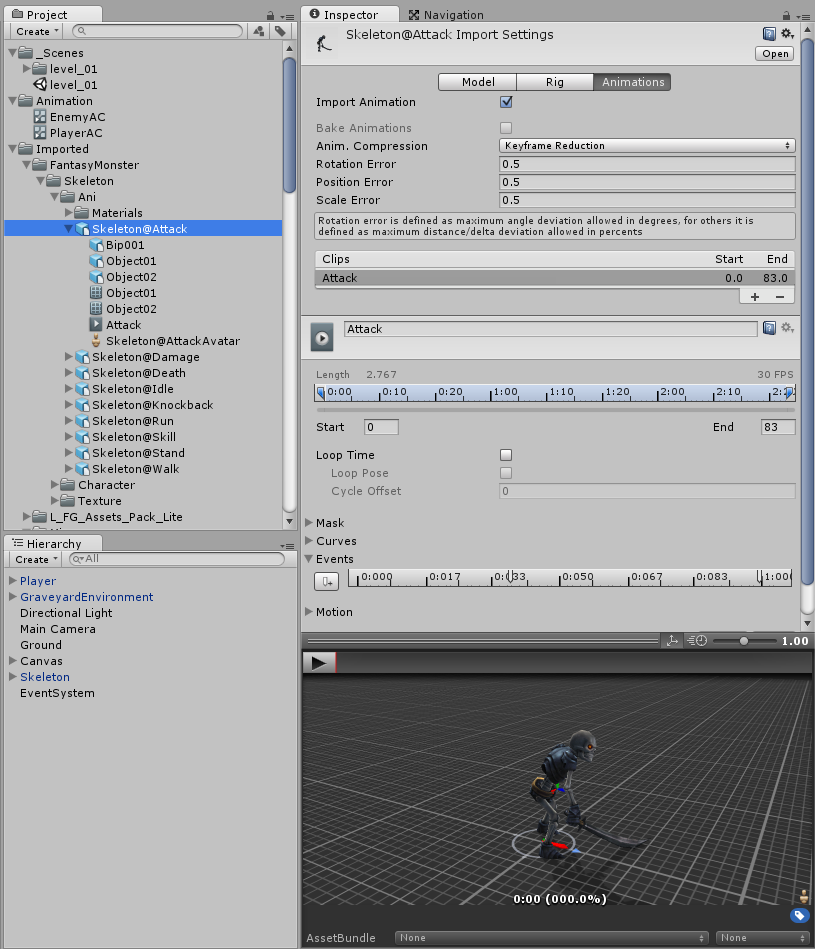
I’ve got two animation packs in my project, when selecting one set in the inspector I have the option to edit them and can add events to the animation, etc:
If you mean the Animator Controller window, there’s no additional options to what I’ve shown in the screenshot above. If you mean in the actual animator window, I don’t know what you’re suggesting, you mean recording a new animation?
On the first image you have the importer dialog for the model open. There you can add animation events for the imported animations.
On the second image you have selected an animation directly.
If you what to add an animation event to a not “imparted” animation you have to open the animation window and select an object that uses the animation you what to edit.
Select the animation you like to edit from the dropdown list in an animation window.
Then you can create an animation event by clicking the corresponding icon ( the long vertical bar with the + sign) or right click on the bar under the time value stip.